
Best CRM Software in
Are you looking for CRM Software for your Business in ? SaaS Adviser brings you the best CRM Software to ease your worries. In order to make your work smooth and swift, SaaS Adviser has compiled a list of the best software available. Compare the Best software features, pricing, free demo, and trial to select the best CRM Software for your organization.
 Researched and Written by Akash Patel
Top 3 Featured Softwares


List of Top CRM Software
Get Free Consultation


Zoho CRM is an online, omnichannel and integrated business platform that streamlines sales, marketing and other business-related processes to deliver better customer experiences. G...
View Profile
Salesforce is a cloud-based customer relationship management (CRM) platform that helps businesses manage sales, customer interactions, marketing campaigns, and customer service pro...
View Profile

Twozo CRM

Deals in your pocket
Twozo CRM is an AI-powered customer relationship management platform designed to help businesses manage their sales, customer engagement, and operations in one unified space. ...
View Profile
Creatio CRM
AI-Native Platform to Automate CRM and Workflows with No-Code
Creatio CRM is a comprehensive no-code/low-code customer relationship management (CRM) platform designed to optimize sales, marketing, and customer service operations. It offer...
View Profile

What Is Pipedrive?Pipedriv Read More...
View Profile

Apollo.Io is a practical sales intelligence and engagement platform designed to help companies generate leads, automate outreach, and decorate sales performance. It allows entry to...
View Profile

monday sales CRM by monday.com
By monday sales CRM by monday.com
Monday.com is a cloud-based Work Operating System (Work OS) that provides a versatile platform for teams to build custom workflows, manage projects, and enhance collaboration. ...
View Profile
Capsule CRM is a cloud-based customer relationship management (CRM) solution designed to help businesses organize their customer interactions, sales processes, and workflows effici...
View Profile

Brevo
Grow with our Email Marketing Platform & CRM suite
Brevo, formerly known as Sendinblue, is a cloud-based marketing and customer relationship management (CRM) platform designed to streamline business communications and drive gro...
View Profile
.jpg "Salesflare")
Salesflare is a powerful customer relationship management (CRM) software designed specifically for small and medium-sized businesses (SMBs) that thrive on building strong customer ...
View Profile

QuoteIQ
The #1 CRM Built For Home Service Pros.
QuoteIQ is a comprehensive CRM designed to streamline operations for home service businesses. Our software empowers businesses to manage clients, create estimates, send invoice...
View Profile

PipelinePro
THE ULTIMATE SALES PIPELINE DASHBOARD FOR MAXIMUM PROFIT
PipelinePRO is a sales and marketing software platform designed to help businesses manage, track, and optimize their lead generation and sales processes. It combines customer r...
View Profile

Keap is an intuitive Sales, CRM, and Marketing Automation software that businesses can use to improve sales and save time. Companies can generate more leads, sort them out, and for...
View Profile
What is Thryv?Thryv is an all-in-one small enterprise control software program designed to assist marketers streamline their daily operations. It combines essential gea...
View Profile

Quickbase CRM
Spend more time on work that matters
Quickbase is a cloud-based, low-code platform that empowers businesses to create custom applications tailored to their unique operational needs without extensive coding kno...
View Profile

MRPeasy is a cloud-based total Manufacturing Resource Planning (MRP) software program for small to mid-sized manufacturers with 10 to 200 personnel. It integrates essential enterpr...
View Profile

Supportbench is a present-day B2B helpdesk and customer relationship management (CRM) software designed to streamline customer service operations. It offers equipment for case mana...
View Profile

Docsie
Enterprise Knowledge Base Software
Docsie is a versatile digital documentation and knowledge management platform designed to streamline the creation, management, and distribution of various types of content, includi...
View Profile

Success.ai
Find and Win Your Ideal Customers
What is Success.Ai?Success.Ai is an AI-powered sales outreach and lead era platform designed to help companies automate cold emailing, customise campaigns, and generate...
View Profile

Credit Repair Cloud
Software to Run and Grow your Credit Repair Business
What is Credit Repair Cloud? Credit Repair Cloud is a cloud-based totally software solution that offers gear and education for walking a credit repair commercial enterprise. It ...
View Profile

Table of Content
What is CRM Software?
CRM Software is the dynamic digital answer to interactions with customers, both present and potential. CRM Platform is very important as it centralizes all the information about customers, thus helping a firm better control its leads as well as improving communication and workflow automation. From marketing campaigns to sales, CRM platform combines all customers' interfaces and the end product into an integrated hub. From marketing automation to leading tracking, sales forecasts and detailed analysis, Modern CRM Software helps to have meaningful conditions by offering an integrated platform to software companies. Companies are using a CRM system online for fast sales, marketing and support functions. It is here that companies have the opportunity to compare customer relationship management software and see tailored solutions to their specific needs. In small enterprises or corporate homes, the right investment in CRM Tools shall revolve the customer management strategy to better engagement of customers and, subsequently, to enhanced profitability.
1. What is CRM Software Used for?
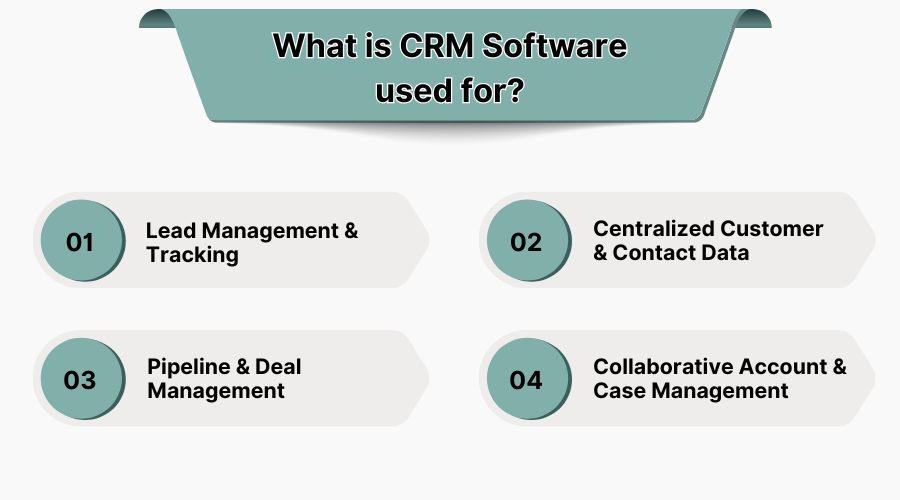
Companies use CRM software for multiple functions that span departments and customer touchpoints. Here are some key uses:
1. Lead Management & Tracking
Lead Management & Tracking becomes more efficient with advanced lead management software in the USA which helps capture, nurture, and convert leads effectively. Tracking leads starts from where they are acquired to conversion. A CRM system will automatically score leads for you, assign them to sales representatives, and keep tabs on the interactions that follow thereafter in the pipeline.
2. Centralized Customer & Contact Data
Customer profiles and contact histories are kept in one location—this helps in making communication better and reducing any possible redundancies. With real-time accessible data, this would make sure there is better coordination, plus the fact that the response will be quicker.
3. Pipeline & Deal Management
Sales pipelines help track the advancement of deals and visualize revenue forecasting. Drag-and-drop boards with CRM platforms offer probability tracking and providing real-time updates, which allows for better prioritizing actions to close deals.
4. Collaborative Account & Case Management
Being able to have multiple people working on managing cases, allocating tasks related to case resolution, and keeping track of whether tasks are resolved or not within a CRM app, so that queries are handled and also kept for future reference on that customer, proper across-department teamwork is enabled.
2. What CRM Software is the Best for E-commerce Platforms?
E-commerce CRM has a real need for Online Store Integration with features like real-time analytics, customer segmentation, and seamless integration with online stores. Here are Key features to consider :
1. Real-Time Customer Insights
They track browsing behavior and purchase history plus engagement metrics. All this is used to create personalized product recommendations and marketing to the customers; this ultimately leads to higher conversion rates.
2. Marketing Automation
Tying into what’s in stock and orders makes sure numbers are right and things move well. This cuts down on mistakes with orders and makes shoppers happier. Companies looking at different customer relationship tools need to put first easy online selling links.
3. Inventory and Order Tracking Integration
A link to the inventory and order management systems will upload the stocks and make the deliveries more accurate and also reduce the time taken. This will reduce the errors in orders and make the clients happier. Companies that check different types of customer relationship management software must choose easy online sales connections.
3. Conclusion
CRM software plays an important role in modern business operations by enabling better customer engagement, streamlined workflow and increased sales performance. With several CRM tools available in the market, the operation of perfect CRM comparison helps identify the most appropriate solution. Whether you want to lead more efficiently or offer personal service, it is necessary to invest in the right CRM system for permanent development. Companies should compare CRM programs regularly and adapt to new trends to maintain a competitive advantage. A well-used CRM platform is not just a software tool. It is a strategic feature that increases customer satisfaction, loyalty and revenue.
4. Related Article CRM Software
- CRM Features B2C Companies Use to Build Stronger Loyalty
- Best CRM System for Recruitment: Features, Benefits & Tools
- What to Look For in a Sales CRM For Your SaaS Startup (Insights From Founders)
- Choosing the Right CRM Integration Tool for Sales Teams
- Integrating AI with CRM: Future-Ready Solutions for USA Enterprises
- From Local to Global: Best CRM Software for US Companies
- The Rise of AI in CRM: Transforming Customer Relationships in USA
- Cost-Benefit Analysis of CRM Software for USA Companies
- Why Do You Need CRM Software for Real Estate Business?
- What is the CRM Experience, and How Does It Contribute to Better CX?
- Transform Your Real Estate Business with CRM Software
- Top 10 Customized CRM Solutions for 2024
- The Role of CRM Software in Effective Lead Prospecting
- What Features To Look For In CRM Software?
5. Criteria for Selecting the Right CRM Software
Choosing the right CRM system requires a strategic method that fits your business goals. The solution you have chosen needs to strengthen your groups, streamline workflows, and provide long-term scalability. Below are critical elements to consider:
1. Ease of Use
A simple and easy interface guarantees quicker adoption by different departments. If a system is very complex, then the employees will not use it and hence undermine the benefits. Look for CRM tools that offer help in the introduction, show information on dashboards, and have easy features. Training and customer support should also be made available to help in implementation.
2. Customization Options
Every business has unique needs; therefore, the CRM system has to be flexible enough to fit different workflows and various requirements within different industries. More abilities to add custom fields, modules, and automation workflows will increase the level to which the system can align with the business operations. Companies that compare CRM systems should give priority to the platforms that offer high levels of customization.
3. Integration Capabilities
A good CRM should be able to integrate without any problems with the existing marketing automation software, email platforms, accounting tools, and help desks. This not only streamlines the processes but also helps make the data consistent. Companies should look at how easy the CRM software is to hook up to other platforms so that data flow is efficient.
4. Cost and ROI
Cost is one factor that plays a big role in CRM. The use of implementation cost along with training support and upgrade costs, besides the license fee. The evaluation of costs and ROI is becoming more efficient with billing system software that streamlines financial operation and increases profitability. Making a CRM software comparison helps to see the value versus the investment.
5. Scalability
Choose a CRM platform that can evolve with the growth of your business, beginning with the basic features that a startup company may need. Eventually, as the firm develops and more advanced automation, analytics, and integration are required, increasing enterprises might need those features. In this regard, the phased investments would align with the growth of the business as well.
6. Benefits of CRM Software
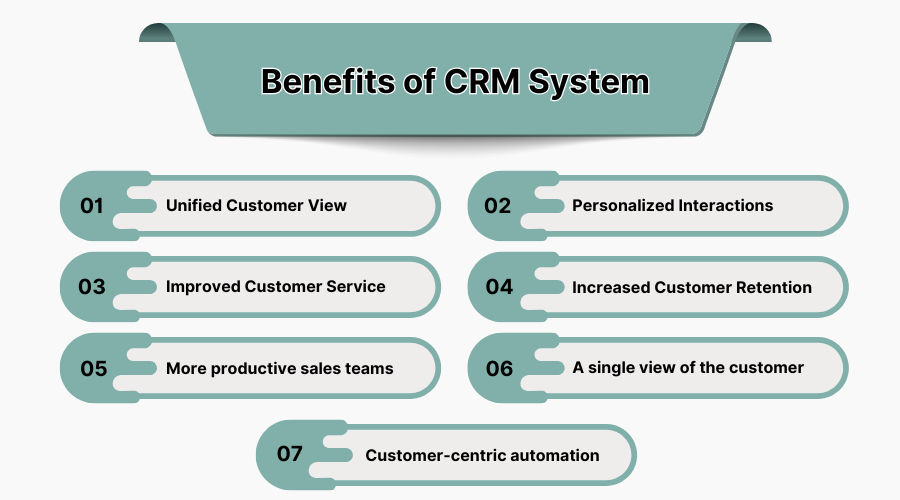
A CRM platform gives companies a powerful way to control consumer relationships and streamline sales tactics. It allows groups to get admission to real-time purchaser statistics, tune interactions, and automate repetitive obligations for more performance.
1. Unified Customer View
A CRM platform puts together data from many different points of contact and makes a single profile for each customer. This includes what and how they bought, logs of all communication, their preferences, and interactions. A view that is so complete helps teams to understand who the customers are and to respond in a proactive way to their needs.
2. Personalized Interactions
The detailed insight into any customer's behavior helps the team to adapt to the marketing and support strategies. This is because CRM tools allow for division and targeted messages, which further promote engagement and conversion frequency. In the long term, this customer promotes loyalty.
3. Improved Customer Service
Having benefited customer service agents with centralized data access, it helps to manage faster response and accurate solutions. Better customer service can be obtained through the best marketing automation software for small businesses, enabling personal communication and fast response time. The CRM software uses an automation feature to track and resolve support requests more efficiently, thus leading to higher customer satisfaction scores.
4. Increased Customer Retention
Timely follow-up, loyalty programs, and content-oriented personalization help in retaining relationship strength with the customers. The predictive analytics throws the at-risk customers up on the board so that the business can re-engage with them before the churn. Retention strategies become more proactive as well as measurable.
5. More Productive Sales Teams
This would thereby enable the sales representatives to be more focused on closing leads rather than the activities being performed by them manually, providing them with task reminders and sales forecasting which would eventually lead towards an increase in efficiency. And then, teams compare CRM Programs around them, focusing on the availability of real-time updates and the degree of automation to empower sales productivity.
6. A Single View of the Customer
A unified record of customer interactions allows more coherent marketing and sales strategies. Every hand that is a part of the team touches the same piece of information, which means that there is more coordination and consistency across departments. This breaks data silos.
7. Customer-Centric Automation
It saves time to use the automation of email sequences, task assignments, and reporting. The CRM system automates customer journeys while preserving the human touch. This helps keep valued customers at every step.
7. Features of CRM Software Comparison in USA
Conducting a CRM tools comparison is vital when choosing the appropriate tool in the market of the USA. Business requirements in the USA are for comprehensive, scalable, and easy-to-use solutions. The following features are typically key in any CRM comparison:
1. Contact management
This is what begins any CRM program. It helps you input, watch, talk, and history in one spot. Seek smart contact sort, labels, and file-building options. In small business contact management, companies can build stronger relationships and increase customer retention. Linking with social sites and business folders provides better data detail.
2. Lead Management
Capturing and scoring leads and then nurturing them through the sales funnel is important. The CRM system should also be able to automatically route leads as well as track pipeline stages and do so with real-time updates. Custom criteria should define the quality of the lead as well as responsibilities.
3. Opportunity Tracking
Sales representatives can easily monitor deal progress and expected revenue through robust features of opportunity management. In the decision-making process, visualization tools like Kanban boards and dashboards help greatly. Tracking performance against KPIs—these are features that help teams.
4. Email Integration
Email as a very important channel of communication. Online CRM Software Platforms that work with email services, such as Gmail and Outlook, ensure better tracking of engagement. Templates, bulk emailing, and analytics features will help improve campaign outcomes.
5. Managing Documents
Files such as agreements, offers, and payments can be kept and sent right from the CRM software. Check for versions, safe sharing, and trails, make sure rules are followed and everything is clear. Tools for e-signature that connect right into it make approvals simpler.
6. Workflow Automation
Workflows that are set up save time and cut mistakes made by hand. From giving out jobs to making reports, it helps run things well. Companies that look at different CRM software need to check how much help with automation comes with it and how easy it is to set up.
8. Latest Market Trends in Compare Customer Relationship Management Software
CRM software landscape continues to develop with changed new technologies and customer’s expectations. When comparing CRM systems or detecting new implementations, businesses should be updated on the latest trends.
1. Cloud-Based Solutions
Adoption of cloud provides flexibility, remote access and cost-effectiveness. Companies of all sizes now prefer cloud-based CRM platforms due to the low costs of infrastructure and easy scalability. Cloud-based sales tracking solutions provide easy access to sales data anywhere and anywhere.
2. Omnichannel Customer Engagement
Customers also interact on e -mail, chatting and social media as well as phones. A modern CRM system ensures easy connection by integrating all communication channels. This supports tracking and faster issue resolution.
3. Customer Data Platforms
The platforms bring together data from multiple sources to create accurate, real-time customer profiles. CRM tools with CDP capabilities make for hyper-personalization. Businesses can analyze behavior trends and forecast demand.
4. Social CRM
This feature links CRM to social media platforms, capturing mentions, comments, and feedback. It allows real-time engagement plus monitoring reputations. A CRM system with social listening has tools for a holistic customer view.
5. Low-Code/No-Code CRMs
These provide tools for non-technical users to personalize workflows and features without any code. It decreases the reliance on IT teams plus brings speed to innovation. Companies that compare CRM tools must evaluate the presence of drag-and-drop builders.
6. Mobile CRM
A CRM platform with dedicated mobile apps that work offline is meant for sales reps and support teams. Traits like voice-to-text and mobile dashboards can throw weight behind the field.
7. Emerging Trends
CRM with voice, AR demos, and Blockchain for secure deals is the new set of tools for managing customers. Companies that want to choose a CRM system should know about these for readiness to use such solutions in the future.
8. AI and Automation
Artificial Intelligence Revolutionizes CRM. Predictive analytics, chatbots, and automated data entry have a major effect on the CRM environment. AI‑in‑CRM segment is on fire, rising from $8.09 billion in 2024 to $11 billion in 2025, with a whopping CAGR of - 36%. This results in smart decision-making processes based on customer behavior with recommendations for the next best action. Automation also helps create and distribute a personal customer on multiple channels.
9. How Does a CRM Software Work?
CRM software is what collects stores and manages all information related to customers from any touchpoint. This data is then processed to provide actionable insights and to make sure that an automated workflow is triggered. In this new setup, sales teams will be able to track lead journeys, and marketing teams will be able to segment customers and send personalized campaigns.The online crm tool unites collaboration by ensuring all departments have shared access to the same information. Third-party tool integrations such as email platforms, calendars, and analytical software highlight a seamless environment. Reminders and task assignments are made automatically so that nothing is missed. Basically, a CRM platform aids in making better customer interactions, improves service delivery, and promotes revenue growth.
10. How to Choose the Best CRM Software Comparison?
The best CRM tools comparison approach involves a mix of strategic evaluation and practical analysis. Consider if you require sales-focused CRM software, a marketing-based solution, or an all-in-one system. First, list core features such as contact management, analytics, integrations, and mobile access. Perform CRM solutions comparison by assessing the shortlisted platforms based on usability, scalability, and pricing.Priority should be given to platforms that offer robust support, training resources, and regular updates. The success of CRM adoption is going to depend more on ease of implementation and the adaptability of teams. When you compare CRM systems, focus on long-term value and return on investment.
11. See How CRM Software Can Grow Your Business
Implementing CRM software will change the way you do things with your customer relationships. It will automate every activity, help in team building, and give some intelligence that will help increase efficiency.As you grow, the use of CRM grows with you. Everything from increasing the sales force to starting a new marketing campaign can be an added implementation of the strategy. A reliable business management solution helps to streamline operations, promote productivity and improve general efficiency. The companies that regularly compare CRM systems come to know about the opportunities to streamline their workflow and improve customer satisfaction.
12. Five Best CRM Software in USA
From possible leads to action on workflow, the top CRM software solutions enable firms to make their operations more effective and increase customer content. Below are the most important CRM equipment known for its performance, functions and user-friendly interfaces in the USA.
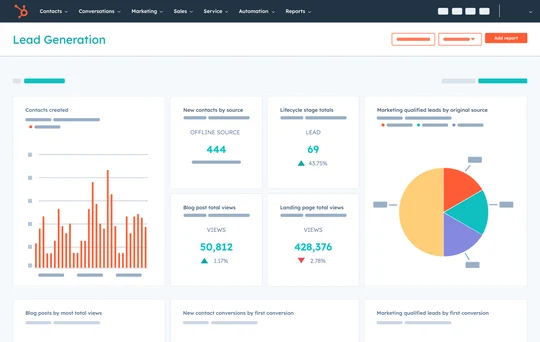
1. HubSpot
HubSpot is very simple to use, with strong marketing tools. It helps with sales and marketing, along with customer service and content for small businesses. It has a lot of features for free, with plans you can pay for as you grow.
Top Features:
-
Contact and lead management.
-
Built-in email marketing tools.
-
Live chat and chatbot integration.
-
Deal tracking with sales pipelines.
-
Reporting dashboards and task automation.
Pros:
-
Free plan with essential features.
-
Easy to use with quick setup and clean UI.
Cons:
-
Limited customization in lower-tier plans.
-
Advanced reporting requires higher-tier plans.
Pricing : Starts at US$9/month/seat.
2. SalesForce
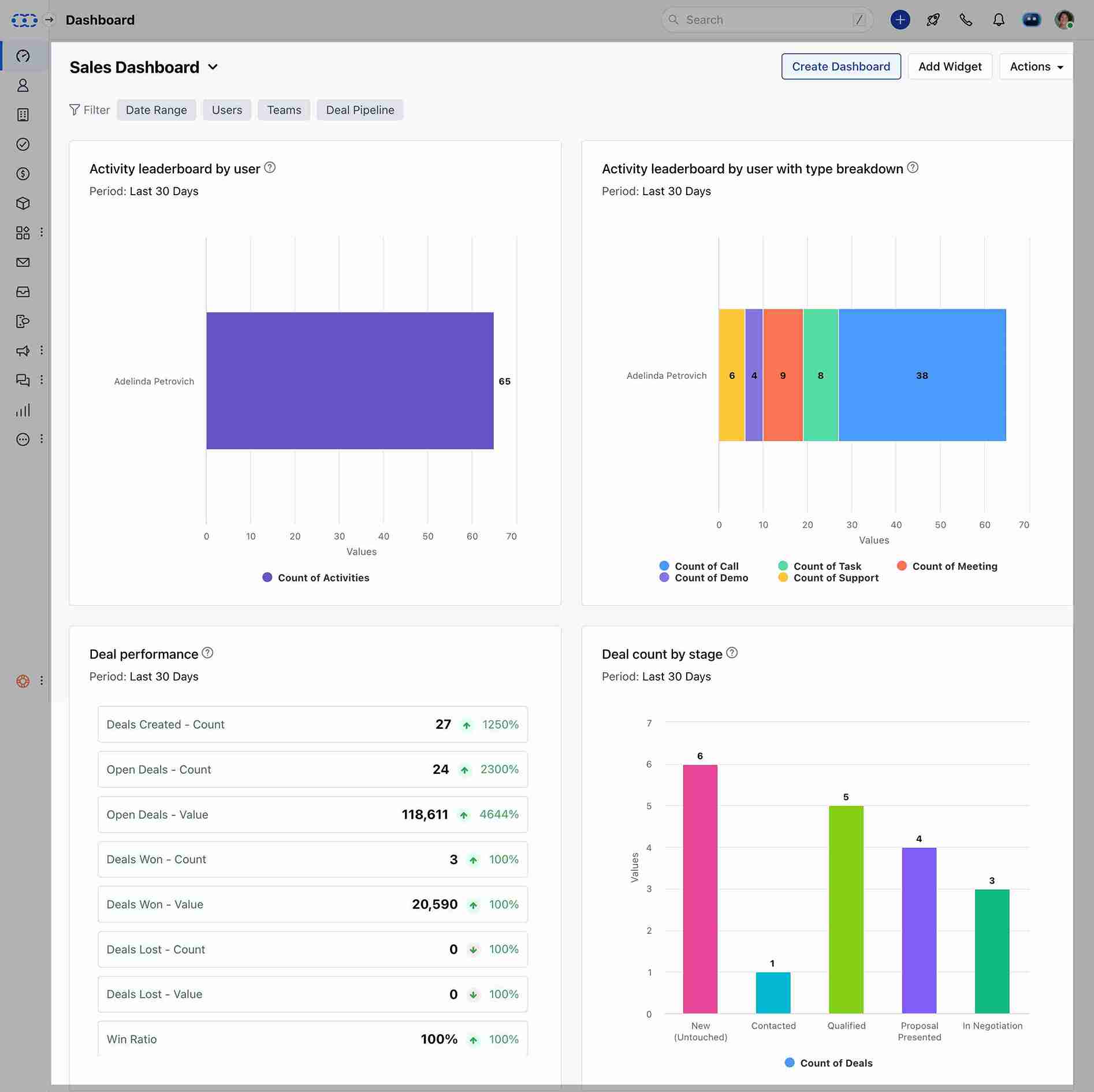
Salesforce is one of the leading enterprise-grade CRM solutions that has been designed for scalability and deep customization at every level. The tools available for sales and marketing are quite comprehensive, and they also offer features for analytics and customer service from AI-driven insights that are to be found in AI. Global companies choose this solution because of its flexibility and the strong integration that it offers with other available systems.
Top Features:
-
Advanced contact and opportunity management.
-
AI-powered insights via Einstein Analytics.
-
Customizable workflows and automation.
-
Omnichannel customer service tools.
-
AppExchange marketplace for integrations.
Pros:
-
Scalable for any business size with extensive features.
-
Highly customizable with strong third-party app ecosystem.
Cons:
-
Complex setup; may require professional implementation.
-
Expensive for small businesses.
Pricing: Visit the website and get a quote for custom pricing.
3. PipeDrive
Pipedrive is a sales-centric CRM solution intended for small to medium businesses, equipped with an intuitive system for managing pipelines, thus helping sales teams keep an eye on deals as well as automating their repetitive tasks.
Top Features:
-
Visual sales pipeline management.
-
Deal rotting and activity reminders.
-
Sales automation and email tracking.
-
Reporting dashboards and custom fields.
-
Integration with Google Workspace and Microsoft tools.
Pros:
-
Extremely easy to use and navigate.
-
Affordable and ideal for small teams.
Cons:
-
Limited marketing automation.
-
Lacks deep customization for enterprises.
Pricing: Starts at US$14 per seat per month, billed annually.
4. Zoho CRM
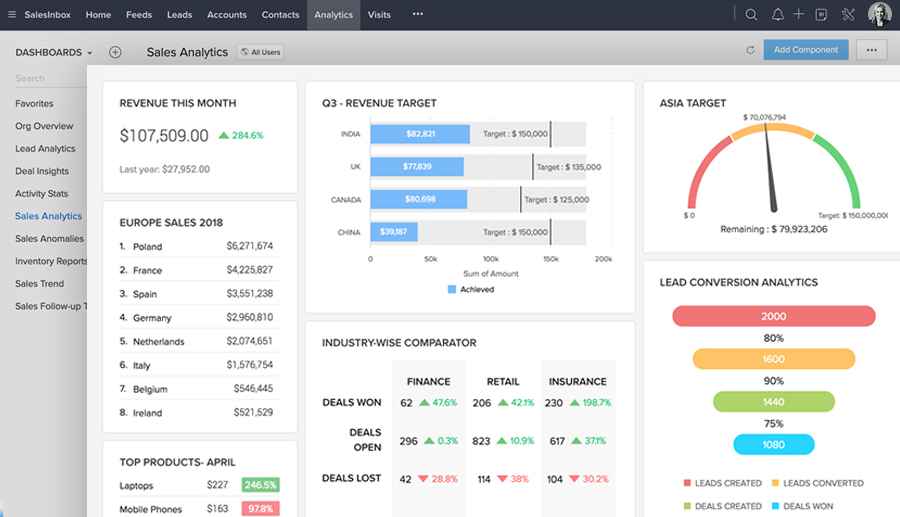
Zoho CRM presents a low-cost, internet-based approach to sales, marketing, and customer service management, comprising flexible communication solutions, AI-based analysis, and process automation, plus being very in demand among startup businesses and SMBs for being both cost-effective and flexible.
Top Features:
-
Multichannel communication (email, phone, chat, social).
-
Sales automation and AI analytics with Zia.
-
Custom modules and workflow automation.
-
Real-time reporting and KPIs.
-
Integration with 45+ Zoho apps.
Pros:
-
Affordable with a wide range of features.
-
Great for small to medium businesses.
Cons:
-
Interface can feel cluttered.
-
Customer support response times can vary.
Pricing : Starts at USD$ 92 User/Month.
5. Microsoft Dynamics 365
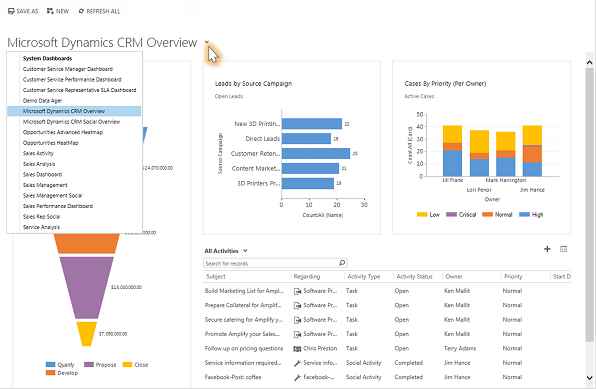
Microsoft Dynamics 365 is an all-in-one business administration platform that integrates the operation of CRM and ERP functions, improves customer relationships, and integrates drives growth. With severe automation, real-time analysis and cloud-based flexibility, it provides companies the ability to make smart, data-driven decisions.
Top Features:
-
Unified CRM and ERP capabilities.
-
Real-time customer insights with AI.
-
Lead scoring and sales forecasting.
-
Deep integration with Microsoft apps (Outlook, Teams, Excel).
-
Role-based workflows and automation.
Pros:
-
Comprehensive platform for large-scale businesses.
-
Seamless integration within the Microsoft ecosystem.
Cons:
-
Complex interface with a steep learning curve.
-
High initial setup and subscription costs.
Pricing: Visit the website and get a quote for custom pricing.
