
Best Electronic Signature Software in
Are you looking for Electronic Signature Software for your Business in ? SaaS Adviser brings you the best Electronic Signature Software to ease your worries. In order to make your work smooth and swift, SaaS Adviser has compiled a list of the best software available. Compare the Best software features, pricing, free demo, and trial to select the best Electronic Signature Software for your organization.
 Researched and Written by Akash Patel
Top 3 Featured Softwares


List of Top Electronic Signature Software

Get Free Consultation


Please Sign Me

By Please Sign Me
If user need to have documents signed, Please Sign Me will make the process fast, easy and secure. It is a Google Docs add-on that allows you to quickly and securely get documents ...
View Profile

INSPAKT Digital Biometric Signature
By INSPAKT Digital Biometric Signature
Adding a signature field to a document provides a basic signature without a time stamp. An advanced electronic signature with biometric data and a legally binding time stamp can ...
View Profile

Component
By Component
Component is a powerful workflow automation tool that helps businesses streamline their paperwork processes. It enables users to create custom workflows that are tailored to their ...
View Profile

Docu Signer
By Docu Signer
The easiest, fastest and most secured way to get documents signed anywhere, anytime is to sign contracts, NDAs and more through any device, from any place. Simple, beautiful and ...
View Profile

Stamper
By Stamper
The software is used to digitally sign PDFs, Word Documents, and other images. The Stamper software is a great way to add your signature to digital documents. With this software,...
View Profile
Certinal
By Certinal
Certinal eSign is a revolutionary Digital Transaction Management solution from Zycus, a leading global provider of procurement and sourcing solutions. Certinal eSign allows orga...
View Profile

Docsketch
By Docsketch
Users can now easily handle documents with the help of DockSketch. It provides features such as document signing, approval, and document tracking. This is backed by an electronic ...
View Profile

Lightico eSignature
By Lightico eSignature
Customers can easily complete eSigning forms, verification of ID, and addition of supporting documents, which allows agents to sell more and makes the business more efficient.
View Profile

sproof sign
By sproof sign
Sproof sign is an online document signing solution that allows you to sign papers with a digital signature. You can digitize your signature workflows in minutes without having to...
View Profile

SignFree
By SignFree
SignFree is a great way to send documents that need to be signed. With SignFree, you can send a document to be signed via a simple link. There is no need for phone calls or manua...
View Profile
Signulu is a cloud-based eSignature or electronic signature platform that is safe, secure and easy to use. With Signulu, you can sign, send/receive and manage documents on a sing...
View Profile

Fairly Even
By Fairly Even
Fairlyeven.com is a contract workflow management platform that helps entrepreneurs, creatives, and freelancers e-sign their documents quickly. Their tools show users the market r...
View Profile

eSign provides the most flexible and scalable solution to support all signing and agreement automation needs. Request signatures from multiple recipients on a single document OR ...
View Profile

Conga Sign is an electronic signature platform that makes it easy to sign e-documents, files, papers, and more. You can sign documents yourself or have others sign them digitally...
View Profile

What is PandaDoc? PandaDoc is a comprehensive document automation and eSignature software that simplifies the process of creating, sending, tracking, and signing digital documents...
View Profile

SignBox
By SignBox
This process is inefficient and time-consuming. SignBox is a solution that makes it possible to collect, save and manage all electronic signatures in one place. This saves time an...
View Profile
Notarize is an online notary platform that allows any person or business to legally notarize a document online, anytime. Simply download the app or register online, prove your id...
View Profile

Signority is a document signing software that enables users to streamline their operations and speed up all processes without any delay. Users can keep in constant touch with the...
View Profile

Legalesign is an electronic signature software that makes it easy to manage signed, witnessed, and approved documents for different organizations. The software is easy to use, wi...
View Profile
CocoSign is an electronic signature management software that helps small and medium-sized businesses and professionals with e-signature and document signing, tracking, collecting...
View Profile

Table of Content
An era of paper files is gradually fading, and Electronic Signature Software is contributing significantly towards the same. They do not have to run around to find courier services or arrange stacks of papers since it is possible to sign, share and conclude transactions directly at the screens. The real strength of E-Signature Software isn’t just that it saves time—it also keeps every signature safe, valid, and legally sound. For anyone who has used a basic Electronic Signature Software before, the difference is easy to spot: newer tools are smoother to use, connect better with other apps, and keep work moving without unnecessary delays.
1. Conclusion
Documents have been transformed to be handled faster, securely and legally compliant with the help of electronic signature software that has brought about speed in signing and approvals as well as storage. It is time-saving, cost effective, flexible, mobile and more secure of the documents. The Simple Electronic Signatures (SES) to Qualified Electronic Signatures (QES) offer a solution with scalable workflows that are applicable to both small and large businesses.
The most popular solutions such as DocuSign, Adobe Sign, PandaDoc, Dropbox, and Zoho are a mixture of high security, integrations, and convenient interfaces. The future is going to be based on emerging trends certified e-signatures, integration of AI, automation of workflow, biometrics authentication, global acceptance, and sustainability. Assessment of the adaptability, security, usability, integration, scalability, support, and cost will help in choosing the most suitable electronic signature software to meet the present and upcoming business requirements.
2. Future Trends In Electronic Signature Software
The use of electronic signature programs has become part of the everyday business world, and it provides efficiency, security, and compliance. As we move forward, a number of new trends will prove to change the face of digital agreements. The knowledge of these developments will assist organizations to implement the most appropriate electronic signature software that conforms to the needs in the future.
1. The Ubiquity Of Certified Electronic Signature
Electronic signatures (e-signatures) are being increasingly popular because of their higher level of security and legality. These signatures have strict rules that are enforced and they offer high degree of certainty than the normal e-signatures. With the growing aspects of operations that are conducted in the macro environment that is regulated, the introduction of certified e-signatures would enable businesses to make sure that the environment complies and reduce the risks to legal liabilities.
2. Integration With Workflow Automation
E- signature software combined with workflow automation tools is simplifying the business processes. The implementation of e-signatures in automated processes can help organizations to accelerate document approvals, minimize manual errors and enhance efficiency. This smooth integration makes things easier for people. It also makes work go faster.
3. Biometric Authentication For Enhanced Security
The issue of security is also high in e-transactions. Adding identity verification methods, such as facial recognition or fingerprint scanning, to electronic signature systems enhances security. This is facilitated through these sophisticated authentication methods that will ensure that the correct person is signing the document and minimize the possibility of unauthorized access and fraud.
4. Integration With Ai
Artificial Intelligence (AI) is transforming e-signature software with the ability to process intelligence in documents. AI can identify and isolate important data in documents, automate manual processes and give insights about the content of the documents. Such an integration will improve decision-making, accuracy, and also speed up signing.
5. Growing Global Acceptance
E-signatures are gaining acceptance in the world as more nations embrace their legality. Standard regulations and norms are being made according to the digital signatures to ensure cross-border transactions. This is a rising acceptance that ensures that the businesses can do their business internationally without facing any limitations since their digital contracts are legally enforceable.
6. Environmental Impact
The environmental advantages of going green and using e-signature software are high. Organisations will be able to reduce their carbon footprint and be a part of the sustainability agenda by minimizing paper usage, printing, and physical storage. The trend of moving away towards digital documentation is in line with the global efforts to minimize waste, and to encourage business friendly practices that are environmentally friendly.
3. Factor to Consider for Choosing Electronic Signature Software
1. Software Flexibility and Adaptability
When choosing an electronic signature software, it is important to have a look at how well the platform can fit your needs. Find solutions that will provide:
Templates: Templates can be reusable and customized that used to make documents standardized, which will save time.
Multi-Device Access: The software should be available on different devices such as desktops, tablets, and smartphones.
User Roles and Permissions: Control access levels and permissions to restrict access to documents by people to sign or edit them.
2. Security Features
In handling sensitive documents, security is the most important consideration. Use e-signature software that offers:
Data Encryption: Documents should be encrypted when being transmitted and stored.
Authentication Methods: This should use multi-factor authentication (MFA) to confirm who is signing.
Audit Trails: This is a compliance facility where you keep a record of every activity done on a document.
The top offerings, such as DocuSign and Adobe Acrobat Sign, are in line with the world-wide security requirements and come with such features as AES 256-bit encryption and detailed audit trails.
3. Ease of Use
An easy to use interface can have a great effect on the rate of adoption in your organization. Choose software that:
Clear layout: It is easy to navigate with a clean interface.
Simple Learning Curve: The user is enabled to start using it with little training.
Support and Resources: Provides support, tutorials and support services.
4. Integration Capabilities
e-signature software can be improved by seamless integration with others. Search solutions that are compatible with:
Document Management Systems: Google drive, dropbox or one drive.
Customer Relationship Management (CRM) Systems: Salesforce or HubSpot like.
Ecosystems: Microsoft Office 365 or Google Workspace.
5. Scalability
e- signature requirements might change as your business expands. Select a software that will be capable of expanding your organization by providing:
Flexible Pricing Plans: It can support many or many fewer users and report volumes.
Premium Features: Add more features upon need, including API access or premium analytics.
Enterprise Solutions: Provide specialized assistance and customization features to big companies.
6. Customer Support
In order to address any disputes, there should be reliable customer support. Make sure that the software provider provides:
Several Support Channels: Support phone, email or live chat.
Full Knowledge Base: Guides, tutorials and FAQs.
Responsive Service: Rapid and quality service on demand.
7. Cost
The price is one of the major considerations when selecting e-sign software. Consider:
The Subscription Models: The Subscription Model is monthly or yearly fee.
Free Trials: It has free trialing where they can test the software before they commit.
Extra Price: Do not overlook any extraneous costs or charges on premium functionality.
4. Different Types of Electronic Signature Software
1. Simple Electronic Signatures (SES)
These are the simplest ones and they may be as simple as typing a name or clicking a check box. Although SES is good when using low risk agreements, it provides little authentication and is recommended in scenarios where security is not a big issue.
2. Advanced Electronic Signatures (AES)
This is an application of E signature software a step ahead of SES and is simpler in providing a better-secured identity verification as well as, document integrity. AES is frequently used in business contracts, human resource agreements and in cases that require the use of a stronger authentication. The digital signature market is also thriving globally with the country projected to experience a 39.2 percent CAGR in the digital signature market revenue which is projected to grow to USD 13.4 billion by 2025 but is expected to be USD 70.2 billion by 2030.
3. Qualified Electronic Signatures (QES)
The most secure of all, QES is supported by the digital certificates issued by reputable political bodies. QES has been used by many governments and enterprises in the regulated industries to conduct transactions in a legally binding manner using E signature services.
5. Best Electronic Signature Software in USA
1. Docusign
DocuSign is a secure and user-friendly Esignature platform that enhances digital document workflows. Perfect fit for enterprises and startups. It also works as trustworthy small business document management software which enhancing efficiency and compliance.
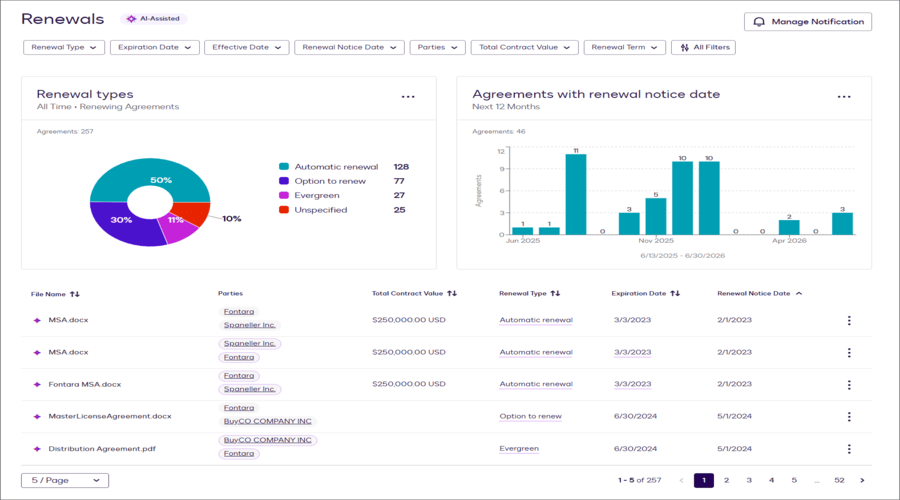
Key Features
-
Legally binding documents using electronic signatures with audit trails and tamper-evident features.
-
Massive connectivity with CRM and cloud storage among other tools.
-
Reusable templates and documents with customizable branding options.
-
Flexibility in workflow and signing, bulk sending, custom fields and signer attachments.
-
mobile application and Interplatform connectivity.
Pros
-
Extremely high level of security and compliance.
-
Well-developed ecosystem and sophisticated workflow.
Cons
-
Cost becomes high as the number of users or signing volume grows.
-
You need to pay for advanced features like bulk send and advanced fields.
Pricing
Personal - £8 /month per user
Normal - £20 /month per user
Business Pro - £33 /month per user
Enterprise/Improved - custom pricing
2. PandaDoc
The electronic signatures Adherent of PandaDoc are legally binding and comply with the regulations of ESIGN and UETA, which guarantees efficient and secure signing of documents electronically. It has been integrated with CRM systems and has features such as real time tracking, re-usable templates, as well as integration with CRM systems.
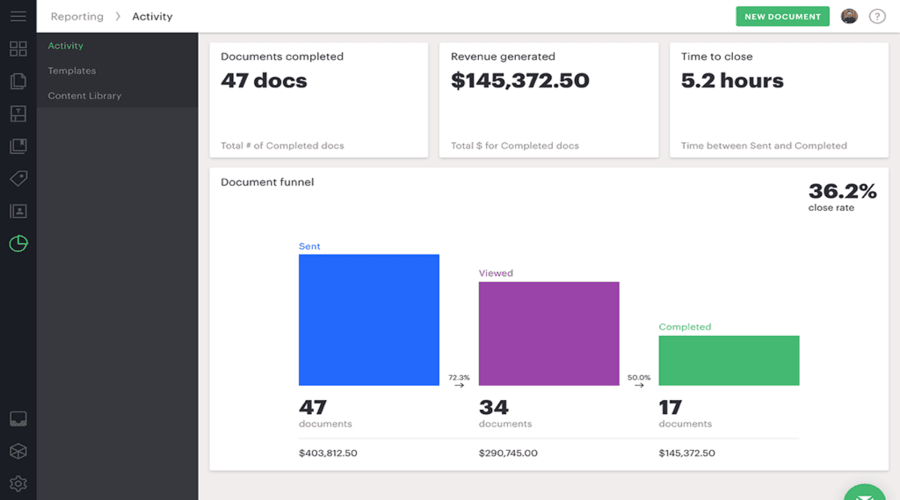
Key Features
-
End to End document processes: design, distribute, monitor, and e-sign.
-
Easy edit with drag-and-drop templates and a content library.
-
Real time notifications, reminders and document tracking.
-
CRM connections and Personalized branding.
-
More sophisticated workflow and bulk sending at the higher levels with API availability
Pros
-
Complete document management outside of e-signatures.
-
Excellent flexibility & transparency in pricing for mid-tier users.
Cons
-
High cost for large volumes.
-
Advanced features are more difficult to learn.
Pricing
-
Starter: $19/user/month (annual)
-
Business: $49/user/month (yearly)
-
Enterprise: custom pricing
3. Adobe Sign
Adobe Sign is an electronic signature software that provides individuals and companies with the opportunity to sign, send and handle documents online securely and efficiently.
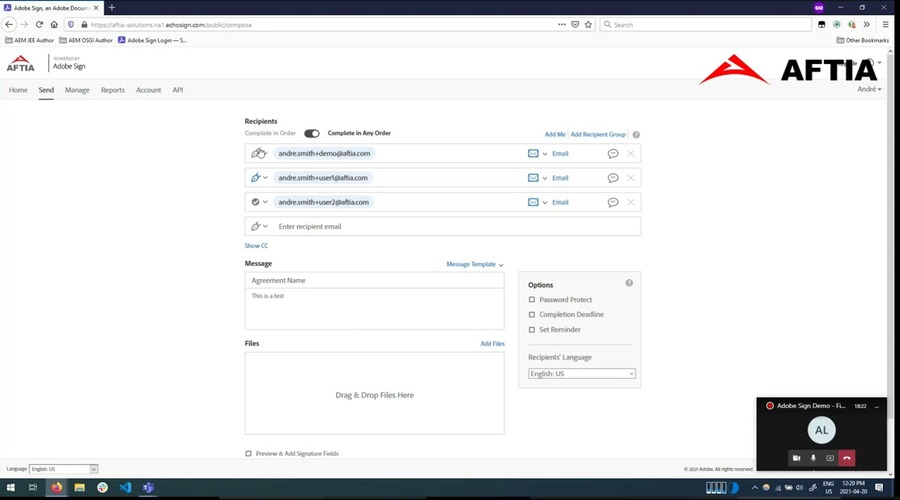
Key Features
-
Strong PDF tools with e-signatures, editing and reusable templates come with Adobe’s own Ecosystem.
-
Integrates with Microsoft 365 and other business tools.
-
Bulk send and advanced form tools in higher plans.
-
Secure, compliant with audit trails and legal standards.
-
Works for teams with easy admin controls.
Pros
-
Strong reputation and reliability with solid security and legal compliance.
-
Comprehensive and professional-grade features
Cons
-
High costs can be a burden on smaller users.
-
Heavy resource demands & performance issues
Pricing
-
Acrobat Standard (individual): $12.99/month
-
Acrobat Pro (individual): $19.99/mont
4. Dropbox
To enhance e-signatures with its powerful file sharing software, Dropbox has applied the abilities to provide a secure system allowing users to sign, store, and share files. Its user-friendly interface and integration capabilities make it suitable to teams that require digital workflows, which are rapid and well-organized.
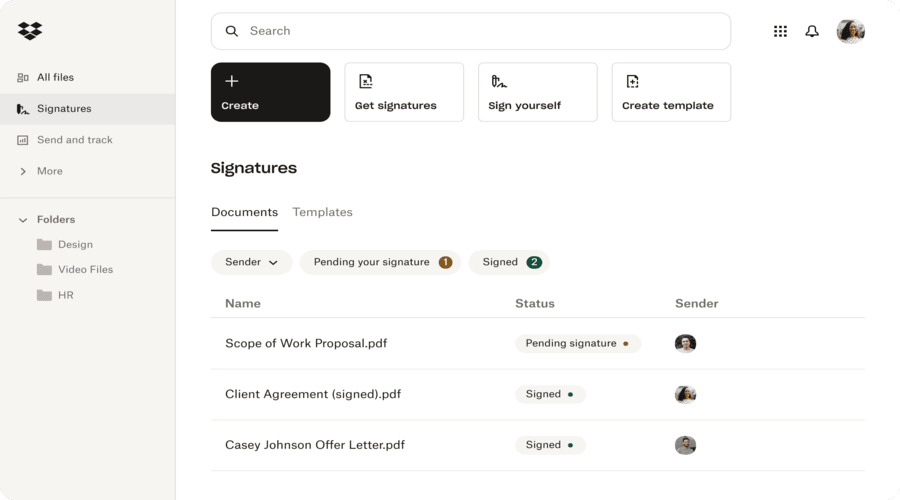
Key Features
-
E-signatures that are legally binding with non-editable audit trails.
-
Good reusable template with placeholders and integrations with Dropbox & Google Drive
-
Clean and user-friendly interface with ease of use.
-
Team features, bulk sending and branding in higher tiers.
-
Audit trail with security & compliance (ISO, SOC, GDPR etc.)
Pros
-
Easy to use with the least learning curve and works smoothly with Dropbox.
-
Affordable for small to mid-sized teams.
Cons
-
custom features may become expensive.
-
Some needed features are only in higher plans.
Pricing
-
Plus (Personal) - $9.99/month
-
Professional - $16.58/month
-
Standard (Teams) - $12/user/month(3+ users)
-
Advanced (Companies) - $19.20/user/month(3+ users)
5. Zoho
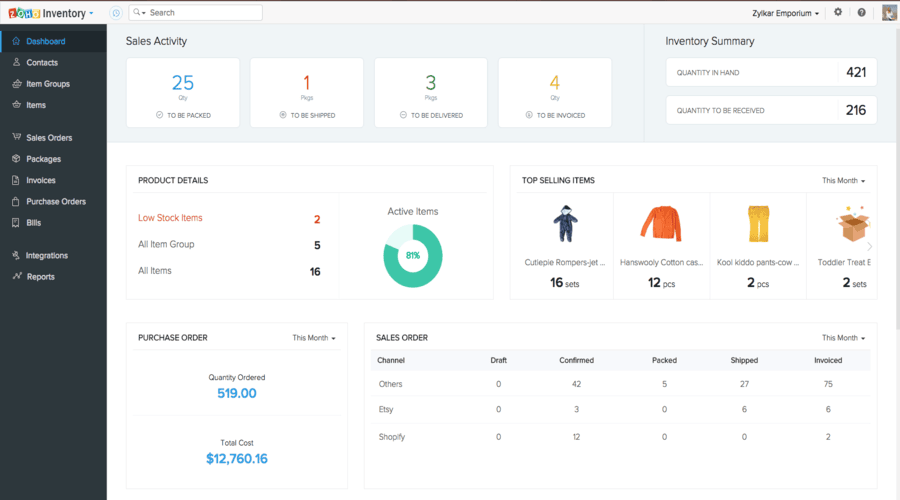
Zoho Sign is an easy to use electronic signature product that is available to any business, small or big. It provides legally binding signatures, easy integrations with zoho and third-party apps, customizable workflows, and strong security frameworks.
Key Features
-
Supports multiple file formats and reusable templates, with integrations for Zoho Suite, Google Drive, OneDrive, Dropbox, etc.
-
Provides a sequential process with approvals, signer order, remote collaboration and reminders.
-
Strong security and compliance with audit trails and authentication.
-
Upgrade plans include branding, customization, multilingual support, in-person signing and bulk sending.
-
API options and flexible usage.
Pros
-
Budget friendly for small business and startups
-
Robust security, compliance and multiple integration
Cons
-
Advanced features only in higher tiers.
-
Envelope limits on lower tiers may restrict frequent usage.
Pricing
-
Free plan: 5 envelopes/month
-
Standard: $10/user/month
-
Professional: $16/user/month
-
Enterprise: $22/user/month
6. What is Electronic Signature Software?
Electronic Signature Software is a safe online digital software that allows individuals and companies to sign, send, and control documents digitally. E-signature software or Esign software as it is also referred to is the alternative of the traditional paper-based processes with legally binding and effective approvals. The services of modern e-signatures enhance the speed and security as well as the accessibility of the workflow in any industry. Startups, and large companies nationwide are resorting to the most suitable software to manage the intricate processes more efficiently. Electronic Signature Software in the USA, in addition to such tools as the best mobile forms automation software, has become a necessity in maintaining the workflow to be even smarter, faster and completely compliant.
7. Benefits of Electronic Signature Software
Electronic Signature Software has transformed businesses in the manner in which documents and approvals are processed smoothly combining with user friendly contract management software to deliver efficient, secure and legal transactions.
1. Save Time
The normal paper work is time consuming and may take days to make, sign and submit. In USA with Email Signature Software, it takes minutes to approve documents to enhance sales contracts, HR forms and legal agreements.
2. More Flexibility and Mobility
Teams are no longer required to be attached to their desks. Since smartphones and tablets can run E signature software, it provides flexibility to employees and clients to sign anywhere, ensuring business continuity even with remote or global teams.
3. Create Custom Workflows
Each company has their different approval procedures. The most effective electronic signature software, when combined with best workflow management software, gives organisations the ability to generate custom workflows to automate reminders and to monitor the progress in real time- enabling managers to concentrate on growth rather than on paperwork.
4. Enhance Document Security
E signature services center around security. Such characteristics as multi-factor authentication, encryption and digital audit trails ensure the safety of sensitive data and comply with the standards of various industries.
5. Reduce Operational Costs
Printing, courier fees, stocking and administrative time hours are quick to add up. With Esign software it reduces cost to the businesses and also minimizes their impact on the environment; hence is cost effective and sustainable.
8. Key Features of Electronic Signature Software
The value of Electronic Signature Software could be best explained through the main features. small firms and businesses in the United States that utilize the best enterprise business process management software like E-Sign software due to its level of security, flexibility and scalability. These are the key factors to be taken into consideration when comparing platforms:
1. Security and Authentication
It is extremely vital to secure sensitive information. Optimally, the electronic signature software has to be such that data is encrypted, and multi-factor authentication, as well as audit trails, ensure the identity of each signer. This renders documents as legal and invulnerable.
2. Integration Capabilities
There is no tool that is used alone. The most robust E signature services are those that are woven into CRMs, cloud storage and workflow automation tools that enable teams to build a smooth digital environment. In the case of businesses that are expanding into the online realm, integration can be a more significant deal than even the signature feature itself.
3. User Experience and Interface
E signature software has a clean and easy to use interface which is simple to adopt to, regardless of whether it is a first time user or a tech-savvy professional. Easy navigation and low learning curves promote their extensive usage in companies.
4. Pricing and Plans
The budget is significant in both startups and international corporations. In USA, Electronic Signature Software has flexible pricing models that will only enable companies to pay what they require, be it simple signing or high-tech enterprise packages.
5. Online Document Signing
The basic element of any Electronic Signature Software is faster and secure than ever internet signing. Contracts and agreements can also be concluded immediately instead of taking time to be printed or mailed; it saves time and expenditure incurred in running the business.
