
Best Bug Tracking Software in
Are you looking for Bug Tracking Software for your Business in ? SaaS Adviser brings you the best Bug Tracking Software to ease your worries. In order to make your work smooth and swift, SaaS Adviser has compiled a list of the best software available. Compare the Best software features, pricing, free demo, and trial to select the best Bug Tracking Software for your organization.
 Researched and Written by Nikita Rao
Top 3 Featured Softwares


List of Top Bug Tracking Software

Get Free Consultation


What is Freshservice? Freshservice is a cloud-based IT service management (ITSM) solution developed by Freshworks that enables organizations to modernize and streamline their IT...
View Profile

Monday.com Dev

Empower your R&D teams to build better products
Monday.com is a Devops tool your team would love to utilize. It is easy and simple for everybody to team up, concentrate on what's imperative, and accomplish more at work.
View Profile

Wrike is a powerful cloud-based project management and collaboration software designed to streamline workflows, improve team productivity, and enhance visibility across project...
View Profile

JIRA Service Management
By Atlassian
Check How JIRA Service Management can help to automate Indian Business. SaaSAdviser provide their list of features, pricing, Free demo and Comparison with the best alternative
View Profile

Mantis Bug Tracker (MantisBT) is an open source issue tracker that allows for convenient project management and effective team collaboration. Issue related updates are notified to ...
View Profile

Bugzilla
By BugzillaCheck How Bugzilla can help to automate Indian Business. SaaSAdviser provide their list of features, pricing, Free demo and Comparison with the best alternative
View Profile

GitHub is a cloud-based platform that helps software program improvement, model management, and collaboration with the use of Git, an open-source model management system. It permit...
View Profile

What is GitLab?GitLab is a complete AI-powered DevSecOps platform designed for software creation, allowing users to collaborate and develop software. It helps organizations boost d...
View Profile

Zoho BugTracker is a scalable bug tracking solution that helps you handle issues and deliver amazing products on schedule. It enables you to identify, track, and repair your bug de...
View Profile

BugHerd is a bug tracking and reporting solution that is simple to use, effective, and loved by its users. agencies, designers, developers, marketers, and project managers. BugHerd...
View Profile

RedmineUP
By RedmineUP
RedmineUP is a tool that helps teams manage Agile projects in Redmine without having to switch between multiple tools. It offers features like drag & drop cards with task ranks...
View Profile

Userback is a feedback management tool that lets users provide tools to their customers to collaborate and give feedback on all of the user's web projects from a single and central...
View Profile

Asana is a cloud-based project management software designed to help teams organize, track, and manage their work efficiently. It streamlines workflows, improves collaboration, ...
View Profile

ClickUp is a comprehensive, all-in-one productivity platform designed to streamline work management for individuals and teams across industries. It centralizes project planning...
View Profile

What is Trello?Trello is a flexible, web-based project management tool that helps individuals and teams organize their tasks visually. Based on the Kanban method, Trello uses b...
View Profile

Backlog is an online project management software that also provides different task management solutions to teams. The software enables project management, code management, and bug ...
View Profile

Marker.io is a website feedback and bug tracking tool that enables developers to receive adequate suggestions from colleagues and clients on the go. Web developers dependent on the...
View Profile

YouTrack
By JetBrainsCheck How YouTrack can help to automate Indian Business. SaaSAdviser provide their list of features, pricing, Free demo and Comparison with the best alternative
View Profile

BugHost
By BugHost
BugHost offers a robust bug tracking and issue management system that is perfect for businesses of all sizes. The system is easy to use and offers a variety of features that are pe...
View Profile

SpiraTeam
By InflectraCheck How SpiraTeam can help to automate Indian Business. SaaSAdviser provide their list of features, pricing, Free demo and Comparison with the best alternative
View Profile

Table of Content
What is Bug Tracking Tools?
Bug tracking software is an application that captures and keeps track of the bugs and defects found in a particular software application. It enables developers, testers and project managers to log issues, prioritize them based on severity, assign tasks and track their resolution status.
These systems enable better communication and collaboration among team members by providing a single point of access to the status of ongoing issues. Most modern bug tracking tools integrate with development environments, CI/CD pipelines, and project management systems.
By organizing and automating the bug life cycle, bug tracking software improves the quality of software, development time, and the overall delivery of the product.
The bug tracking software market size was estimated at USD 268.25 million in 2024 and is projected to reach USD 639.92 million by 2031.
1. Conclusion
Selecting the optimal bug tracking software best suited for the team improves productivity of the entire team, increases the quality of software, and reduces the time it takes to resolve issues.
Using SaaS Adviser, one of the trusted platforms available, you can easily compare different bug tracking software and choose the one that fits the needs of your team’s development objectives. With SaaS Adviser, you can now optimize your bug reporting and progress tracking, and improve user satisfaction by achieving flawless experiences.
2. Some Software and Services Related to Bug Reporting Tools
1. Application Performance Monitoring Software (APM)
APM systems aid in performing bug tracking by detecting performance drain, system crashes, and other unusual activities in real-time. They help in identifying backend issues prior to them turning into major bugs and work well with bug tracking systems in auto ticket generation.
2. Software Testing Software
These tools provide software testing frameworks for both manual and automated testing. They assist in the early identification of bugs in the software development life cycle and promote orderly test case management. This complements bug tracking systems and improves the management of the defect life cycle.
3. Test Automation Software
Incorporating automation aids the detection of critical issues and bugs by testing procedures automatically, providing accurate results and quicker detection of crucial problems in integrated development environments.
When automation aids the detection of critical issues and bugs by testing procedures automatically, bugs are reported and issues are tracked in a more speedy and accurate manner especially when automation assists in the debugging process. Read our blog on the impact of automation for more information.
3. How to Choose the Right Bug Tracking Tools?
While identifying possible bugs, precise focuses can help enlist the bugs more efficiently. Sudden omissions of crucial issues, documentation issues of the methodology approach, current software used in comparison to other tracking tools, and omissions of primary integration hurdles faced with external sources should be taken into consideration.
4. What are the Common Issue in Bug Tracking Tools?
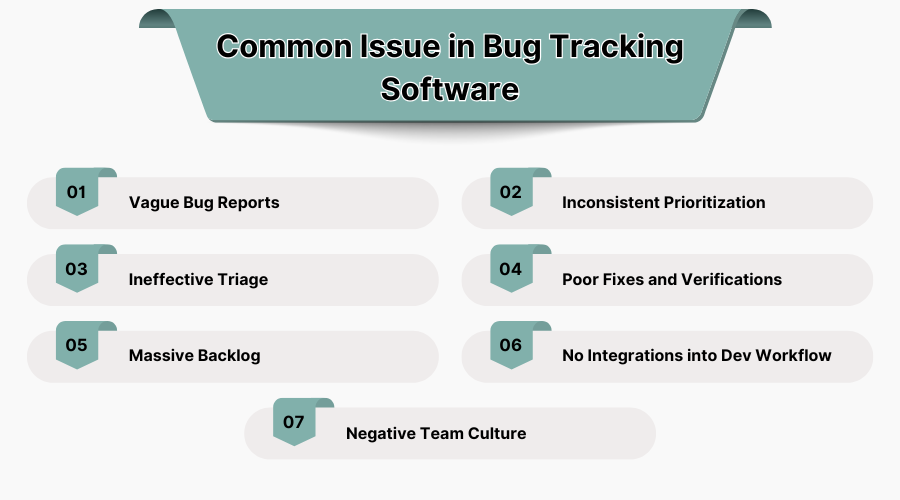
1. Vague Bug Reports
When the requisite information of documents to get procured is step wise, the required documents become hard to access, leading to so many confusions that one does not want to deal with anymore which turns out to be completely inaccurate information indeed takes up so much and anger intense amongst the peers turning into chaos.
2. Inconsistent Prioritization
Lack of distinctive, comprehensible, justifiable benchmarks leads to wholly ineffective thought processes turning into set methods to give pre-listed components without structural design and makes added essential tasks ignored while getting unnecessary superfluous areas added on to extremely mundane components. Development resources become scattered due to the inability to gauge and set order of importance.
3. Ineffective Triage
Ineffective triage significantly impacts issue resolution. In situations where bugs are not properly evaluated or assigned, teams consume resources trying to figure out who should claim the problem and its urgency level. This blocks the pipeline, postpones development, and detrimentally alters the final product quality.
4. Poor Fixes and Verifications
Rushed changes and insufficient testing usually result in previously mitigated issues being reintroduced into the system. Skipping validation procedures or lacking proper QA consistently erodes consumer confidence, damaging reputation, while also draining additional cycles required to rectify recurrent issues.
5. Massive Backlog
Bugs that are left unresolved create an overwhelming backlog. This accumulative clutter makes it exceedingly challenging to track progress, prioritize tasks, case critical issues, and lower team morale, culminating in poorly-maintained software.
6. No Integrations into Dev Workflow
Significant context switching and reduction in visibility of bugs within the overall development lifecycle occur when bug tracking tools do not integrate with development tools like Git and CI/CD. This reduces overall developer productivity.
7. Negative Team Culture
A blame-centered tracking methodology may inhibit collaborative effort. Openness of communication is absent and silence is the direct order in the development team forcing members to not log issues. With passing time, this shifts the environment into one where bugs worsen and worsen, deteriorating quality as well as teamwork.
5. What are the Best Practices in a Bug Tracking Tools?
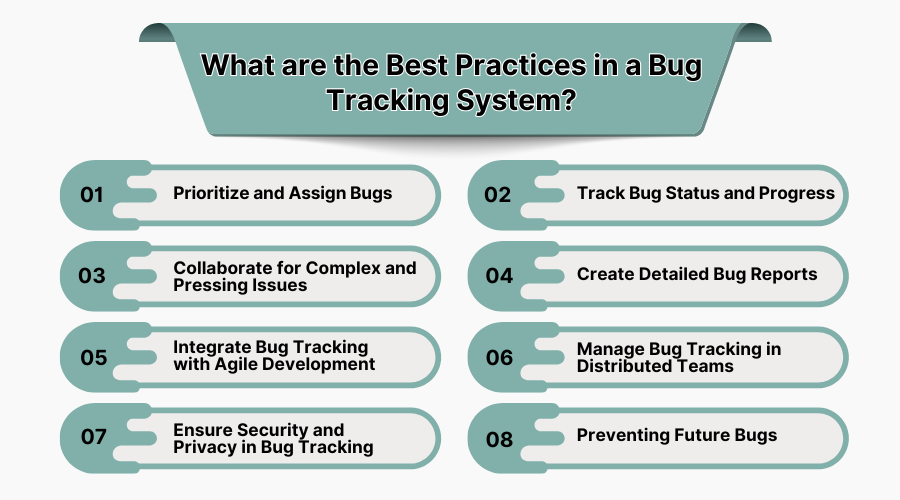
1. Prioritize and Assign Bugs
Always sort bugs with respect to their seriousness and impact. Ensure timely assignment to the appropriate developers to avert development flow clampdowns, resolve high priority issues first, and maintain efficiency, customer experience, and development workflows.
2. Track Bug Status and Progress
Update status tracking items with relevant information, from a bug being open to closed dealt with. Use status tracking to determine overall developer activity efficiency in conjunction with persistent problems to improve overall sprint enhancement, product stability, and resolve versioning control system bugs.
3. Collaborate for Complex and Pressing Issues
Highly collaborate and encourage directness to enable testing with developers and project managers on top impact bugs.
Comments and attachments alongside feedback sharing accelerate and enhance the heightening quality of resolutions speed wise.
4. Create Detailed Bug Reports
Dev-related time wastage redirection is foregoing lagging back and forth. Alongside being precise and clear reports result in effortlessly solving and achieving faster workloads leading to direct alteration in logs, screenshots, environment details, expected behaviors, and steps to reproduce them.
5. Integrate Bug Tracking with Agile Development
Ensure integration of bug tracking tools with agile tools such as Jira or Trello. Primary alignment smoothens with cycles working for sprint planning, prioritization, and constant for features working that’s setting the pace for tasks progression towards attainable fixes working results, functioning, alterations task targets towards unnoticed blockages bypass active ongoing merge setting uninstall control mechanisms scenarios assist in unblock options Programmed elimination lasers inverse control authored rats.
6. Manage Bug Tracking in Distributed Teams
Use cloud solutions that enable all team members, regardless of their location, to access bug reports in real-time. To maintain productivity across different time zones, ensure that communications are consolidated, notifications are turned on, and workflows are synced.
7. Ensure Security and Privacy in Bug Tracking
Safeguard sensitive information contained in bug reports by configuring user permissions and access restrictions, as well as encrypting storage. This is crucial, particularly for confidential projects, user data, or other sensitive information.
8. Preventing Future Bugs
Examine resolved bugs for the most common root causes and recurring issues and take corrective actions. Reduce the chances of similar bugs being introduced in future releases by implementing code reviews, automated testing, and static analysis.
6. Best Bug Tracking Tools with Features, Pricing, Pros, and Cons
Here are some of the best bug tracking tools in USA:
1. Jira – Best Bug Tracking Software for Agile Teams
Atlassian has designed Jira as a top-of-the-line tracking system for bugs and project management. Agile groups can plan, track and release their software as seamlessly as possible. The workflows are customizable as well as integrated seamlessly with CI/CD pipelines. Smooth tracking and resolution are followed throughout the development lifecycle which helps in effortless bug fixing.
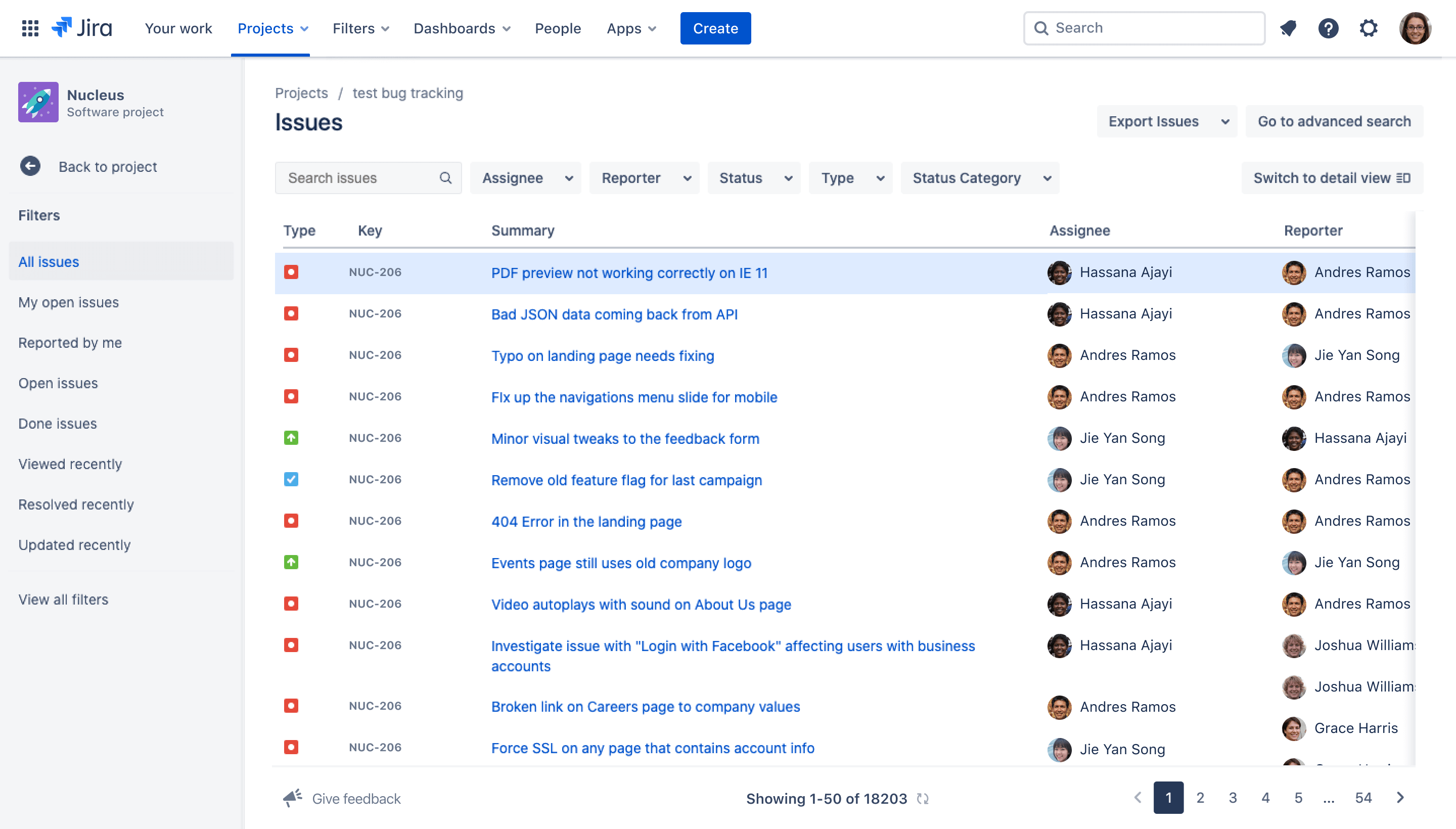 Features:
-
Customizable workflows for issue tracking.
-
Sprint planning and agile reporting.
-
Real-time collaboration and comments.
-
Powerful automation and integration options.
-
Custom dashboards and reporting.
Pros:
✔️ Advanced issue tracking capabilities.
✔️ Scalable for small to enterprise teams.
✔️ Integration with over 3000 tools.
Cons:
❌ Steep learning curve for beginners.
❌ May be overkill for small teams.
Price:
Free for up to 10 users.
Standard plan: $7.75/user/month.
Premium: $15.25/user/month.
2. Asana – Best Bug Tracking Tool for Team Collaboration
Asana holds expertise when it comes to managing tasks and projects at a strategic level along with bug tracking. The interface eases the process of capturing bugs and monitoring them as well as tracking them throughout the entire workflow system.
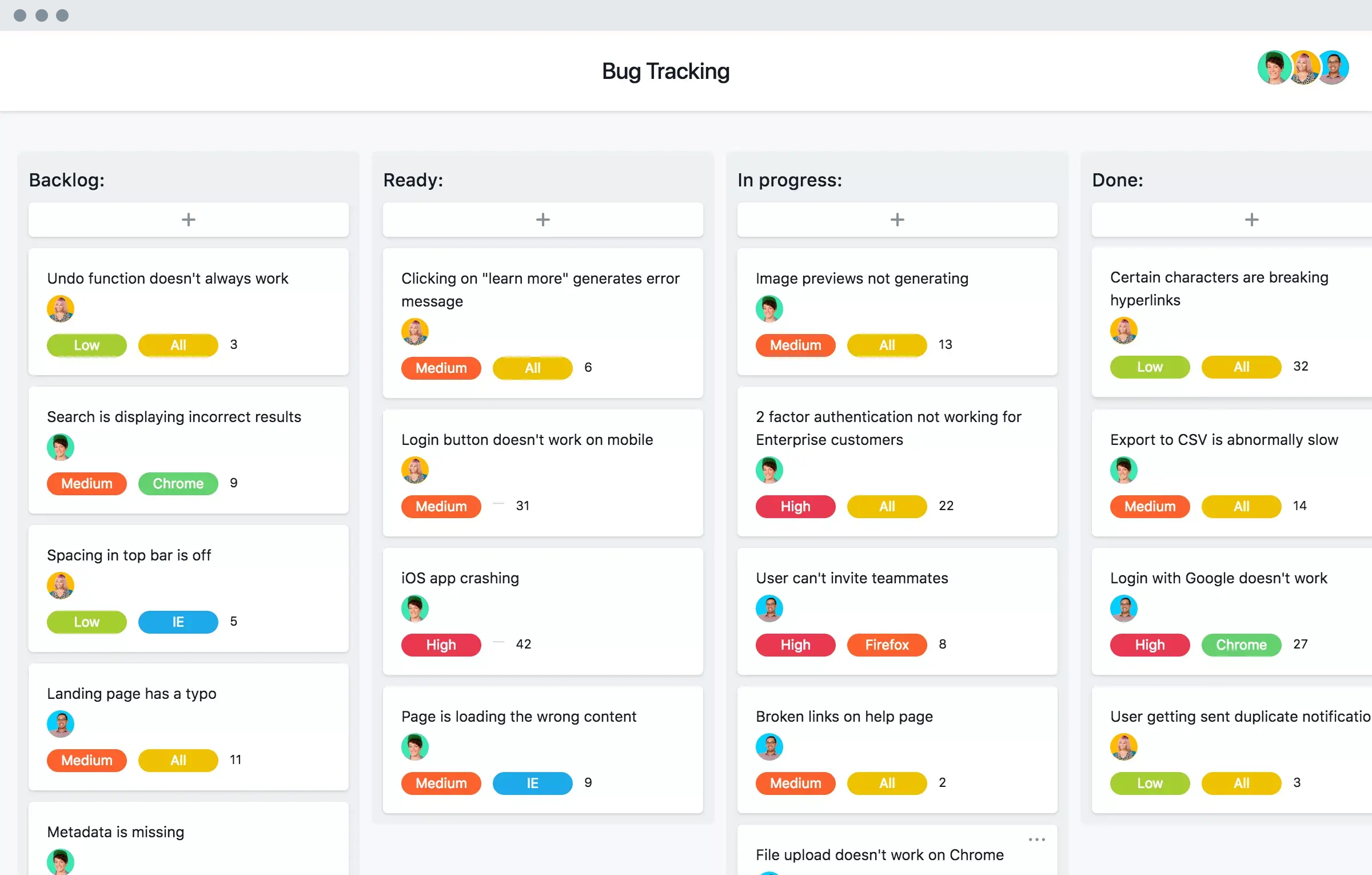 Features:
-
Visual task boards and timelines.
-
Custom fields for bug reporting.
-
Automated workflows and rules.
-
Real-time collaboration and comments.
-
Bug tracking templates.
Pros:
✔️ User-friendly and visually appealing.
✔️ Excellent for cross-team collaboration.
✔️ Easy to set up and scale.
Cons:
❌ Limited advanced reporting features.
❌ No dedicated QA/tester integrations.
Price:
Basic: Free for individuals/small teams.
Premium: $10.99/user/month.
Business: $24.99/user/month.
3. Trello – Best Kanban-Based Bug Tracker for Simplicity
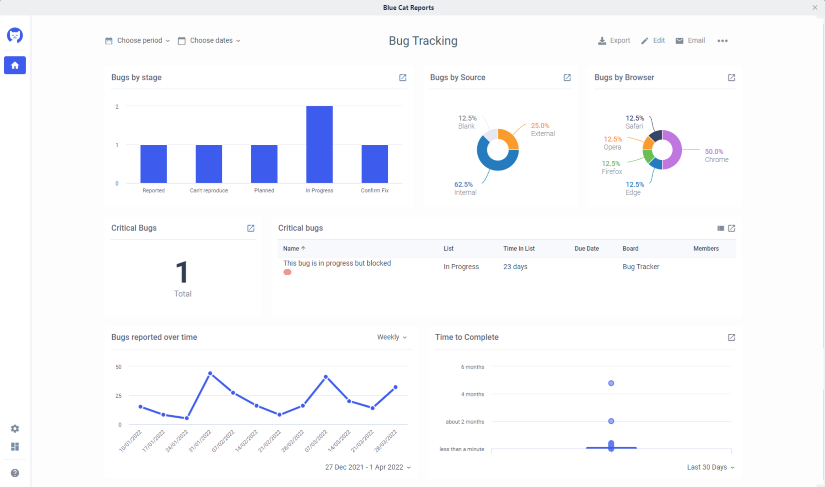
Lightweight bug tracking is made easier with popular bug issuing tools and stepwise project managers to do it in one go. Being based on the Kanban board, it turns up with drag and drop functionalities; it fosters carefree tracking and creation of bugs.
Features:
-
Drag-and-drop task cards.
-
Labels, checklists, and attachments.
-
Power-ups for added features (integrations).
-
Automation via Butler.
-
Team collaboration and notifications.
Pros:
✔️ Extremely easy to use and onboard.
✔️ Highly visual and customizable.
✔️ The free version is very functional.
Cons:
❌ Lacks complex bug tracking workflows.
❌ Not ideal for large dev teams.
Price:
Free Plan Available.
Standard: $5/user/month.
Premium: $10/user/month.
Enterprise: Starts at $17.50/user/month.
4. Zoho BugTracker – Best Value Bug Tracking Tool
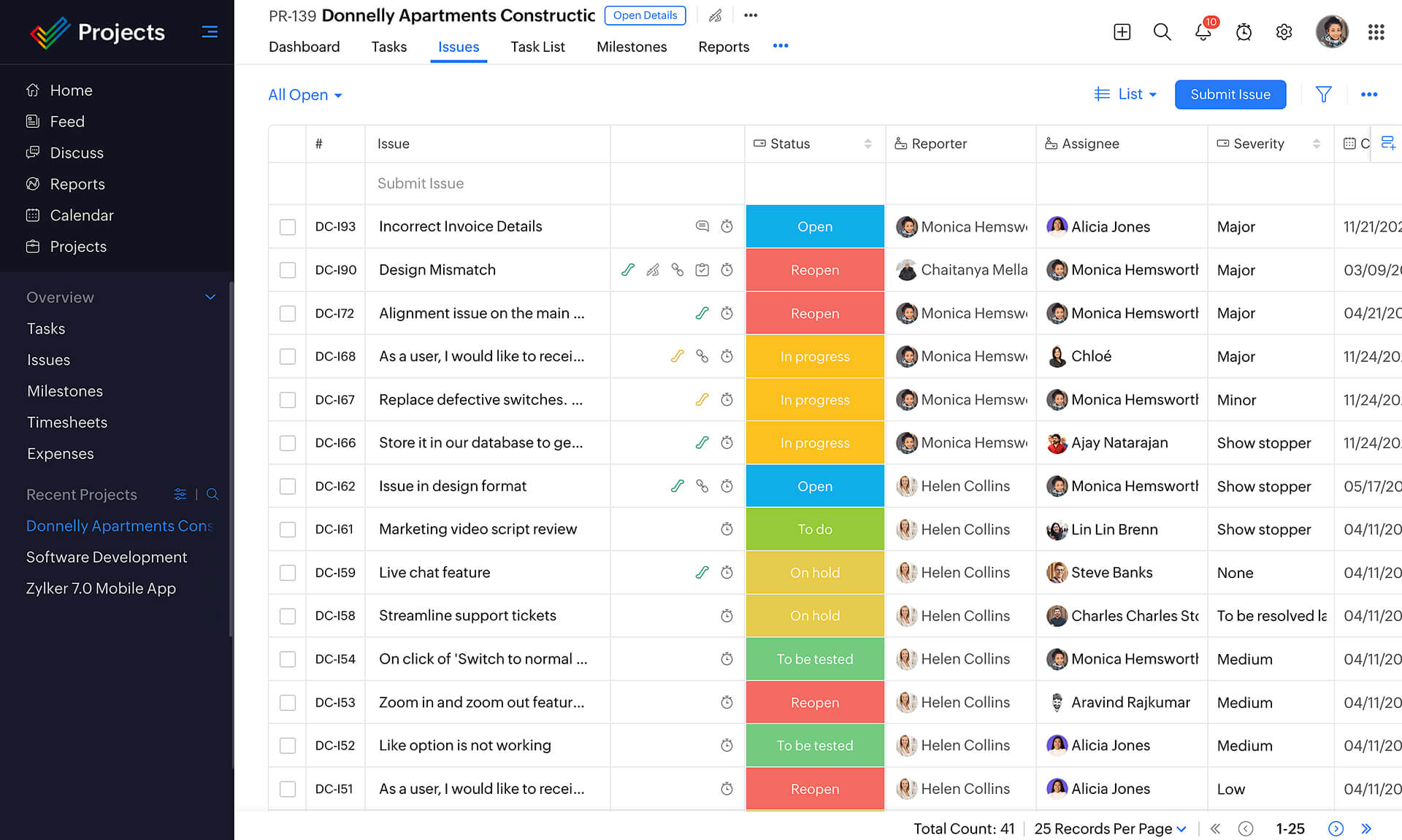
Collaborating and reporting are the big strengths of Zoho BugTracker while tracking bugs, which helps small and medium businesses meet their constraints. Ideal for small and mid-level businesses wishing to have effective solutions at reduced costs, Zoho BugTracker stands out.
 Features:
-
Issue tracking with severity and due dates.
-
SLAs, business rules, and workflows.
-
Custom views and notifications.
-
Time tracking and integrations.
-
Client portal for feedback.
Pros:
✔️ Affordable and scalable.
✔️ Intuitive UI and robust features.
✔️ Integrates well with Zoho ecosystem.
Cons:
❌ Limited integrations compared to Jira.
❌ UI may feel dated to some users.
Price:
Free for up to 3 users.
Premium: $4/user/month.
5. Redmine – Best Open-Source Bug Tracking Software
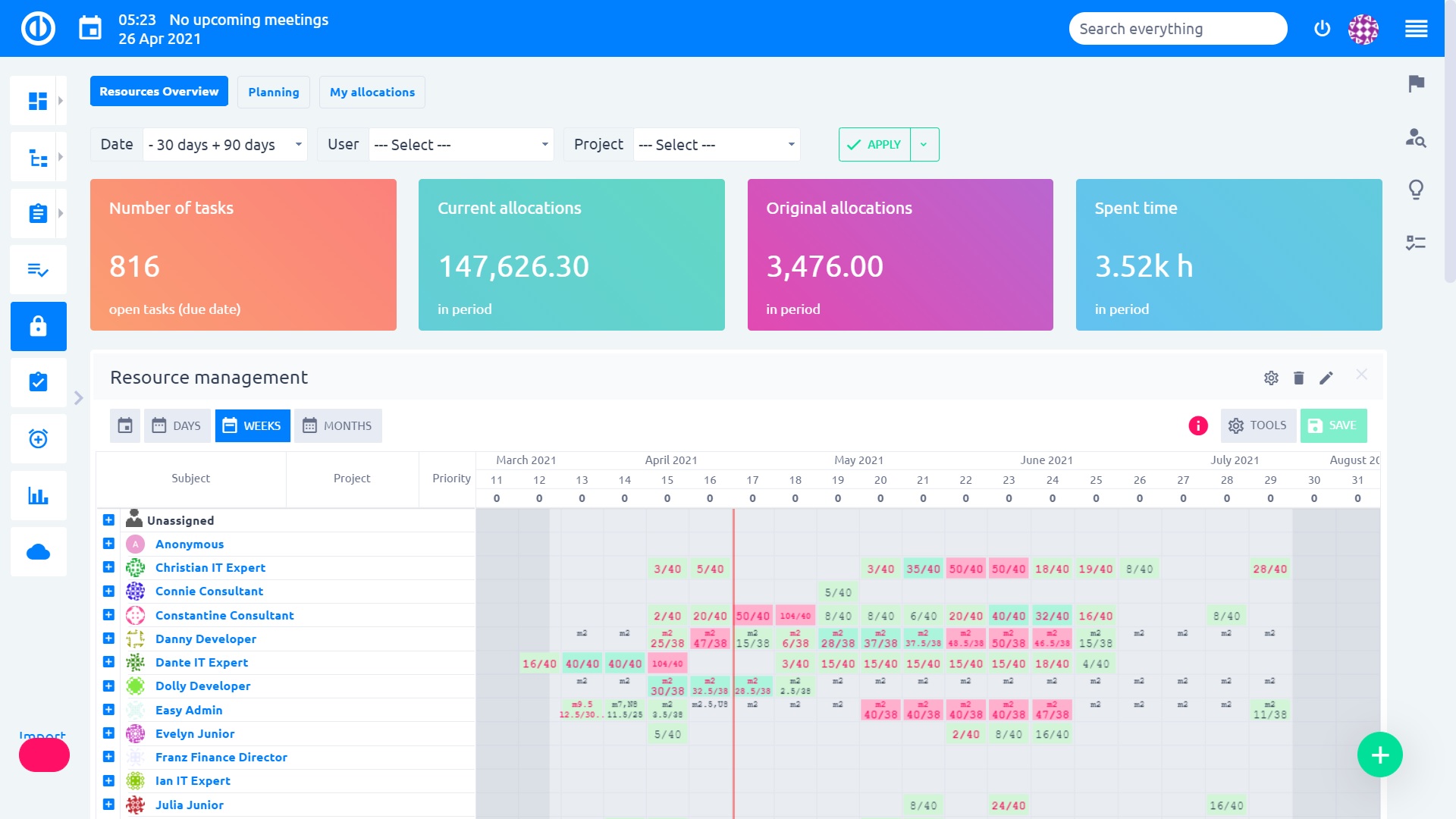
One of the best open-source project management tools that features bug tracking is Redmine which has a powerful architecture. Strong customization options make Redmine powerful with the ability to integrate plugins. The software has no licensing fees which makes it suitable for developers looking for flexibility.
 Features:
-
Custom fields and workflows.
-
Role-based access control.
-
Issue tracking with Gantt charts.
-
Time tracking and repository integration.
-
Multi-language support.
Pros:
✔️ Open-source and free to use.
✔️ Highly customizable with plugins.
✔️ Good for technical users.
Cons:
❌ Requires self-hosting and setup.
❌ Outdated UI and limited official support.
Price:
Free (open source, self-hosted).
Hosting services may cost extra.
7. What are the Key Benefits of Bug Tracking Tools?

1. Task Management
Simplicity is enhanced through highly organized workflows. In multi-level software development projects, the clear division of labor facilitated by bug tracking tools ensures that every team member including the developers of various teams, is linked to specific bugs.
This enhanced organization, productivity, and systematic, timely issue resolution across software development branches are made possible through efficient cross and multi-team cooperation. Also, you can try out task management software for this.
2. Activity Tracking
These tools keep a record of all the actions carried out with respect to the reported bug, ensuring accountability and transparency. Teams are able to review all updates, comments, and even changes in status in real time thereby making certain that there is no discontinuity of communication throughout the development cycle.
3. Planning Tool
Systems for tracking issues facilitate the planning of releases and sprints by organizing issues according to project schedules. This allows teams to control workloads, allocate resources, and improve the accuracy of meeting delivery timelines and minimizing disruptions.
4. Reporting, Statistics
The provided visual reports and dashboards offer a comprehensive overview of the bugs and their resolution times alongside team performance insights. This information is crucial for stakeholders when assessing software quality, tracking recurring problems, and devising informed solutions to improve development processes and the reliability of the product.
5. Integrations
Issues tracking tools are integrated into well-known development and collaboration tools such as GitHub, Slack, Jira, and CI/CD pipelines. These integrations improve workflows, decrease context shifts, and allow the monitoring of all development and testing activities from a single access point.
6. Customizations
Custom workflows, dashboards, issue types, fields, and notification settings enable teams to configure the bug tracking software to meet their requirements. This configuration increases usability and compliance with organizational processes, allowing businesses to maximize productivity and control.
8. What are the Key Features of Best Bug Tracking Tools?
1. Advanced Bug Reporting
Users may document problems with screenshots, video captures, error logs, and severity levels. Being able to report issues with this level of detail improves clarity, which helps developers resolve issues with greater context and fewer follow-up questions.
2. Centralized Dashboard
A dashboard that is centralized tracks all bugs, tasks, priorities, and overall progress making it easier to track projects and issues. Leveraging a single tool enables managers and teams to assess issue statuses, resource allocation, and monitor development health all in one location without having to switch between multiple tools or spreadsheets. You can use dashboard software for the same.
3. Collaborative Workspace
Cross-functional teams can communicate, share updates, assign bugs, and do much more within a single platform. Ensures everyone is aligned on a single program improving visibility while enabling discussions happening towards the same scope and ensuring problem-solving is faster and more effective throughout the lifecycle.
4. Real-Time Notifications
Automated notifications sent to team members about any change in status, comments, and even assignments ensure everyone is up to pace on the ongoing activities on the system. Real-time notifications ensure no bottlenecks are created improving workflows and providing accountability by notifying stakeholders exactly when their input or action is required. You can use push notification software for the same.
5. Custom Workflows
Custom workflows provide the option for organizations to configure their own custom user roles along with defining the stages of bug lifecycles. These flexibilities are beneficial from a compliance perspective, and also improve efficiency automation at the same time ensuring that every issue from reporting to resolving it, is handled in a standardized manner.
6. Attachment Management
With regards to bug reports, attachment management is beneficial as it enables teams to upload and view related files such as logs, screenshots, or test cases which are important. This ensures that all pertinent resources are readily available which improves diagnostic accuracy and accelerates issue resolution.
7. Manage Feedback
User and tester participation can be managed without any interruptions through the integrated forms making feedback management easier. Aggregated feedback assists in making prompt bug fixes and prioritizing enhancements based on actual usage improving user-centered development maintained through constant advancement.
8. Powerful Search and Filtering
With great filtering and searching capabilities, teams can easily find specific comments attached files or bug reports belonging to a particular user. Users are able to filter out issues based on their completion date, person in charge of the issue, tags assigned to the issue, and several others which not only enhances time efficiency but productivity as well.
