
Best Collaboration Tool in
Are you looking for Collaboration Tool for your Business in ? SaaS Adviser brings you the best Collaboration Tool to ease your worries. In order to make your work smooth and swift, SaaS Adviser has compiled a list of the best software available. Compare the Best software features, pricing, free demo, and trial to select the best Collaboration Tool for your organization.
.jpg "Prachi Rana") Researched and Written by Prachi Rana
Researched and Written by Prachi Rana
Top 3 Featured Softwares


List of Top Collaboration Tool
Get Free Consultation


Egnyte is a content management platform that helps you manage, safeguard, and control your most important content across any device, any cloud, and from any location. This platform...
View Profile

Figma is a cloud-based design and prototyping tool that enables teams to collaborate in real-time on user interface (UI) and user experience (UX) design projects. It provides an in...
View Profile

Element is a secure chat app developed for teams, organizations, and friends groups to keep their conversations in control and safe from ads and data mining. It is an open global...
View Profile

Mural is an online digital workspace that enables innovative teams to think and collaborate visually, thus allowing them to solve critical problems. The tool will enable users to e...
View Profile

Microsoft Forms for Confluence
By Alpha ServeCheck How Microsoft Forms for Confluence can help to automate Indian Business. SaaSAdviser provide their list of features, pricing, Free demo and Comparison with the best alternati...
View Profile

Zimbra Collaboration is the world’s leading open source messaging and collaboration solution. Zimbra includes complete email, contacts, calendar, file sharing, tasks, and messa...
View Profile

Mattermost's mission is to make the world a safer and more productive place by providing secure, open-source collaboration software that is trusted, flexible, and offers a fast tim...
View Profile

LogicalDoc is a document management application that helps organizations organize and store all critical documents effectively at one place. Its smart tagging feature helps reduce ...
View Profile

Visor

Crystal Clear Alignment for Managing Project
Visor is a cutting-edge project management and data visualization software designed to integrate multiple platforms into a unified, interactive workspace. It enables teams to s...
View Profile
.png "Zoho Social")
Zoho Social is an all-in-one social media management tool that helps businesses and agencies expand their social media presence. It comes with a wide range of features that let you...
View Profile

Quickbase
Meet Quickbase AI! The future of dynamic work is now
Quickbase connects your current systems with important contributors to assist your team in minimizing risk, cutting down on waste, and minimizing unforeseen expenses. The appropria...
View Profile

Columns
By Columns
Columns offers one-click access to the most relevant insights that are automatically generated by the software. This allows users to communicate business intelligence at the common...
View Profile

The Stackby software platform is used to create Project management apps to automate workflow. Collaborate with your team in real-time to create checklists, and recieve notification...
View Profile

Notetracks Pro
By Notetracks Pro
Notetracks Pro helps audio creators review, collaborate, and complete their audio projects from anywhere around the globe. Audio creators can share projects and invite collaborat...
View Profile

What is Lark?Lark is an all-in-one productivity suite designed to empower modern teams with seamless communication, collaboration, and workflow management. It combines messagin...
View Profile

Workplace is a work collaboration tool from Facebook that aims to disrupt the way offices function. It comes with a free forever plan that allows instant messaging, video chat and ...
View Profile

Spike
By Spike
Spike is a productivity tool that disrupts the practice of sending, replying, or using headers by blending email with messaging. Similar to chat apps, Spike intimates users in real...
View Profile

The JANDI software platform is designed to improve team management and communication by providing features such as file sharing, feedback collection, member and period download h...
View Profile

Zeplin is a collaboration platform that connects frontend developers and UI designers. It makes communication easier and helps the two teams work together more efficiently. Simply ...
View Profile

Nozbe Teams is an app that helps companies with team-specific work by sharing projects, delegating tasks and communicating with other team members. It enables supervisors to divi...
View Profile
Table of Content
What is are Collaboration Tool?
A collaboration tool is a software solution that is designed to make teamwork and communication better thereby being a crucial one, especially for remote or hybrid teams. They enable teams to share files, handle tasks, and collaborate, all in real time. As an example, file sharing software allows team members to store and access documents easily, whereas task management software assists in tracking progress and assigning responsibilities.
An online collaboration tool bundles features like messaging, video calls, and file sharing into one platform, which in turn makes communication seamless. To small businesses the discovery of the best collaboration software for small businesses in the USA results in higher productivity and smoother operations. Before you buy any collaboration tool, you need to know what you want to get done. The main focus of this buying guide is to give you all the necessary particulars so that you can choose the right solution.
1. Conclusion
Picking out just collaboration software is the main point towards improving teamwork and productivity. In some cases, if you are a small business that wants a simple collaboration tool or a big organization that is looking for advanced features, the most suitable platform will optimize and help you have better communication. With the information in this report, you can easily select the most efficient collaboration tool for small businesses to assist your crew in working in a smarter way and reaching their goals of success.
2. Latest Market Trends in Collaboration Tool
Trends in collaboration tools frequently shift as companies change their technologies and habits. Here are the newest market trends that are making the future of collaboration tools be:
1. Enterprise Social Networking
Enterprise social networking is transforming team communication with features like messaging and discussion boards. These tools are enhancing engagement and fostering a connected digital workplace.
2. Collaboration with Artificial Intelligence Bots
AI bots integrated into online collaboration tools automate tasks and schedules and provide real-time support, helping teams boost productivity and focus on strategic work.
3. Data Collaboration
Cloud-based online collaboration software makes it possible to share secure cloud data in real time, allowing teams to make decisions faster and innovate better.
4. Virtual and Augmented Reality
Virtually and augmented reality take team collaboration a step further with a real-world feel of togetherness and many experts argue that the top team collaboration software (Slack, Asana, Zoom, Wrike and Webex among others), boosts productivity with strong capabilities in communication, file sharing and workflow integration, which are the features that have been put into the limelight in recent software reviews.
5. Knowledge Sharing and Learning
Modern collaboration tools have evolved to incorporate learning management and knowledge-sharing capabilities, thus facilitating the exchange of ideas between team members, the acquisition of resources, and the constant improvement of skills.
3. Challenges in Collaboration Tool
Although a collaboration platform can increase the productivity of an organization, it is not free from problems. When planning to purchase a collaboration tool, bear in mind what issues may come up and how they will influence your team's achievement.
-
Challenges to Work-Life Balance
The increase in remote work has made it so that online collaboration software may in some cases make it difficult to tell the difference between work and personal life. The balance of communication and personal time is a key point of avoiding burnout.
-
Lack of Clear Vision
A collaboration system can become chaotic without a clear vision and defined goals. Teams may find it hard to choose one out of many tasks to work on or team up with others for a common purpose, thus being unable to reach the goals of the team. One of the most important factors that must be a part of any team's collaboration platform is making sure all people are aware of its goals or the success of their collaboration platform will be minimized.
-
Centralizing Communication
While online collaboration tools offer centralized communication, it can also result in information overload. With multiple threads, messages, and updates happening simultaneously, it can be challenging for employees to track important discussions or prioritize key information. Ensuring clear communication channels and proper organization is crucial to avoid confusion.
-
Sharing Information Openly
Some employees may hesitate to share critical information, especially when working in a collaboration software small business environment. Lack of trust or fear of judgment often stifles good communication. It is crucial to develop an environment that allows for honesty and empowers staff to express truth and provide feedback openly.
-
Distrust and Disrespect
With remote work in mind, the trust to be created can be challenging whether it is a virtual environment or not. The situation where there is no sign of respect or bad communication within the whole system of collaboration can turn into disengagement, misunderstandings, and even fights. Supporting the team with team-building activities and clear means of communication can reduce this problem and create a respectful environment.
4. Features of Collaboration Tool Small Business in USA
In order to choose the right collaboration tool for small businesses in the USA, it's important to search for functionality that will benefit each other, to improve communication, and to establish near-effortless teamwork among colleagues. Here are some key features to consider:
1. Unified Communication
One of the most essential features that a powerful collaboration system should have is a unified communication platform, whereby instant messaging, emails, video calls, and document sharing are combined into one platform. By being the first one to join in this integration, the team members can remain more closely connected, and thus, no engagements will go unanswered.
2. Real-Time Collaboration
One of the most essential features that a powerful collaboration tool should have is a unified communication platform, whereby instant messaging, emails, video calls, and document sharing are combined into one platform. By being the first one to join in this integration, the team members can remain more closely connected, and thus, no engagements will go unanswered.
3. Calendar Integration
One thing to always remember is that integrating a calendar is a crucial thing to do when you want to organize your meetings, tasks, and deadlines. With a good calendar integration, the team's members will be able to coordinate their schedules and organize meetings with little to no conflicts in the timetable. Shared calendars in combination with collaboration platforms ensure the synchronicity of all the team members and the high energy output they have.
4. Voice Calling and Screen Sharing
With the need for remote collaboration, voice calling and screen sharing features are crucial. They allow team members to connect instantly, share visual information, and discuss ideas in real time. These features are essential for virtual meetings and are often found in the best collaboration solutions for small businesses.
5. Security and Privacy
Selection of quality collaboration software is a must. Make sure that it has all the features related to security and privacy that you are looking for. To name a few would be facilities like end-to-end encryption, secure access controls and complying with industry standards. These features help protect your business data and build trust within your team.
6. Customization and Personalization
Every business has unique needs, and the right collaboration system should allow customization. Whether it’s personalizing the interface, adding specific workflows, or adjusting notifications, this feature helps your team adapt the software to their preferences and work style.
5. Five Best Collaboration Tool in USA | Top Picks
|
Platform |
Best for |
Features |
Pricing +Plans |
|
Webador |
Small teams & startups building websites together |
Drag-and-drop editor, Real-time editing, SEO tools,Templates, Hosting & domain included |
Starts at $6/month; premium packages with hosting and domain |
|
Google Workspace |
All-in-one productivity & collaboration suite |
Real-time Docs & Sheets, Google Meet, Shared Drive,Smart search, 3rd-party integrations |
Plan varies |
|
Miro |
Creative brainstorming & remote team collaboration |
Infinite whiteboard canvas, Video & chat inside boards,Integrations with Slack, Jira, Google Workspace |
Free collaboration tool plan available; paid plans from $8/user/month |
|
Microsoft 365 |
Enterprises needing secure, professional productivity tools |
Microsoft Teams, Word, Excel, OneDrive cloudstorage, Real-time co-authoring, AI Copilot productivity |
Starts at $8.82/user/month (Business Basic); advanced enterprise plans higher |
|
Airtable |
Teams managing projects, content, or data visually |
Spreadsheet + database hybrid |
Free plan available; paid plans from $20/user/month |
1. Webador – "Build your website easily, beautifully, and fast"
Webador isn’t just a website builder—it doubles as a lightweight collaboration application for small teams and startups that want to design, edit, and publish websites together. Its drag-and-drop editor and real-time editing allow teams to co-create without technical barriers.
.png)
Top Features
- Drag-and-drop editor for easy website building
- Real-time team editing and feedback
- Professionally designed templates
- SEO-friendly tools for visibility
- Hosting and domain management included
What you’ll like
- Simple learning curve for non-technical users
- Affordable pricing for startups and small businesses
What you might dislike
- Limited advanced features compared to enterprise-level tools
- Less suited for large-scale collaborative projects outside web design
Pricing: Plans start from $6/month, premium packages available with hosting and domain included.
2. Google Workspace – "Everything you need to get work done, in one place"
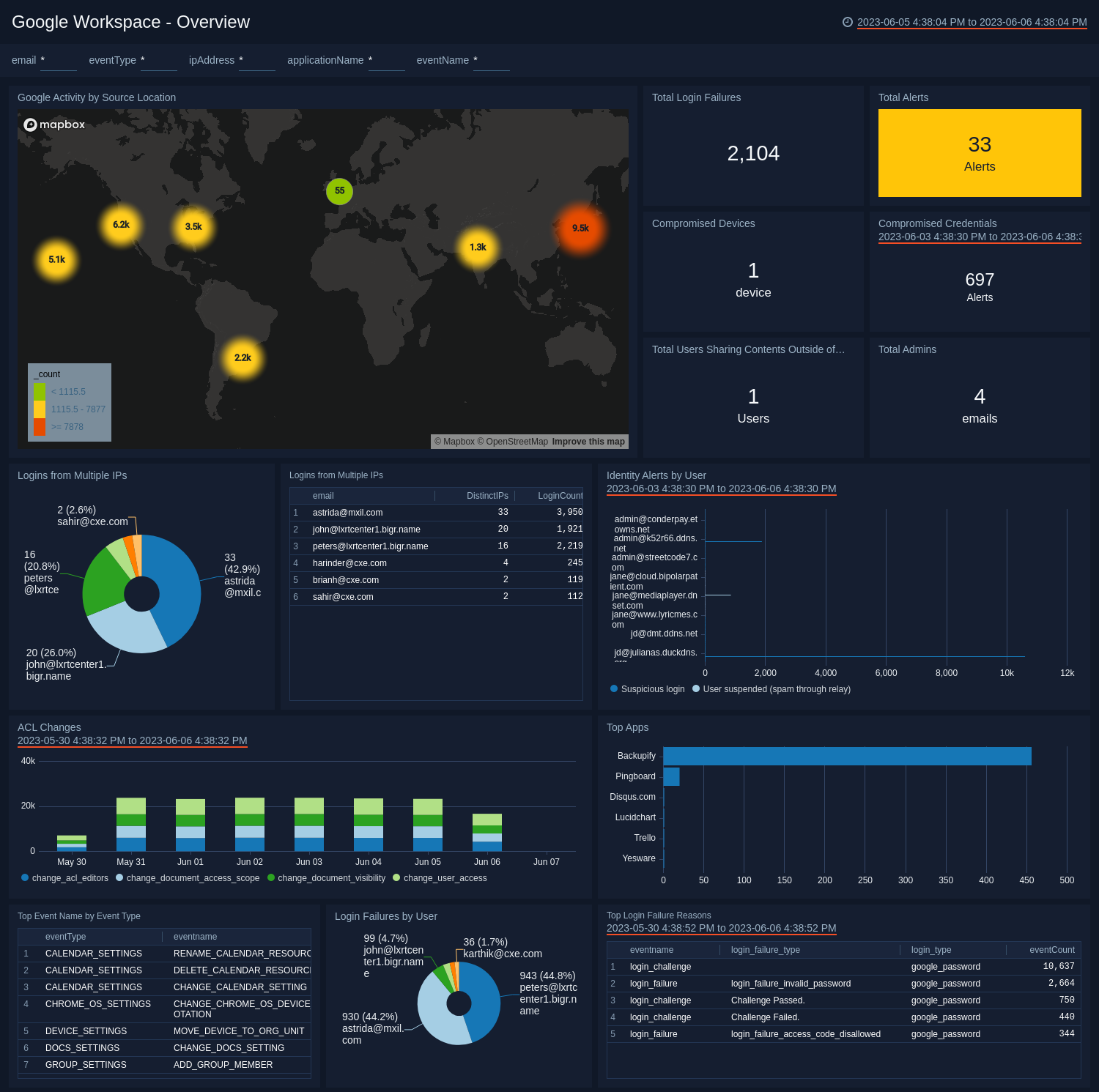
Google Workspace is one of the most popular collaborative applications and is a productivity powerhouse. It enables teams to coordinate their activities in real time in documents, files, and meetings, in Gmail, Drive, Docs, Sheets and Meet among others.
Top Features
- Real-time document and spreadsheet editing
- Google Meet for video conferencing
- Shared Drive for centralized storage
- Smart search across all apps
- Integration with thousands of third-party tools
What you’ll like
- Seamless integration across all Google tools
- Real-time collaboration that feels natural and fast
What you might dislike
- Storage limitations in lower plans
- Can feel overwhelming with too many apps for smaller teams
Pricing: Plans varies,starts at ₹160.65 with business and enterprise plans available.
3. Miro – "The online whiteboard for team collaboration and creativity"
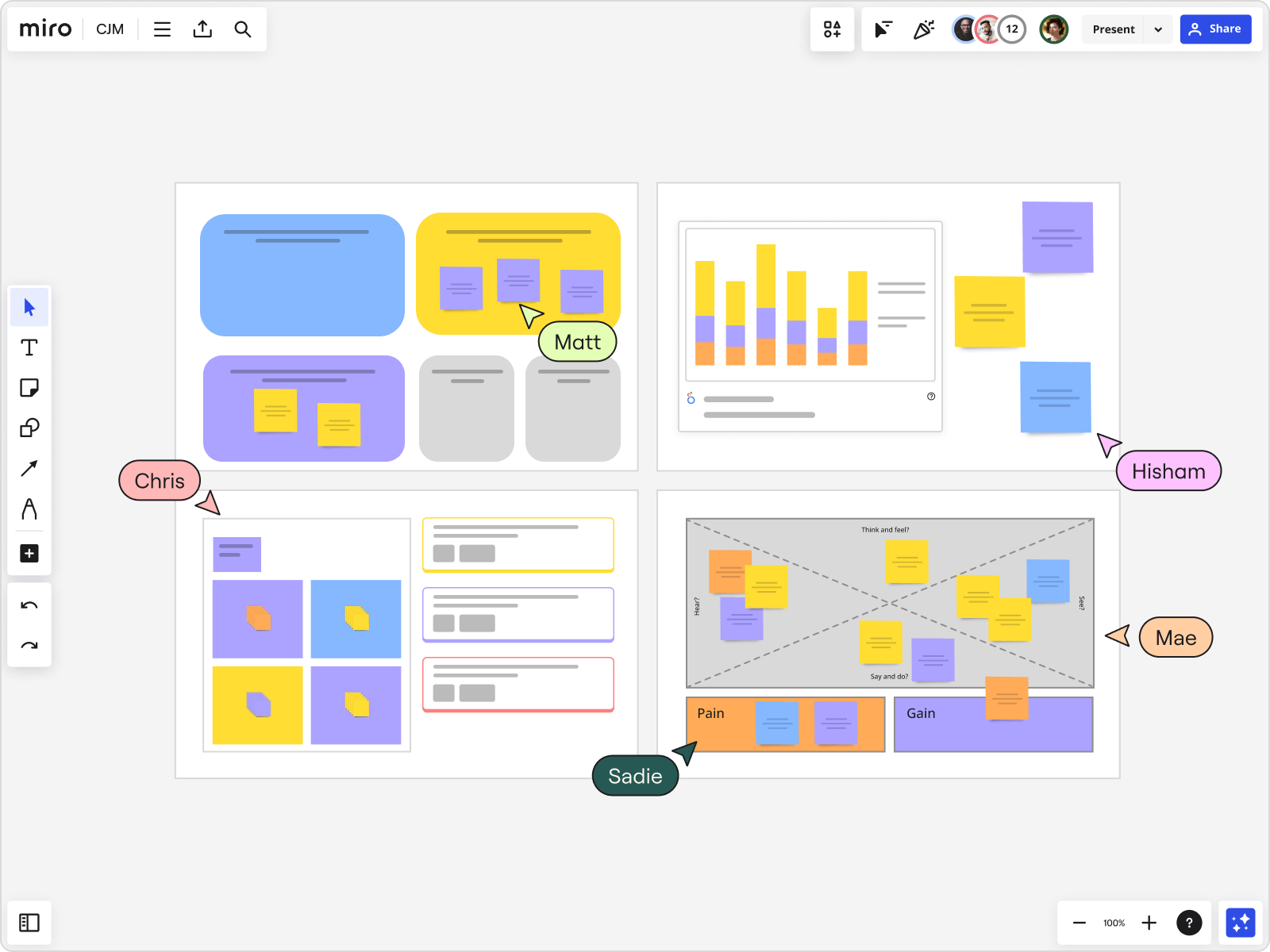
Miro is a collaboration tool that is best to use in brainstorming, visualizing workflows, and working with remote teams. It serves more like a digital whiteboard, where ideas are made alive and is therefore particularly popular with design, product, and agile teams.
Top Features
- Infinite canvas for brainstorming and mapping ideas
- Real-time collaboration with sticky notes and drawing tools
- Pre-built templates for agile, design, and strategy sessions
- Video, chat, and commenting inside boards
- Integrations with Slack, Jira, Google Workspace, and more
What you’ll like
- Intuitive and fun to use for creative brainstorming
- Strong integrations with popular project management tools
What you might dislike
- Large boards may slow down performance
- Some advanced templates locked behind higher plans
Pricing: Free collaboration tool plan available; paid plans start from $8/user/month.
4. Microsoft 365 – "Empowering productivity with apps you already know"
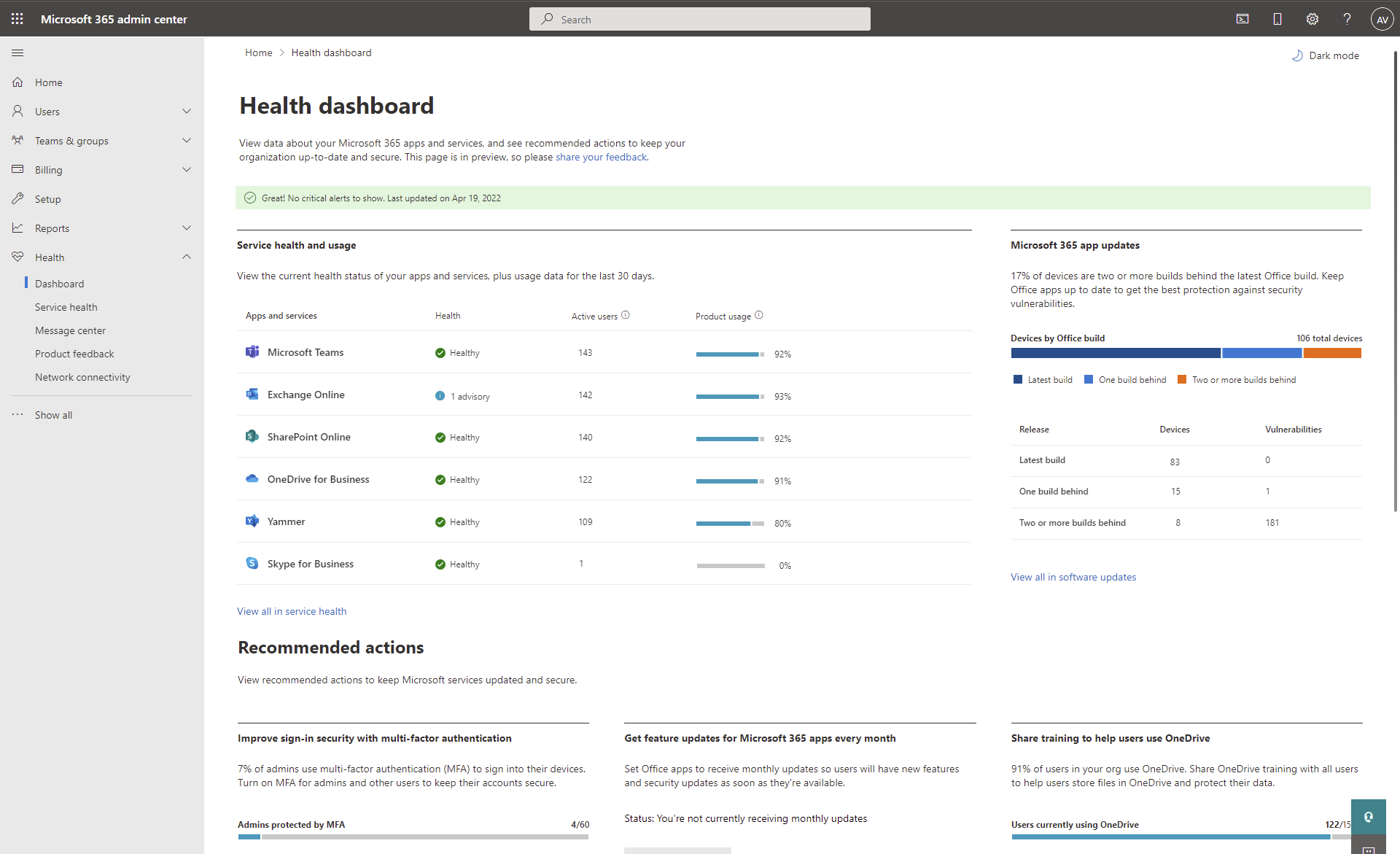
Microsoft 365 is a well known collaboration platform that is in use by companies across the globe. It integrates Outlook, Teams, Word, Excel, and PowerPoint in order to collaborate efficiently. Its easy integration and enterprise security solutions offers it as a preferred business solution in the USA.
Top Features
- Microsoft Teams for video calls and chat
- Real-time co-authoring in Word, Excel, and PowerPoint
- OneDrive cloud storage with version control
- Advanced security and compliance features
- AI-powered Copilot for enhanced productivity
What you’ll like
- Familiar tools that most professionals already use
- Enterprise-grade security and reliability
What you might dislike
- Can be costly for smaller teams
- Slightly steep learning curve for advanced features
Pricing: Advanced enterprise plans cost more but the starter plan starts at $8.82/user/month for Business Basic..
5. Airtable – "Where spreadsheets meet databases for smarter work"
Airtable is a collaborative application that integrates the ease of spreadsheets and the strength of databases. It is one of the best team collaboration tools since it is used by teams of all sizes in managing projects, content calendars, CRM, and others.

Top Features
- Customizable spreadsheet-database hybrid
- Multiple views (Kanban, calendar, gallery, grid)
- Real-time collaboration with comments and mentions
- Automations for workflows
- Strong integrations with Slack, Google Workspace, and Zapier
What you’ll like
- Flexibility to adapt to multiple use cases
- Intuitive interface for teams of all sizes
What you might dislike
- Advanced features can get expensive
- Can feel overwhelming for first-time users
Pricing: Free plan available; paid plans start at $20/user/month.
6. Benefits of Collaboration Tool In USA
Choosing the right collaboration software can significantly improve team dynamics and overall productivity. Here are the key benefits of using collaboration tool in the USA:
-
Enhanced Innovation
Teams can use a collaboration tool to brainstorm, exchange ideas, and team up at the very moment, which will inevitably engender creativity and innovation. A collaboration system, on the one hand, whether it is document sharing or instantaneous messaging, allows your team to function productively by assisting in the creation and subsequent promotion of new concepts and solutions.
-
Improved Employee Satisfaction
Collaboration software small business teams use promotes a more flexible and connected work environment, increasing employee satisfaction. Tools that enable easy communication and task management reduce frustration and make employees feel more supported and engaged.
-
Stronger Decision Making
Real-time data and communication provided by an effective online collaboration tool are the means that lead to the rapidness of the decision-makers analysis of the information. One can make choices more efficiently by bringing the to as many people and ensuring they are updated about what your team is working on to help you make better decisions faster.
-
Enhanced Communication Skills
Online collaboration software is a great way to change communication through real-time and transparent information sharing among teams. The feature of the platform of sharing is inclusive of everyone, giving a boost and ensuring effective and constructive communication across the organization.
-
Strengthened Customer Satisfaction
By collaborating seamlessly, teams are capable of answering customers' queries actively and more reasonably. The best collaboration tool that will introduce the necessary technology for support, track issues, and find faster solutions is the key point to the better overall customer satisfaction.
-
Data Protection
A secure workflow management software or collaboration system ensures your team’s data is protected from unauthorized access. Many collaboration platforms offer robust encryption, backup solutions, and user access controls to safeguard sensitive information, keeping your business secure.
7. Criteria for Selecting the Right Collaboration Tool
Choosing the right collaboration solutions is crucial; thus, one must bear in mind quite a number of essential issues in order to be sure that this software can cope with the tasks in the team that ultimately lead to a rise in productivity. Here are key criteria to guide your selection:
-
Prefer Multiple Features
A collaboration tool is good if it provides a lot of great features like messaging, file sharing, task management, and video conferencing. Opting for a tool that integrates multiple functions reduces the need to switch between different systems.
-
Look for Ease of Use
The collaboration software small business teams choose should be intuitive and easy to navigate. There is no need for your team to waste time on a steep learning curve. A simple and user-friendly interface makes sure everyone, no matter how much knowledge they have in technique, can cooperate without encountering obstacles.
-
Pay Attention to Privacy Options
Privacy and security are the most important ones, more than anything, when it comes to very sensitive company data. Thanks to the online collaboration tool, the safety is secure due to the fact that the server can only be accessed by authorized users i.e. through data encryption or secure access controls. Be sure that the privacy policy of the platform does not compromise your security and personal data protection is included among the system as well when you are responsible for some important information.
-
Ask for Integrations and Compatibility
The ideal collaboration system should be able to work with the other tools which are already in use, like calendars, email, and project management software. Compatibility with the existing software can help to increase the efficiency of the workflow, thereby minimizing any disruptions in their management.
