
Best Business Management Software in
Are you looking for Business Management Software for your Business in ? SaaS Adviser brings you the best Business Management Software to ease your worries. In order to make your work smooth and swift, SaaS Adviser has compiled a list of the best software available. Compare the Best software features, pricing, free demo, and trial to select the best Business Management Software for your organization.
 Researched and Written by Akash Patel
Top 3 Featured Softwares


List of Top Business Management Software
Get Free Consultation


What is FreshBooks? FreshBooks is a cloud-based accounting and invoicing solution built for freelancers, small businesses, and service-oriented professionals. It enables users t...
View Profile
.jpg "Visma-eAccounting")
Visma eAccounting is ideal for small businesses that need a scalable, user-friendly, and cost-effective accounting solution. Whether you’re a sole trader or running a growing ent...
View Profile
Sage HR

For every stage of business
Sage HR is a cloud-based human resource management software designed to streamline HR processes for small to mid-sized businesses. It helps organizations manage core HR functio...
View Profile

What is Monday.com?Monday.com is a cloud-based Work Operating System (Work OS) designed to help teams plan, track, and manage their projects and workflows efficiently. Its high...
View Profile

What Is Pipedrive?Pipedriv Read More...
View Profile

ClickUp is a comprehensive, all-in-one productivity platform designed to streamline work management for individuals and teams across industries. It centralizes project planning...
View Profile

Tradify
| #1 Rated Job Management Software | The Best Tool to Run Your Business
Check How Tradify can help to automate Indian Business. SaaSAdviser provide their list of features, pricing, Free demo and Comparison with the best alternative
View Profile

FINOM
More than just a business account
Finom is a European tech startup headquartered in Amsterdam—and we’re on a journey towards revolutionizing the financial landscape for entrepreneurs worldwide. Our mission ...
View Profile

What is Trello?Trello is a flexible, web-based project management tool that helps individuals and teams organize their tasks visually. Based on the Kanban method, Trello uses b...
View Profile

What is Payhawk? Payhawk is a modern spend management platform that enables businesses to control company expenses, paymentsâ€...
View Profile
Netsuite CRM
The #1 Cloud ERP
What is NetSuite CRM?NetSuite CRM is a cloud-based totally purchaser relationship control solution that provides a complete view of purchaser interactions at some stage in ...
View Profile
QuickBooks Time
By QuickBooks Time
QuickBooks Time is a time tracking app that makes it easy to track, submit, and approve time for your business. It includes an online timesheet tracker with GPS capabilities for ev...
View Profile

Asana is a cloud-based project management software designed to help teams organize, track, and manage their work efficiently. It streamlines workflows, improves collaboration, ...
View Profile
Zoho One is a business management platform that consolidates your company's diverse activities into one streamlined, cohesive operation. It offers an array of features designed t...
View Profile
Salesforce is a cloud-based customer relationship management (CRM) platform that helps businesses manage sales, customer interactions, marketing campaigns, and customer service pro...
View Profile
Wrike is a powerful cloud-based project management and collaboration software designed to streamline workflows, improve team productivity, and enhance visibility across project...
View Profile
Scoro is a work management software that helps professional service agencies, consultancies and companies to optimize projects, simplify the quotes, automate billing and optimize o...
View Profile

What is HoneyBook? HoneyBook is an all-in-one clientflow management software designed for freelancers, solopreneurs, and small service-based businesses. It helps manage the entire...
View Profile
Wix is a leading website builder that empowers users to create stunning, feature-rich websites with ease. As a cloud-based platform, Wix removes the need for manual coding and ...
View Profile
Bitrix24 is a powerful all-in-one business management software that combines CRM, project management, communication, and collaboration tools in a single unified platform. Desig...
View Profile

Table of Content
A company’s operations, finances, other affairs, marketing, and customer relations, as well as staff productivity, require sophisticated applications or tools to manage the business effectively.
Business management software serves such needs by combining diverse sets of applications such as project management and reporting within a single platform. This enables workflow automation and ensures decision-making is efficient and timely.
Automation and cloud support facilitate a reduction in manual efforts, enhanced inter-team cooperation, and improved day-to-day work within a firm. From a start-up to a small or medium-sized enterprise or a large company, adopting the right business management system will drive efficiency enhancement, cost savings, and business expansion for any type of organization.
Find the software for business management that works within your industry, meets your business objectives, and maximizes your firm’s agility and profitability to succeed in today’s business environment easily.
1. Benefits Of The Best Business Management Software
Enhanced Management
With the aid of a business management system (BMS), businesses can automate and optimize their scheduling of tasks, project tracking, task handling, and customer relationship management (CRM). Businesses can use automated reporting to administer a workflow, boost productivity, and improve operational control in order to better manage their business on a daily basis while utilizing resources more efficiently.
Collaboration
Communication is enhanced even further with the inclusion of team communication services, cloud storage, and real-time shared document editing. Employees can access information and manage projects as well as tasks easily, which improves efficiency within departments and facilitates faster decision-making.

Simplicity
Advanced AI-enabled automation, coupled with a simple and easy-to-use interface, allows users with no or little technical skills to complete comprehensive work reporting. Intellectually customizable dashboards simplify workflows that usually complicate the integration of standalone systems.
Costs
Increased process automation, error minimization, and improved task efficiency translate to lowered spending in administrative work, manpower, and resources which improves operational cost control and increases ROI.
Accessibility
Making use of cloud-based business management software permits anytime access to critical business data, reports, and collaborative tools. This is a big advantage for remote team members, multi-location businesses, and those employing hybrid models.
Increased Employee Engagement
The presence of goal setting, evaluation, feedback, and automation within a workplace leads to higher productivity, efficiency, and motivation from employees, which drives satisfaction and engagement.
Smarter Business Decisions
Efficiency bottlenecks caused by hassle-prone document management systems are instantly resolved by organized document custody with automated compliance, error reduction, ease in retrieval, and secure storage, enhancing overall business productivity.
Better Document Management
AI systems enable preemptive predictive assessment and intel while giving instant visualization of data, which allows better business decision-making and planning as well as improved expansion forecasting and overall financial performance.
2. How Does A Business Management Software Work?
Business Management Strategies
A business management solution enhances strategic planning by automating decision-making and connecting business objectives with specific goals. Using business planning software, it helps develop actionable plans to stimulate growth and supervise operational effectiveness.
Business Management Tactics
Business management software helps execute operational plans by automating processes and managing business activities. It allows firms to effectively implement strategies and refine business processes for continuous growth and profit generation.
Business Management Implementation
While implementing a business management solution, relevant infrastructure such as CRM and project management systems, as well as accounting software, is integrated. The application facilitates collaboration within and between teams and reports organizational performance in a way that supports continuous improvement.
3. Conclusion
An efficient business management application automates processes, improves collaboration among employees, and provides relevant insights for effective changes. Here at SaaSadviser, we help businesses through expert advice and best-rated solutions to enable our clients to choose the most appropriate optimal factors for their unique requirements to deliver growth and operational effectiveness.
4. Latest Market Trends In Top Business Management Software
Cloud-Based Solutions
As of 2024, the business software programs and services market in the United States was valued at $133.77 billion and is projected to grow to $422.18 billion by 2034. Using a cloud approach to hosting allows remote work and permits scope of growth. Thanks to cloud hosting, these programs allow users to access application toolsand customers remotely, enhancing operational cost-effectiveness and effectiveness due to virtualization.
Integration With Artificial Intelligence
Business management systems have integrated artificial intelligence for automating processes like task execution and enhancing customer relations. With the growth of AI-enabled capabilities such as predictive analytics and automated actions, the way companies conduct operations and manage customer relations is changing for the better.
Mobile Accessibility
A more recent phenomenon in IT management is the availability of user-friendly applications that enable effortless execution of business management functions like task assignments and data management.
Remote management ensures that business functions with the support of a physical location promote agility, effectiveness in production as well as efficiency in the firm’s human resources by enhancing its overall performance.
Enhanced Security Features
New business management software incorporates new security technologies such as data encryption and role-based access control. These security measures aid institutions to meet compliance standards while minimizing the chances of a cyber security attack.
Customization And Flexibility
The most sophisticated business management software programs allow dashboards and operational modules to be modified to meet the specific requirements of the sector. Tailoring the software to specific operational procedures and overall corporate strategy enables industries to increase their operational effectiveness.
Data-Driven Decision Making
The leading management software providers incorporate analytics and data mining in their products to support decision-making processes. Utilizing business intelligence allows firms to detect patterns and formulate tactical decisions that enhance productivity while increasing profits.
Subscription-Based Models
Most platforms providing business management software services have adopted a subscription model. This type of payment is advantageous as it allows clients to “pay as you go”, and offers tier pricing as a function of features available and number of users, thereby making it economical and extendable.
5. 5 Business Management Software In The USA
1. Zoho – Best All-in-One Business Management Tool
Customer relationship management (CRM)and even human resource (HR) management capabilities are included in Zoho. It is a fully integrated suite of cloud-based business administration software. It helps companies manage operations and enhance interactions with colleagues and consumers across many channels with ease thanks to its wide range of tools.
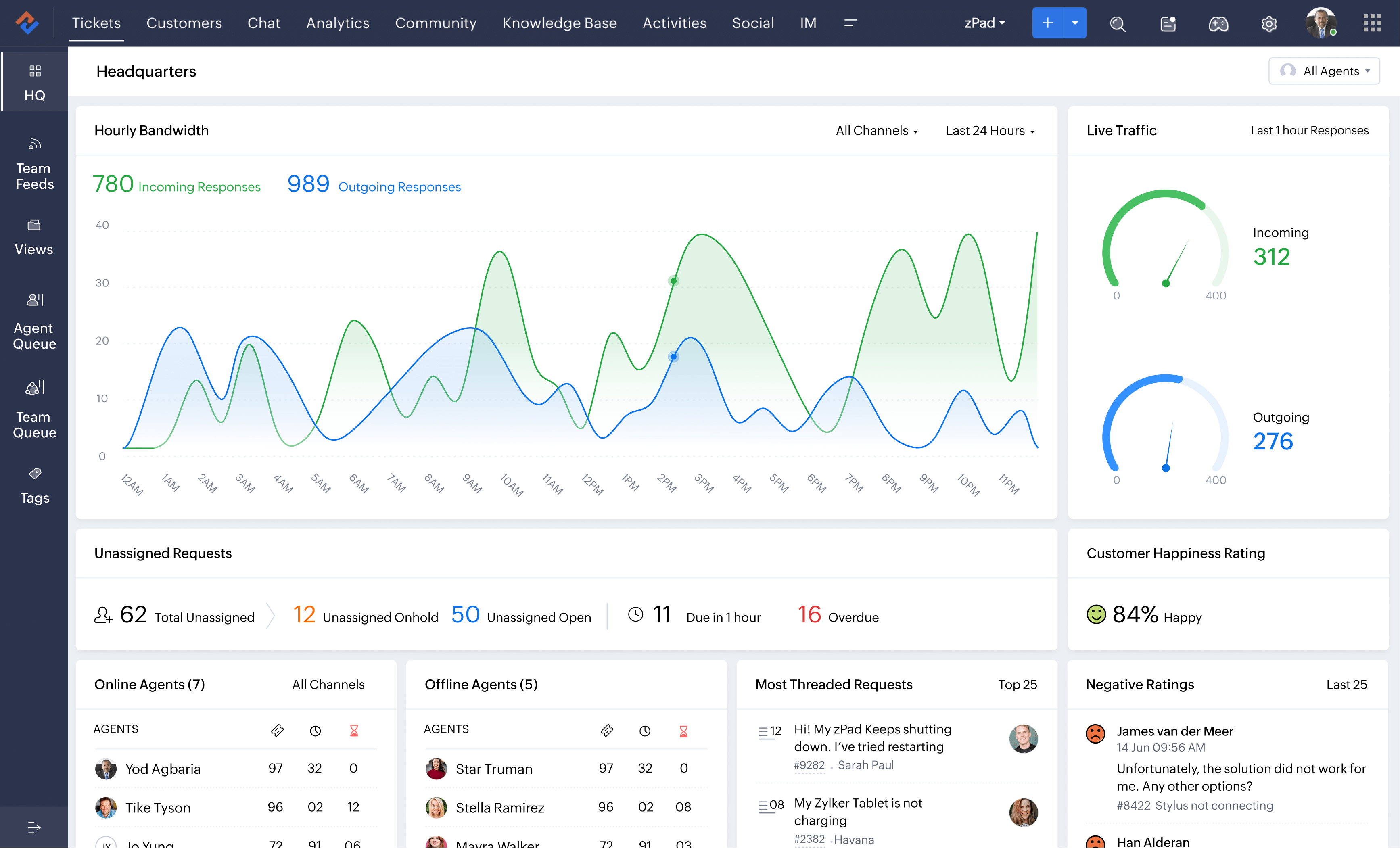
Features:
-
Customizable CRM system to manage leads and sales.
-
Advanced project management with task tracking and document management.
-
Automation tools for workflow and sales tracking.
-
Accounting and finance management tools.
-
Multi-device access and cloud storage.
Pros:
✔️ It offers flexibility for all sizes of businesses.
✔️ Affordable pricing.
✔️ Comprehensive suite of tools.
Cons:
❌ User interface is complex.
❌ Additional costs for premium features or advanced integrations.
Pricing:
-
Free plan for up to 3 users.
-
Start at $25 per month (billed annually).
2. NetSuite – Best for Enterprise Resource Planning (ERP)
This system combines finance and many more into a single package. It is ideally suited for medium-scale to large-scale businesses. It offers real-time automated insights that enhance operational efficiency and productivity. This integration also simplifies decision-making processes.
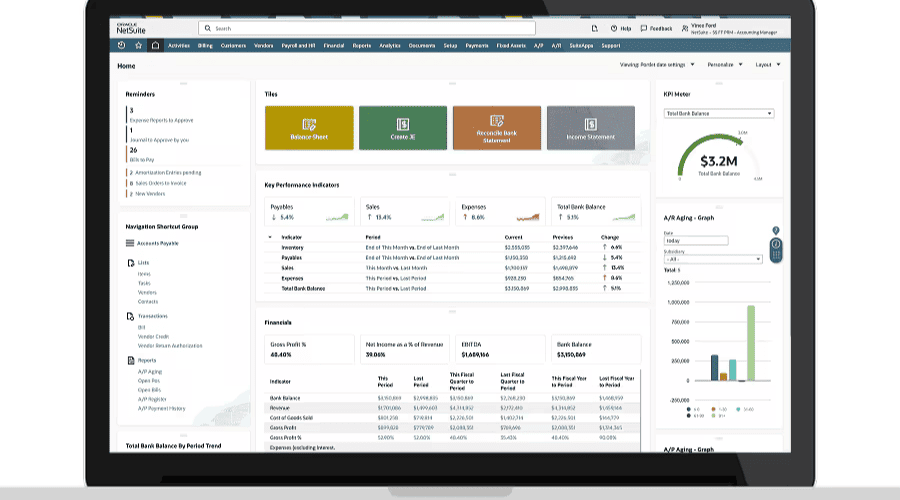
Features:
-
Complete ERP suite for managing accounting and human resources.
-
Real-time financial and operational data for better decision-making.
-
CRM and project management tools.
-
Scalable solutions for large, growing businesses.
-
Cloud-based with global accessibility and mobile support.
Pros:
✔️ Comprehensive ERP and is suitable for enterprise-level businesses.
✔️ Highly scalable according to business needs.
✔️ Automation tools for financial reporting and operational management.
Cons:
❌ Expensive pricing, not ideal for small businesses.
❌ Long learning curve due to its complex functionality.
Pricing:
-
Pricing varies based on business size and requirements.
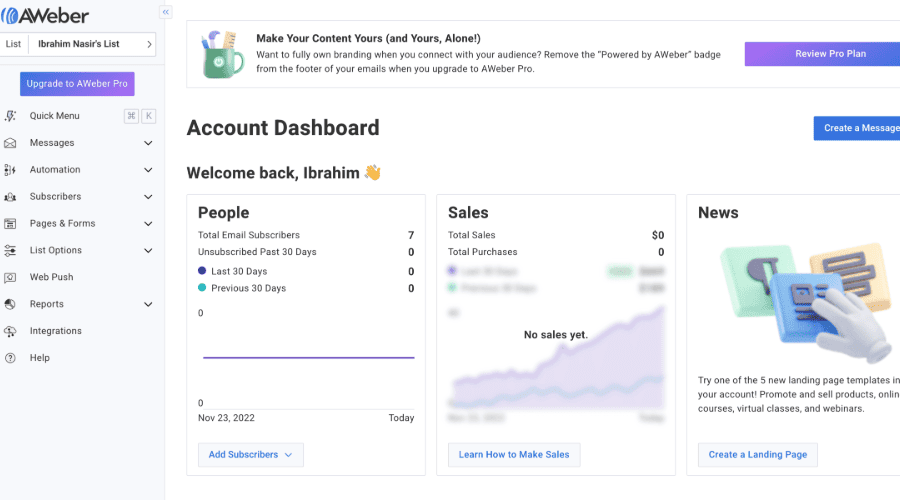
3. AWeber – Best for Email Marketing and Automation
The best cloud solution in the business for drip campaigns and automatic follow-up sequences. AWeber is popular because of its simple design and amazing automation-driven capabilities that enable businesses to interact with their clients on a huge scale.
Features:
-
Drag-and-drop email editor with pre-built templates.
-
Automation tools to send follow-up emails and newsletters.
-
Email list segmentation for personalized campaigns.
-
Advanced analytics to track email performance and open rates.
-
Integrations with CRM and eCommerce platforms.
Pros:
✔️ Easy-to-use interface and perfect for beginners in email marketing.
✔️ Effective automation tools for marketing campaigns.
✔️ Affordable for small businesses and startups.
Cons:
❌ Limited advanced features compared to other high-end platforms.
❌ Limited customization options for email templates.
Pricing:
-
Starts at $15/month (up to 500 subscribers).
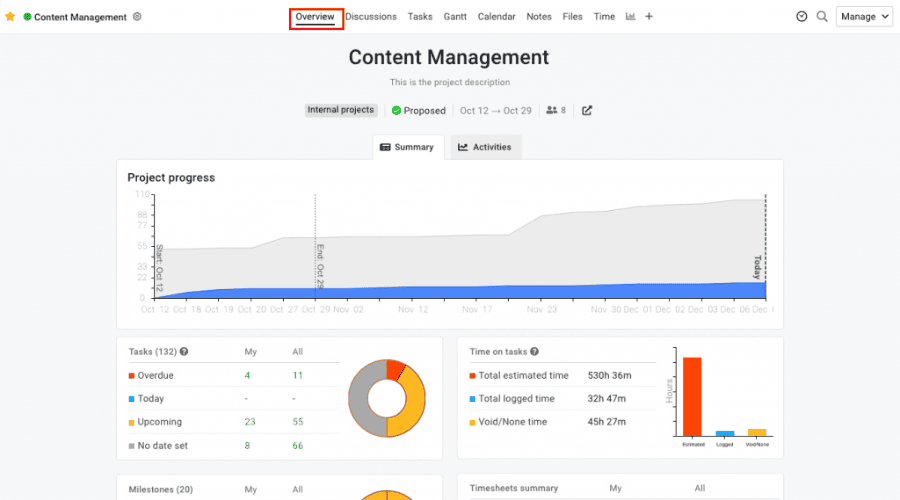
4. ProofHub – Best for Team Collaboration and Project Management
ProofHub is a project management software that comes with built-in collaboration features that make it easy to organize tasks and other information and effortlessly collaborate on virtually any other common document. Ideal for remote teams and businesses with complex workflows.
Features:
-
Task management with customizable workflows and deadlines.
-
Collaborative tools for file sharing and real-time discussions.
-
Time tracking and project reporting.
-
Team messaging for internal communication.
-
Calendar and milestone tracking for project timelines.
Pros:
✔️ Easy-to-use interface and minimal setup required.
✔️ All-in-one platform for project management and team collaboration.
✔️ Flat pricing model with unlimited users.
Cons:
❌ Limited reporting capabilities compared to competitors.
❌ Mobile app experience is not as robust as the desktop version.
Pricing:
-
Starts at $45 per month for 40 projects and unlimited users.
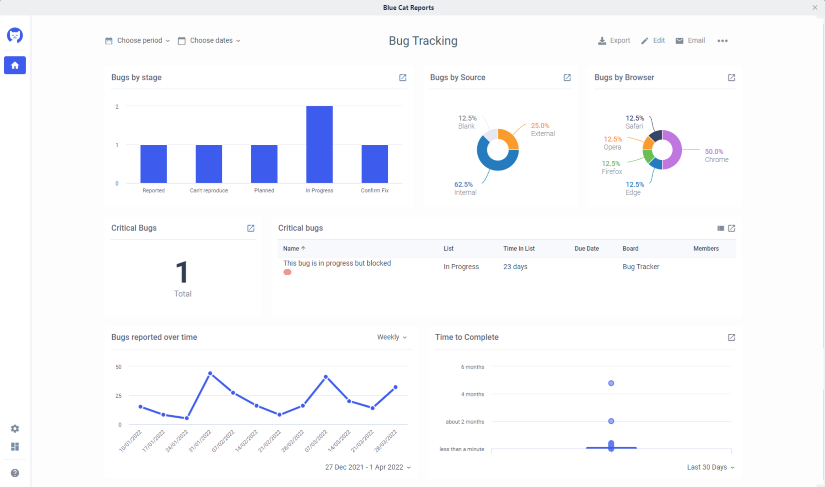
5. Trello – Best for Visual Tasks and Project Management
Tello is a tool used for visual project management and cards to allow different teams to structure tasks and monitor task completion. It has gained fame for its basic and user-friendly UI, especially for companies that are in need of project management software that is versatile.
Features:
-
Board-based task management with drag-and-drop functionalities.
-
Collaboration tools with real-time updates.
-
Customizable templates for different workflows.
-
Integration with Slack and other tools.
-
Automation with Butler to create custom workflows.
Pros:
✔️ Highly visual and intuitive, ideal for task management.
✔️ Free plan available for basic users.
✔️ Easy setup with minimal training required.
Cons:
❌ Limited features in the free plan.
❌ Lacks advanced project tracking for larger teams.
Pricing:
-
Free plan available.
-
Paid plans start at $5 per user/month.
6. Challenges In Best Business Management Software
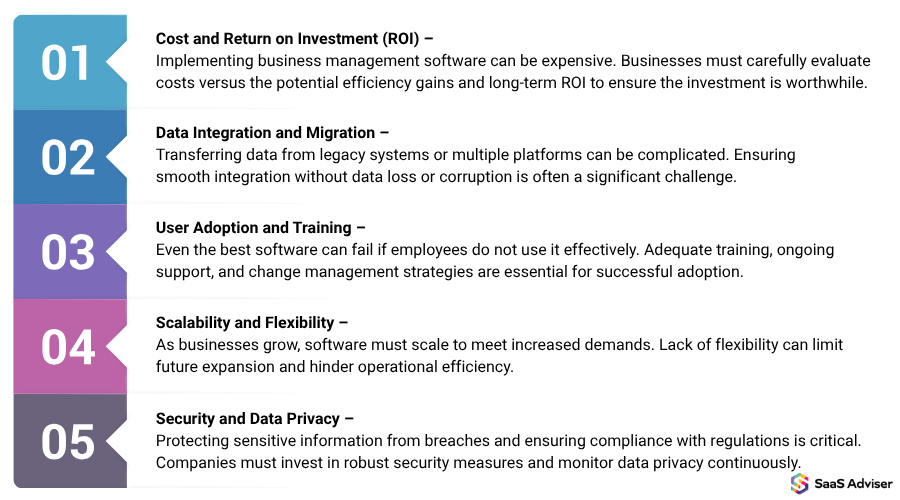
Cost And Return On Investment (ROI)
An absence of basic technical know-how can create a major system change barrier for staff. If instruction is not given, low uptake and unfulfilled potential will be the outcome.
Data Integration And Migration
Transitioning older organizational information from other systems poses a challenge while merging files due to an assortment of customer relationship management (CRM) tools, accountancy software, and third-party applications forms compatibility gaps.

User Adoption And Training
Capturing a targeted ROI from instating a business management system will take time due to initial costs incurred from software, training, and tailoring expenses, which is risky for smaller firms with shallower pockets.
Scalability And Flexibility
Most business management platforms fail to grow with the business. The absence of infrastructure expansion, customizability, and modular options might impede business growth.
Security And Data Privacy
When sensitive company information is stored in the cloud, a business has to concern itself with encryption, multi-factor verification, and compliance with cyber-security legislation (GDPR, HIPAA), as they are essential within the context of cyber threat and data breach mitigation.
7. Features Of Business Management Software
User-Friendly Interface
The simplest and most intuitive interface allows for fast navigation while also minimizing employee training. Clear dashboards, drag-and-drop options, and custom layouts quickly acclimate users and allow businesses of all sizes to use the software.
Scalability
The best online business management software is able to accommodate growth by having scalable features. As the business grows, the system can increase the amount of data, users, and several other processes, such as intricate operations, without having to frequently upgrade or substitute the system.
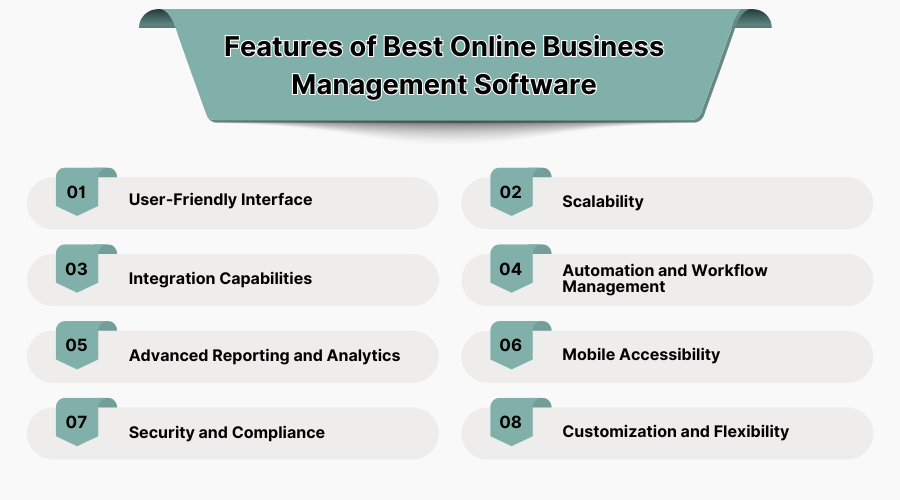
Integration Capabilities
Workflow automation software is a digital application that automates business operations by adhering to preset logic and rules. This guarantees that activities are completed properly and eliminates human involvement. In order to facilitate data sharing and increase efficiency, these solutions are made to connect with other systems.
Automation And Workflow Management
This automation software increases work efficiency by integrating communication through emails, assignment of tasks, invoices, etc. Further, the automation and workflow management tools ensure unobstructed tracking of tasks, approval workflows, and team collaboration to increase productivity.
Advanced Reporting And Analytics
Automated reporting tools offered by the software enable businesses to gain up-to-the-minute information on finances, performance, and customer metrics. Analytics empower business leaders to make decisions based on data to track patterns, measure how well challenges are met, and see what new opportunities are possible, thus making more effective, strategic decisions.
Mobile Accessibility
With mobile accessibility comes the ability to manage business operations at any location. Employees, in the case of remote work, can manage tasks, enter data, and communicate with clients thanks to the availability of essential functionalities on mobile devices which increases flexibility, not to mention the enhancement of remote working capabilities.
Security And Compliance
The business management software with advanced features possesses obvious security features like encryption of data and access control by role. It ensures compliance with data protection regulations like GDPR and HIPAA, therefore protecting sensitive business information.
Customization And Adaptability
The system can be customized to meet certain company demands since it allows companies to create unique dashboards and features. Companies may optimize software performance by fine-tuning unique processes and process linkages.
8. Criteria For Selecting The Right Business Management Software
To choose and purchase proficiency in business management software, search for aspects like growth/ scalability, automation, user-friendliness, and lack of walled gardens. The set of features and functions must allow for collaboration software, financial reporting, and task automation in real time for efficiency and accuracy in reporting data phenomena.
Being able to customize and reshape everything is an important aspect because every company is different, and so are the processes in the manual dashboards, reports, and process management tools. The firm can then implement business continuity more effectively using business continuity management software. A cloud-based solution ensures easier data security from within and outside the firm, remote accessibility, and automated backup.
Analyzing how cost-effective a business is, how vendors support the business, and how AI can help in analytics provides businesses with valuable insights. The ideal platform should ensure enhanced productivity and improved customer management while marketing the business’s long-term goals to ensure growth and profits are sustained.
