
Best Business Intelligence Software in
Are you looking for Business Intelligence Software for your Business in ? SaaS Adviser brings you the best Business Intelligence Software to ease your worries. In order to make your work smooth and swift, SaaS Adviser has compiled a list of the best software available. Compare the Best software features, pricing, free demo, and trial to select the best Business Intelligence Software for your organization.
 Researched and Written by Akash Patel
Top 3 Featured Softwares


List of Top Business Intelligence Software
Get Free Consultation


Zoho Analytics, a modern, self-service BI & analytics platform with AI-powered transformative capabilities, helps organizations derive maximum value from their data assets....
View Profile

What Is Pipedrive?Pipedriv Read More...
View Profile
.jpg "Visma-eAccounting")
Visma eAccounting is ideal for small businesses that need a scalable, user-friendly, and cost-effective accounting solution. Whether you’re a sole trader or running a growing ent...
View Profile

Sage Accounting software is designed to provide small and medium businesses around the world with the information, insight, and tools they need to grow their businesses. With its s...
View Profile

What is Monday.com?Monday.com is a cloud-based Work Operating System (Work OS) designed to help teams plan, track, and manage their projects and workflows efficiently. Its high...
View Profile

Increff

Our DNA Incredible Efficiency
Increff is a retail SaaS company dedicated to enhancing efficiency and agility within the retail ecosystem by simplifying complex inventory management and supply chain challeng...
View Profile

What is FreshBooks?FreshBooks is one of the most depended on cloud-primarily based accounting software solutions in the usa, constructed for small corporations, freelancers, an...
View Profile

Tableau is an integrated business intelligence and visual analytics solution that helps users analyze key business data and find solutions to different problems. The platform can b...
View Profile
QlikView is a powerful BI platform that provides its users with an analytics solution for developing highly interactive guided analytics applications and dashboards. These are desi...
View Profile

Sisense is a powerful business intelligence (BI) and data analytics platform that enables organizations to analyze and visualize data from multiple sources. Designed for both t...
View Profile

What is Domo?Domo is a cloud-based business intelligence (BI) platform that helps organizations turn complex data into actionable insights. It connects seamlessly with various ...
View Profile

Looker is a business intelligence and data visualization platform that provides users with access to data in an easy-to-understand format. Looker’s pre-built applications and blo...
View Profile

What is ClicData? ClicData is a cloud-based business intelligence (BI) and data analytics platform designed to help businesses manage, analyze, and visualize data in real-...
View Profile

Datapine is a business intelligence software that offers interactive BI dashboards to provide you and your team with safe access to all pertinent corporate data, allowing you to ma...
View Profile

Dundas BI is a powerful platform that provides its users with enterprise-level business intelligence, data analytics, and dashboard software. This software empowers users to quickl...
View Profile

Klipfolio is a cloud-based business intelligence software that gives you detailed insights into your business with customizable dashboards. You can connect your dashboard with any ...
View Profile

Microstrategy is a cloud-based intelligence software that offers a wide range of data analytics capabilities, such as data discovery, advanced analytics, data visualizations, emb...
View Profile

Oracle Analytics Cloud
By Oracle Analytics Cloud
Oracle Analytics Cloud (OAC) is a powerful analytics platform that can be used to fuel an organization's analytics strategy. It allows users to visually examine data in order to ...
View Profile

Cognos Analytics is an AI-powered business intelligence platform that supports the entire analytics cycle of the user from discovery to operationalization. The software enables use...
View Profile

Infor Birst is an enterprise BI solution that uses virtualized business intelligence instances that sit on top of a shared common analytical fabric. It can connect the whole of y...
View Profile

Table of Content
1. Conclusion
In summary, the Business Intelligence Software that is right for your business is the one that can greatly affect the way you analyze and make decisions based on the data you have. This guide for buyers has given a lot of valuable knowledge about critical features, considerations, and the top tools that are currently at the disposal of shoppers. The benefits of BI software by prioritizing the above elements of cloud integration, user-friendliness, surplus of automation, and data performance evaluation are immense, you will then become highly competent in selecting BI Software that is the best fit for your business. The right Business Intelligence tools could help you find out the true potential of your data and increase your business growth and better decision-making. We believe that this guide will not only help you make the right decision but also find the best Business Intelligence Software that will suit your business the most.
2. Advantages and Disadvantages of Business Intelligence Software
Before making any investment in business intelligence and analytics software for your business, it’s smart to weigh the pros and cons. We have covered a quick and clear look at the advantages of business intelligence software, so lets cover one by one.
Advantages of Business Intelligence Software
1. Data Visibility Like Never Before
With the right business intelligence software solutions, your data isn’t buried in spreadsheets anymore. Everything—from sales numbers to customer behavior—is visualized in real-time dashboards. This level of visibility helps you understand what’s really happening across your business, and act on it faster.
2. Accurate Reports Without the Manual Hassle
Manual reporting can be error-prone and time-consuming. One of the top advantages of business intelligence software is that it can automatically produce an accurate and up-to-date report always. Whether to present to stakeholders or to make adjustments to internal strategies, you will always have clean reliable data to work with.
3. Streamlined Processes Across Teams
BI tools reduce the guesswork. From marketing to finance to operations, everyone gets access to the same data-driven insights. That means faster decisions, fewer meetings, and a smoother workflow—all made possible by top business intelligence software companies building user-focused solutions.
Disadvantages of Business Intelligence Software
1. Initial Cost Can Be a Roadblock
Let’s be real, good business intelligent software aren’t always budget-friendly upfront. Between software licenses, integrations, and training, there’s an investment to make. But with the right planning, the long-term returns usually outweigh the initial costs.
2. User Resistance Slows Down Adoption
Even the best tools fall flat if your team isn’t ready to use them. Some employees may resist the change, especially if they’re used to traditional reporting methods. To get full value from your business intelligence and analytics software, you’ll need clear communication and solid onboarding.
3. The Data Skills Gap Is a Real Thing
Not everyone is a data expert—and that’s okay. But to get the most from your BI platform, some level of data literacy is important. Businesses often face a learning curve here, especially if they don’t have a dedicated data team in place.
3. What Makes the Best Business Intelligence Software?
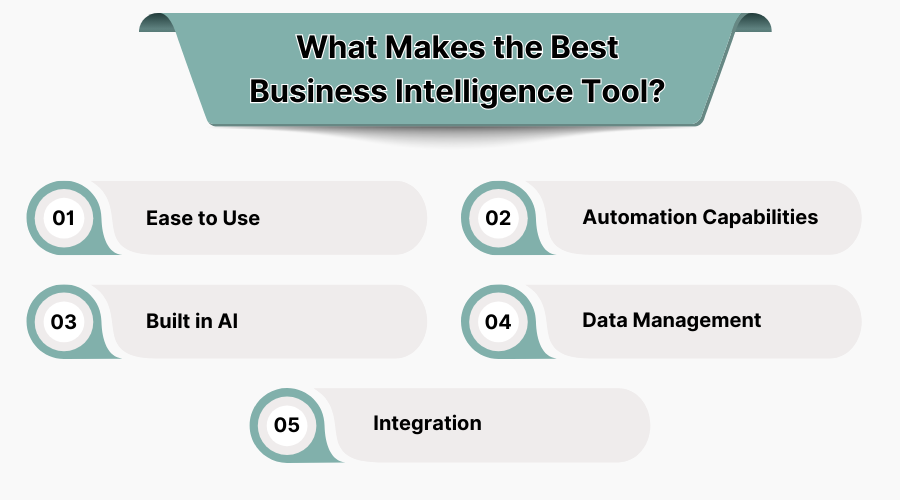
1. Ease to Use
The Best Business Intelligence Software should be made to be natural and simple to use. The interface should be designed for you matter you are a data specialist or an inevitably beginner. With Business Intelligence, good tools, e.g. teams can easily get data-based insights and make decisions without requiring extensive technical training, which makes it a perfect choice for all-sized businesses.
2. Automation Capabilities
Automation in the Top Business Intelligence Software is an essential thing. It cuts the need for manual data entry and slashes processes like reporting, monitoring, and alerting to only a couple of minutes. Through automating repetitive chores, companies can not only get free time but also a higher rate of output as well as pay attention to the most important activities. The right BI Software ensures you stay proactive with minimal manual intervention.
3. Built in AI
Business Intelligence tools with AI-powered functionalities are helping data analysis reach new levels. The software comes with a built-in AI model that can assist in the retrieval of undetected patterns, the creation of predictive patterns, and the suggestion of immediate actions that are derived from actual situations. This significantly improves the speed, quality, and accuracy of decision-making, thus making your business the best in the competition.
4. Data Management
Data management is an essential part of the Best Business Intelligence Software. The software should, therefore, promote you in the collecting and organization of all the data from numerous sources, which have to be accurate, clean, and accessible to you. Along with this, one of the benefits of Business Intelligence tools software is that it has a centralized data management system. Since everyone in a company will have access to and learn from the same data, they will make credible decisions which will subsequently contribute to performance.
5. Integration
In USA, the Business Intelligence Software will only live up to its potential if it can be easily connected to your current systems, such as CRM, ERP, and any other essential business tools. Connecting these platforms is what allows for a more comfortable flow of information when one is working with the BI Software and allows the software to be fed data from various sources with no disturbances. The feature of this software to handle these tasks this way will make your business acquire the best use of its existing tech stack.
4. What is Business Intelligence Software?
Business Intelligence Software means tools that lead the business to collect, examine, and visualize data to make better decisions. The said tools make it possible to analyze any complicated data, translate such findings into actionable insights, and give you better insights about which trends you should improve and how to work out strategies more advantageously and better. Business Intelligence tools support the conduction of both quantitative and qualitative data analysis giving a broader view of your business. With qualitative data analysis software, you can perform customer feedback analysis along with observing sales and financial data. The process of becoming a top business in the USA is strongly associated with finding the ideal Best Business Intelligence Software that gives you a head start. This article is the place to be if you want to learn what to look for before paying so that you might select the most suitable one for your business needs.
5. Why Use Business Intelligence Software?
Business Intelligence (BI) software is the best help for making decisions that are guided by accurate data through the process of efficient, thorough assessment of huge amounts of data. The BI Software for addressing the real-time scope of the company is formed by the real-time data analytics and the predictive analytics software that is used in identifying and forecasting the prevailing trends and consequently driving the right strategic moves. Business Intelligence tools nowadays are vital for companies' growth. To be precise, the tools enable the company to execute its operations more conveniently, as well as to note the improvement in decision speed due to less reporting work by machines. The majority of the Best Business Intelligence Software products are those that are utilized for data visualization and are used for the better understanding and collaboration of the staff, and for improving business processes. Business software provides businesses with an edge to compete effectively, and as a result, performance is optimized and efficiency is improved ensuring that they become leaders in the market.
6. Key Features of Business Intelligence Software
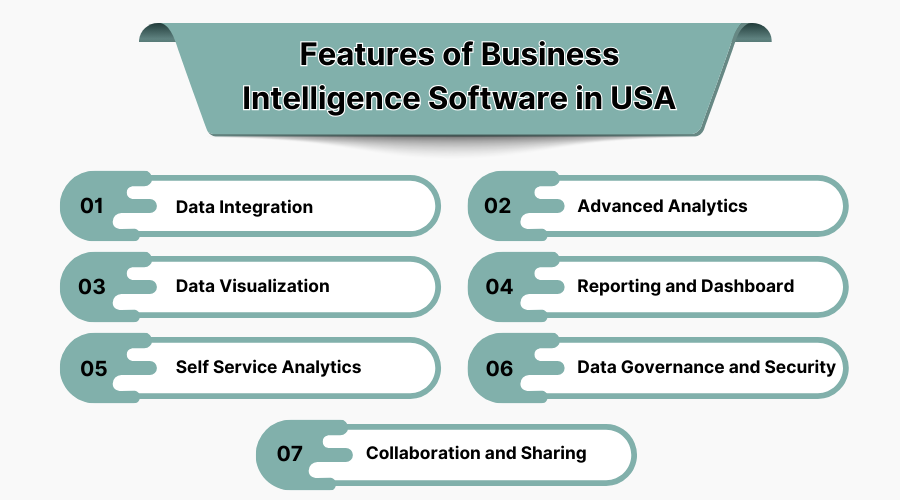
When evaluating Business Intelligence Software in USA, the identification and comprehension of the key features that will make the return on your investment worth it. That's a list of the main features you should consider:
-
Data Integration
One major good of Business Intelligence tools is ability to gather data from many sources into one platform. Whether from cloud applications, databases, or external sources, the best business intelligence software helps you improve accuracy and completeness of the data needed for analysis so that a clearer picture of your business can be obtained.
-
Advanced Analytics
BI Software’s advanced analytics feature does not give you limited reporting, but it generates and discloses trends, patterns, and forecasts. The best Business Intelligence tools software, by using AI and machine learning, is able to foresee future performance and can give the user information that helps them to recognize the possible opportunities or threats for their business.
-
Data Visualization
The most important feature of Business Intelligence Software is its ability to present complex data in a clear and beautiful manner using charts and graphs. Visualization of BI tools empowers the decision-makers to receive the essential information quickly and to offer them a list of solutions which is an aspect that will contribute to the handling of the problem for that is why this one is one of the best features of Business Intelligence Software.
-
Reporting and Dashboard
The best Business Intelligence Software can be used with built-in dashboards and a complete set of reporting tools. Through these features, users can observe in real-time those key performance indicators (KPIs) like the number of defects and thus fix those defects. Apart from that, users can generate in-depth reports which would satisfy the needs of both internal and external stakeholders. The ability to personalize these reports makes data monitoring simple and effective. Additionally, advanced dashboard software enhances user experience by providing clear, visual insights that are easy to interpret and share across teams.
-
Self Service Analytics
Business Intelligence tools should let non-technical people independently examine data, not needing support from IT. The analytics through self-service, employees at each level can access, analyze, and light up the data stream on their own. This will shorten the decision-making process and enhance the productivity of the company.
-
Data Governance and Security
Data security and governance are of the utmost importance when dealing with sensitive business data. The finest Business Intelligence Software can safeguard your data through role-based access, encryption, and GDPR compliance. These tools also allow you to implement governance policies, ensuring data accuracy and reliability across the organization.
-
Collaboration and Sharing
Modern BI software supports teamwork by means of which users can exchange insights and reports immediately. Business Intelligence tools software not only promotes teams' work but also makes the process of working with external stakeholders seamless and time-saving, thus ensuring cohesion and efficiency.
7. Most Popular Business Intelligence Software in USA
USA companies have some of the most powerful tools in the game. Whether you're comparing BI business intelligence software options, hunting for open source business intelligence software, or just trying to decode business intelligence pricing, the key is to find what fits your team, your data, and your budget.
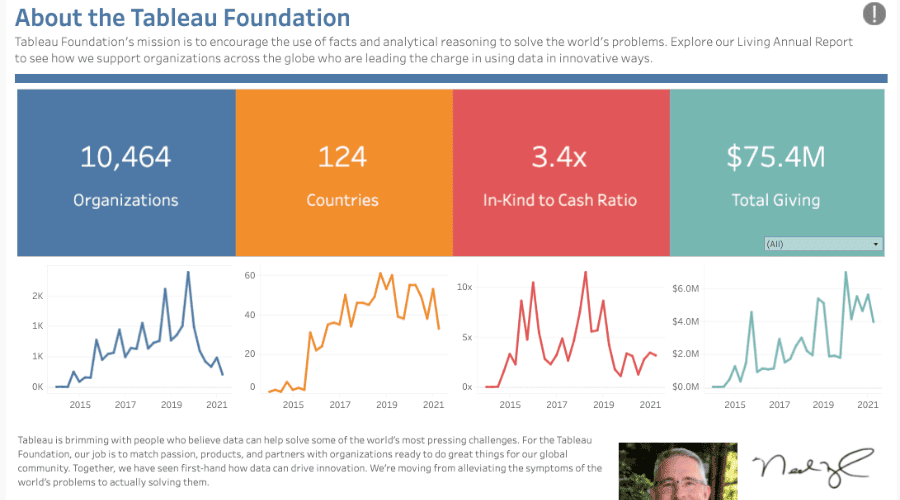
1. Tableau
Tableau is among the top business intelligence tools, providing efficient data visualization and interactive dashboards that help people to a deeper understanding of the subject.
Features:
-
Advanced-Data Visualizations
-
Drag-and-drop Interface
-
Cloud and On-premise Deployment
-
Real-time Data Analytics
-
Mobile Compatibility
Pros:
-
Highly interactive and visually appealing dashboards.
-
Flexible data integration with various sources.
Cons:
-
High learning curve for beginners.
-
Expensive for small businesses.
Pricing: Tableau offers pricing starting at $70 per user/month for the Creator version, with additional pricing available for the Viewer and Explorer versions.
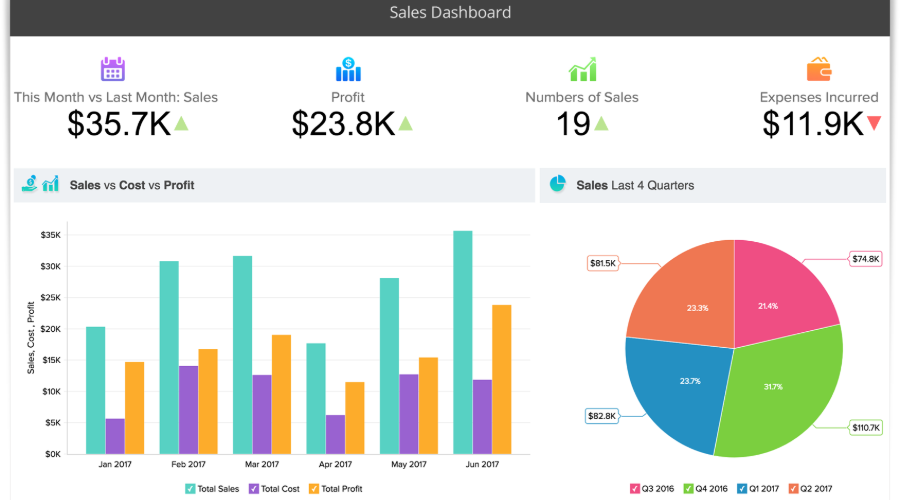
2. Zoho Analytics
Zoho Analytics is a Business Intelligence Software that aligns with Zoho and external apps. It has practical, user-friendly software options for small to mid-sized enterprises, which allows data analysis and gives advice for the right decision-making.
Features:
-
Advanced Analytics with AI-powered insights
-
Data Blending and Integration
-
Customizable Dashboards
-
Pre-built Reports and Templates
-
Embedded Analytics
Pros:
-
Easy-to-use interface with excellent reporting Features.
-
Affordable and best for small to mid-sized businesses.
Cons:
-
Limited real-time analytics capabilities.
-
Some features are complex for non-technical users.
Pricing: Zoho Analytics pricing starts at 960 Rs per user/month for the Basic plan, with additional features available in higher-tier plans. Visit the website for detailed pricing.
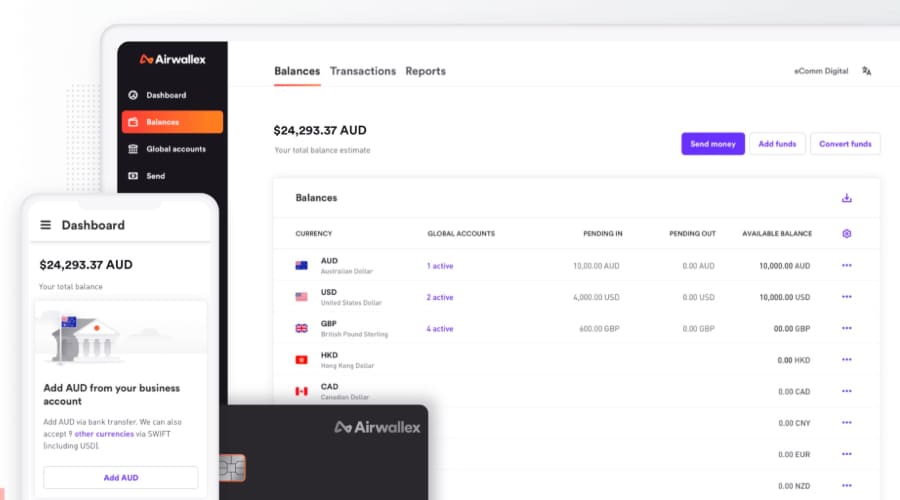
3. Airwallex
Airwallex operates globally. It is the business intelligence tool that among many other things manages financial data and likewise streamlines payment systems. It is perfect for companies engaging in international operations where it can be used to facilitate cross-border payment and data interchange.
Features:
-
Global Payment Processing
-
Automated Reporting and Reconciliation
-
Multi-currency Support
-
Real-time Financial Data Tracking
-
API Integration
Pros:
-
Excellent for businesses dealing with cross-border payments.
-
Provides real-time data and insights for finance teams.
Cons:
-
Limited to financial use cases, not a general-purpose BI tool.
-
May require additional third-party tools for full functionality.
Pricing: Pricing is customized depending on the business’s needs. Contact Airwallex for a quote.
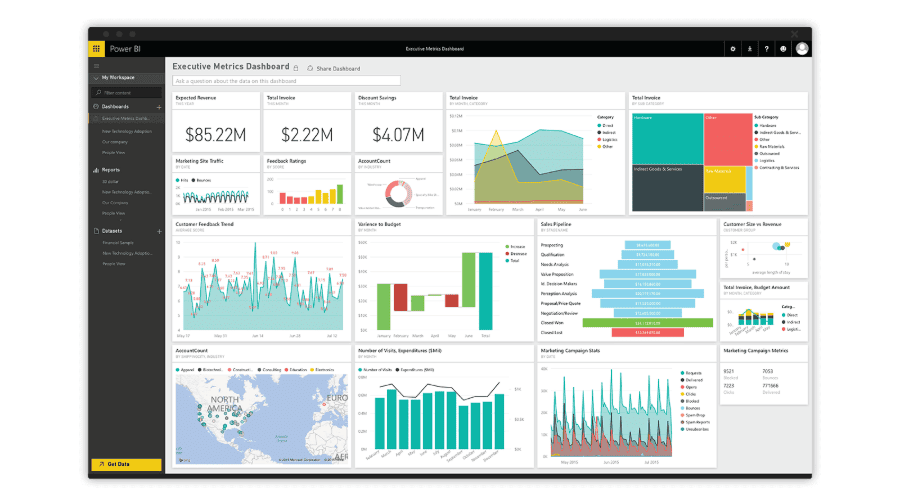
4. Microsoft Power BI
Microsoft Power BI is an advanced Microsoft business intelligence software, and it provides a perfect opportunity for seamless integration with Microsoft Office tools. It's very well respected for having a strong capacity to show figures, present data, and use AI systems.
Features:
-
Seamless Integration with Microsoft Products
-
AI and Machine Learning Integration
-
Customizable Dashboards and Reports
-
Real-time Data Streaming
-
Cloud and On-premise Deployment
Pros:
-
Deep integration with Office 365 tools, making it easy for existing Microsoft users.
-
Cost-effective for businesses already using Microsoft products.
Cons:
-
Limited functionality for non-Microsoft product users.
-
Can be complex for beginners to navigate.
Pricing: Power BI starts at $10 per user/month for the Pro version, with enterprise pricing available for larger businesses.
5. DOMO
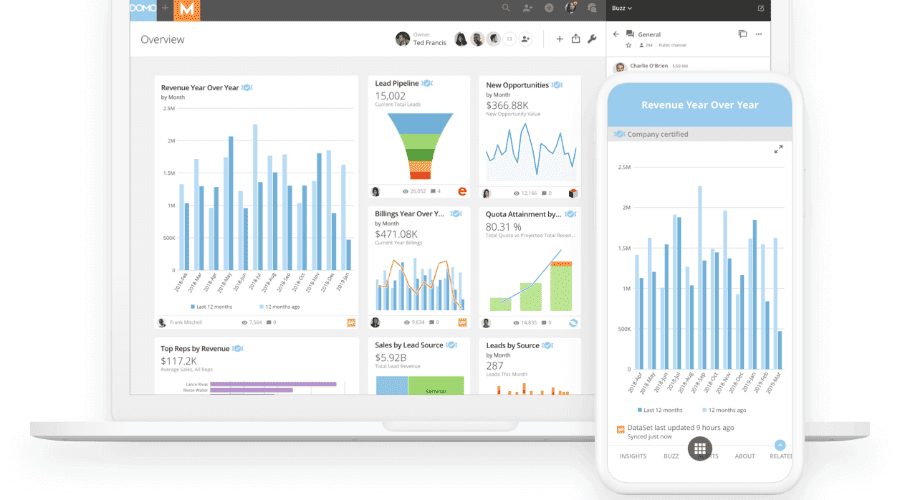
DOMO is an advanced Business Intelligence Tool that aims to connect a plethora of data sources, as well as to be a powerful graphic designer and provide very complex analytics like dynamic visualizations, all this being for the better use of any type and size of business.
Features:
-
Cloud-based Deployment
-
Automated Data Integration
-
AI-powered Insights
-
Real-time Data Monitoring
-
Customizable Dashboards
Pros:
-
Wide range of integration options with other business tools.
-
Strong real-time analytics capabilities.
Cons:
-
High pricing compared to some competitors.
-
Steep learning curve for new users.
Pricing: Pricing for DOMO is customized depending on the business's needs, with plans starting at approximately $83 per user/month.
6. Qlik Sense
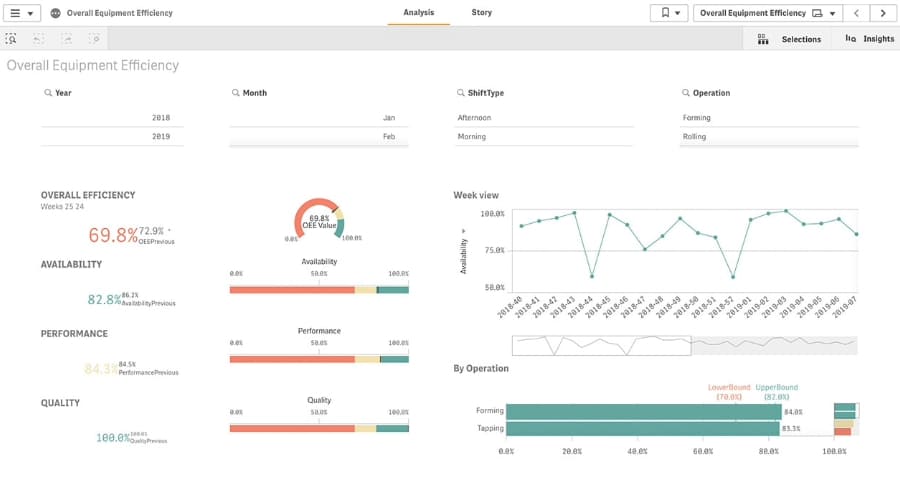
Qlik Sense is one of today’s most user-friendly BI business intelligence software platforms available. Known for its strong data presentation and linked analytics system, it lets users look at data any way they want, without limits typically found in basic query tools.
Features:
-
Drag-and-drop dashboard creation
-
AI-powered insights and suggestions
-
Associative data indexing (discover relationships other tools miss)
-
Customizable reports and real-time collaboration
-
Mobile-responsive, so insights travel with you
Pros:
-
Super flexible for both technical and non-technical users
-
Strong community and documentation for faster onboarding
Cons:
-
Steeper learning curve for advanced customizations
-
May require extra investment in server setup for enterprise use
Pricing: Qlik offers a free version with limited features, which can be great for individuals or small teams. For business users, paid plans start around $200/month for 10 users, but the cost of business intelligence software can rise based on deployment needs.
7. Sisense
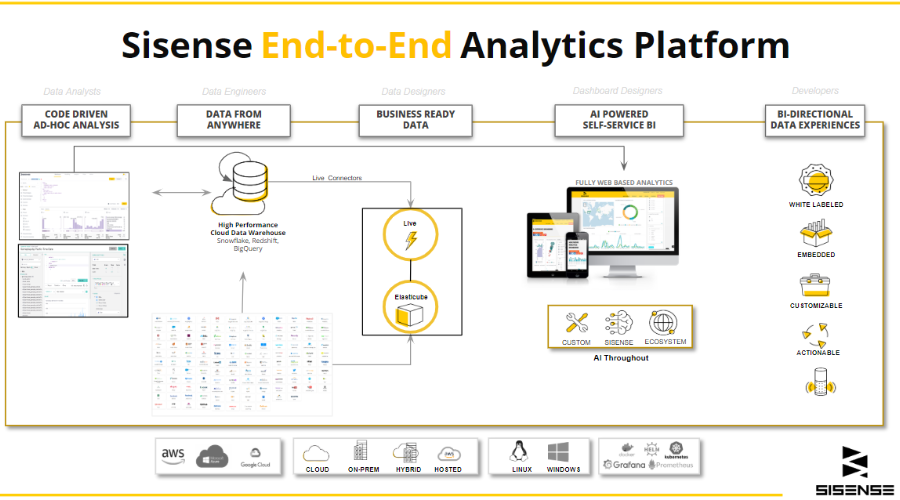
Sisense is a strong contender among top business intelligence software vendors, especially if you’re into embedding analytics directly into your apps and workflows. It's perfect for companies that want both power and flexibility.
Features:
-
Elastic data models for multiple data sources
-
Embeddable analytics for product teams
-
In-chip technology for faster processing
-
Real-time dashboards and alerts
-
White-labeling for custom-branded experiences
Pros:
-
Strong developer support for deep customization
-
Handles complex data environments well
Cons:
-
Can be overwhelming for first-time users
-
Requires technical resources for full setup and optimization
Pricing: Sisense does not offer a business intelligence software free version, and pricing is quote-based. Generally suited for mid-sized to enterprise-level teams.
8. Things to Consider while Choosing the Business Intelligence Software
Choose the Top Business Intelligence Software as critical for extracting valuable insights and enhancing business operations. Here are a few criteria to take into account in deciding which of the software suppliers is most appropriate for your needs.
1. Integration with Cloud Data Warehouse
Make sure it works seamlessly with your cloud data warehouse so you can easily access and analyze real-time data without having to manually transfer it.
2. Usability and Interface
Look for Business Intelligence tools and software with a user-friendly interface. A simple, intuitive design ensures your team can quickly navigate and make the most of your BI Software.
3. Automation of Reports and Notification
Choose BI Software that automates reporting and notifications. This helps your team stay updated on key metrics without manually generating reports.
4. Ability to Import and Export Data
Ensure the Top Business Intelligence Software supports easy import and export of data from formats like Excel, CSV, and APIs. This flexibility allows smooth integration with other tools and systems.
5. Speed, Performance and Responsiveness
The best Business Intelligence Software in USA should provide fast insights and handle large datasets efficiently. Look for Business Intelligence Software that delivers real-time data processing without lag.
