
What we'll cover
Share with your community!


Get Free Consultation

Loom vs Vidyard vs Wistia: Best AI Video Tool for Business Teams?
 David N. Wilks
Video has quickly become one of the most effective ways business teams communicate. In the past, videos were primarily used for marketing purposes, but now they are being used for sales communication, internal updates, customer onboarding, and non-real-time collaboration. According to a research firm study, 91% of businesses currently utilize video as a marketing tool but that isn’t the only area where video usage is on the increasing. Vide use for internal communication is growing just as quickly. Selecting an AI video tool for business teams is not simply about choosing for the tool with the most features.
Although all three of these powerful AI video tools are aimed at business teams, they are built around very different use cases. If you're looking to quickly capture a screen recording for internal teams, Loom is a excellent tool. Vidyard leads the way for sales video and engagement analytics with AI tools. Wistia offers powerful video hosting and in-depth analytics for marketing teams.
Which Tool Should You Choose?

Loom
if your team needs fast, frictionless screen recording software for teams to record your screen, face, and audio in seconds and share a link instantly, without editing or uploading hassle.
Vidyard
if your sales team wants a video messaging tool for sales with AI-powered personalization, viewer analytics, and CRM integration that turns video into a measurable revenue activity.
Wistia
if your marketing team needs a professional best video hosting platform for business with detailed engagement analytics, customizable players, and tools built specifically around converting viewers into leads.
Do you know?
Sales emails that include a personalized video see up to 5x higher click-through rates than text-only emails, according to research from Vidyard's own benchmark data. That single stat explains why video messaging tools for sales have grown so fast.
What Are These Platforms, Really?
What Is Loom?
Loom launched in 2016 with one core idea: sending a video should be as easy as sending a message. Record your screen, your face, or both, click share, and the person on the other end gets a link they can watch instantly no file attachment, no upload wait, no account required to view. That simplicity is still Loom's biggest strength in 2026, and it is why many teams pick it as their first AI video tool for business teams.
As an AI video tool for business teams, Loom has expanded well beyond basic recording. Its AI now generates automatic transcripts, creates video summaries, suggests chapter titles, removes filler words from recordings, and drafts follow-up tasks from video content. For internal teams that use video for async standups, project walkthroughs, and feedback sessions, Loom reduces the friction of video communication to nearly zero which is exactly what a practical AI video tool for business teams should do.
What Is Vidyard?
Vidyard was built from the start around one question: how does video drive revenue? While Loom focuses on communication speed and Wistia focuses on marketing performance, Vidyard focuses on sales outcomes. Its platform lets sales reps record personalized video messages, track exactly who watched what and for how long, integrate that engagement data directly into CRM platforms like Salesforce and HubSpot, and trigger follow-up sequences based on viewing behavior.
As a video messaging tool for sales, Vidyard's AI capabilities are the most sales-specific of the three platforms. AI Avatars allow reps to create personalized video messages at scale without recording each one individually. AI scripts generate outreach video content based on prospect data. And AI video analytics software features surface which videos are driving pipeline movement and which are falling flat.
What Is Wistia?
Wistia has served as a professional best video hosting platform for business since 2006 predating YouTube's dominance and building a deliberate alternative for companies that need more control over the video experience than a public platform provides. No YouTube ads appearing mid-video. No competitor recommendations appearing in the sidebar. No platform algorithm deciding who sees your content.
Instead, Wistia offers a fully branded, customizable video player, detailed AI video analytics software that tracks engagement heatmaps, drop-off points, and viewer behavior, and tools specifically designed to convert video viewers into leads including email capture gates, calls-to-action embedded within videos, and A/B testing for video content.
Comparison: Loom vs Vidyard vs Wistia
|
Feature |
Loom |
Vidyard |
Wistia |
|
Best For |
Internal async communication |
Sales video & outreach |
Marketing video hosting |
|
Screen Recording |
Best-in-class |
Yes |
Limited |
|
AI Features |
Transcripts, summaries, filler removal |
AI Avatars, scripts, analytics |
Engagement AI, A/B testing |
|
Basic |
Salesforce, HubSpot |
Limited |
|
|
Video Analytics |
Good |
Advanced (sales-focused) |
Advanced (marketing-focused) |
|
Custom Branding |
Basic |
Yes |
Advanced |
|
Free Plan |
Yes |
Yes |
Yes |
|
Starting Price (USD) |
$12.50/user/month |
$19/user/month |
$19/month (not per user) |
Feature-by-Feature Breakdown
Screen Recording Software for Teams
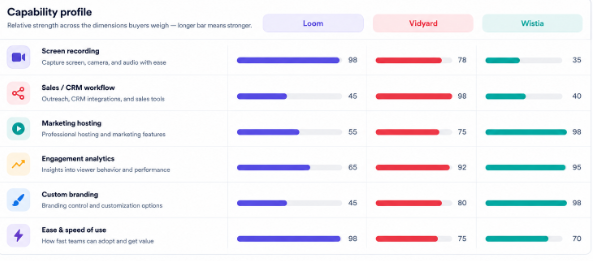
On pure screen recording software for teams capability, Loom leads by a significant margin. Recording starts in seconds from the Chrome extension, desktop app, or mobile and the resulting video is instantly shareable via link without any processing delay. Teams use it for code walkthroughs, design feedback, async standups, bug reports, and customer support explanations.
Vidyard also offers screen recording and does it well, particularly for sales reps who want to quickly record a personalized product walkthrough for a prospect. However, its screen recording is more of a supporting feature to the broader sales video workflow rather than a standalone tool built for internal teams.
Wistia's screen recording capabilities are limited. It is primarily a hosting and analytics platform teams using Wistia for screen recording typically record elsewhere and upload to Wistia for distribution and tracking. If screen recording is your primary need, Wistia is not the right starting point.
AI Video Analytics Software
All three platforms include analytics, but what they measure and why reflects their different priorities. Wistia's analytics are the deepest on the marketing side engagement heatmaps show exactly which moments in a video hold attention and which cause drop-offs, viewer-level tracking identifies which specific people watched your content, and A/B testing lets teams compare different video versions. As AI video editing software built for content performance, Wistia sets the standard.
Vidyard's analytics are built around sales signal who watched, how much they watched, and what that viewing behavior suggests about their buying intent. When a prospect watches 80% of a product demo video, Vidyard flags that as a high-intent signal and can trigger a CRM notification or an automated follow-up. That closed loop between video viewing and sales action is something neither Loom nor Wistia replicates.
Loom's analytics cover views, watch time, and viewer reactions practical data for understanding whether your async video actually got watched. The analytics are sufficient for internal communication use cases but lack the depth needed for marketing performance tracking or sales pipeline correlation.
Video Messaging Tool for Sales
As a video messaging tool for sales, Vidyard is in a different category from Loom and Wistia. Sales reps can record a quick personalized video, add it to a branded landing page that includes a call-to-action, and send it via email or LinkedIn. When the prospect watches, the rep gets a notification in real time which many sales teams use as a trigger to follow up while the prospect is actively engaged.
Vidyard's AI Avatar feature allows reps to record once and generate personalized versions of the video for multiple prospects using AI-generated lip-sync and name personalization. For teams sending hundreds of video messages per month, this kind of automation changes the economics of video outreach significantly.
Loom is used by many sales teams for video outreach, and it works well for straightforward personalized messages. However, it lacks Vidyard's CRM integration depth, sales-specific analytics, and AI personalization at scale.
Best Video Hosting Platform for Business
As a best video hosting platform for business, Wistia is the strongest of the three for companies that need professional, branded video hosting with no third-party platform interference. Videos hosted on Wistia load faster than YouTube embeds for business sites, display without external ads or competitor recommendations, and give you complete viewer data that YouTube's analytics does not provide.
Vidyard also offers reliable video hosting with good performance, particularly for sales content and product pages. Loom hosts videos on its own infrastructure and the links work well for sharing, but it does not offer the customization, player branding, or marketing-focused hosting features that Wistia provides.
Business Video Communication Tools
As business video interviewing tools, all three serve different layers of the communication stack. Loom handles the internal layer team communication, documentation, and async collaboration. Vidyard handles the external sales layer outreach, follow-up, and deal acceleration. Wistia handles the marketing layer content strategy, lead generation, and brand-controlled video distribution.
Many companies looking for the right AI video tool for business teams end up using two of the three together: Loom for internal communication alongside either Vidyard for sales or Wistia for marketing. Trying to use a single platform for all three layers typically means compromising on at least one.
Pricing Comparison
Loom offers a free plan for up to 25 videos per creator. Paid plans start at $12.50 per user per month on annual billing for the Business plan, which removes video limits and unlocks AI features. Enterprise pricing is available by custom quote for larger teams with SSO and advanced security requirements.
Vidyard offers a free plan that includes unlimited video recording and basic sharing. The Pro plan costs $19 per user per month on annual billing and includes CRM integrations, advanced analytics, and custom branding. Business and Enterprise plans are custom-quoted and include AI Avatars, team management, and priority support.
Wistia differs from the other two in its pricing model it charges per account rather than per user, making it more cost-effective for larger marketing teams. The Plus plan starts at $19 per month for up to 20 videos. The Pro plan runs $79 per month and removes video limits. Advanced plans with A/B testing and full analytics suite are available from $319 per month.
For a team of 10 people, monthly costs work out to approximately $125 USD for Loom (Business plan), $190 USD for Vidyard (Pro plan), and $79 to $319 USD for Wistia depending on video volume needs.
Comparisons
Loom vs Vidyard
Loom and Vidyard have two different purposes. Loom is more for internal communication while Vidyard is more for external sales empowerment in particular. Loom is easier to share, faster to use, and better for async team workflows. Vidyard includes CRM integration, sales analytics and AI personalization features missing in Loom. When it comes to communication between teams, Loom is definitely advantageous. Vidyard is the solution if measurable sales video outreach is your primary use case.
Loom vs Wistia
Loom vs Wistia compares a communication-first tool with a hosting and marketing-first platform. Loom is better for quick, informal recording and sharing. Wistia is better for professionally hosted video content that needs to perform on your website, generate leads, and be tracked in detail. The use cases overlap very little, which means the choice is usually clear once you know which problem you are solving.
Vidyard vs Wistia
Vidyard vs Wistia is the closest comparison on this list, since both platforms target external-facing video. Vidyard focuses on sales one-to-one personalized video, CRM integration, and buyer intent signals. Wistia focuses on marketing one-to-many content distribution, engagement analytics, and lead generation. If your video program is sales-driven, Vidyard. If it is marketing-driven, Wistia. Some organizations use both for exactly this reason.
Who Should Use Each Platform?

Loom works best for software and product teams it is the most accessible AI video tool for business teams at an entry price., remote-first organizations, and any team that communicates heavily through async video. It is also the most accessible starting point for individuals and small teams on a budget.
Vidyard works best for sales teams, SDRs, account executives, and revenue-focused organizations that want video to drive measurable pipeline outcomes rather than just create content.
Wistia works best for marketing teams, content creators, and companies that host video on their own website and need professional hosting, lead capture, and performance analytics without a third-party platform's interference.
Conclusion
Lattice, Leapsome, and 15Five are all strong contenders in the AI performance management software market, but they solve different HR challenges. Lattice is the most comprehensive platform, combining performance reviews, OKRs, engagement surveys, and compensation planning into a single ecosystem that works especially well for growing and enterprise organizations. Leapsome stands out for companies that prioritize structured employee development, offering highly customizable reviews, integrated learning tools, and a clear connection between feedback, growth plans, and performance outcomes.
Meanwhile, 15Five focuses on strengthening manager-employee relationships through continuous check-ins and coaching, making it ideal for organizations that want to build a feedback-driven culture without adding unnecessary complexity.The best choice ultimately depends on your company's priorities, management style, and HR maturity.
FAQ's
Loom for internal teams, Vidyard for sales teams, and Wistia for marketing teams each leads in its category.
Yes Loom's free plan includes up to 25 videos per creator with basic sharing and viewing features.
Vidyard adds CRM integration, buyer intent signals from viewing behavior, AI Avatar personalization, and sales-specific analytics that Loom does not offer.
Wistia leads on marketing analytics; Vidyard leads on sales engagement analytics both are significantly deeper than Loom's analytics.
All three offer free plans. For more options, Screencastify and Claap offer free tiers for basic screen recording and async video.
Using AI employee monitoring software tools in the U.S. presents a challenge of finding the right balance between ensuring that employees remain produ [...]

Dokas mile

If you are a small or medium-sized US laboratory wanting to modernize without all the enterprise baggage, CloudLIMS is your best AI-ready option. Scis [...]
David N. Wilks

Small business owners in America often have only one way to manage their cash flow - by sending invoices out the door. As their businesses grow, howev [...]