
Best Document Management Software in
Are you looking for Document Management Software for your Business in ? SaaS Adviser brings you the best Document Management Software to ease your worries. In order to make your work smooth and swift, SaaS Adviser has compiled a list of the best software available. Compare the Best software features, pricing, free demo, and trial to select the best Document Management Software for your organization.
.jpg "Shubham") Researched and Written by Shubham
Researched and Written by Shubham
Top 3 Featured Softwares


List of Top Document Management Software

Get Free Consultation

I Love PDF

I Love PDF - Your Online PDF Toolkit
I Love PDF 2 is a user-friendly online tool for managing PDF files. Users can modify, split, merge, compress, and change PDF documents in a variety of ways to customize files to th...
View Profile

Carepatron
By Carepatron
CarePatron software is a platform that automates workflows by managing client records and video calling. The software offers a Client Portal that allows doctors and patients to acc...
View Profile

What is Monday.com?Monday.com is a cloud-based Work Operating System (Work OS) designed to help teams plan, track, and manage their projects and workflows efficiently. Its high...
View Profile
Microsoft 365
By Microsoft 365
Microsoft 365 is a platform that brings together different apps that can be used for networking and official work at the same time. It has several plans for enterprises and individ...
View Profile
OnTask
By OnTask
OnTask is a document and form management software that allows users to transform tedious paperwork into efficient digital processes. OnTask is powered by Accusoft, and provides an ...
View Profile

DocuSend
By DocuSend
DocuSend is a software that can be used to automatically send out invoices, billing statements, and letters. With DocuSend, there is no minimum commitment or data requirement. All-...
View Profile
DocsCloud
By DocsCloud
DocsCloud is a web-based software platform that helps you create web forms and generate documents from templates. You can also manage and get documents digitally signed, host docum...
View Profile

Adobe Acrobat DC (Document Cloud) is a powerful PDF management software developed by Adobe that allows users to create, edit, convert, sign, and share PDF documents seamlessly acro...
View Profile

Confluence is a powerful platform that can be used to manage online projects related to any kind of functional departments, including marketing, finance, legal, and human resources...
View Profile
Bitrix24 is a powerful all-in-one business management software that combines CRM, project management, communication, and collaboration tools in a single unified platform. Desig...
View Profile
PDF Reader Pro
By PDF Reader Pro
PDF Reader Pro is an app for reading, editing, annotating, signing, Form Fill, Converting, Creating, OCR, Link, Encrypt, TTS, Bates Numbers, Header, Footer, Page Number, Stamp, Pre...
View Profile
Adobe Acrobat Reader
By Adobe Acrobat Reader
Acrobat Reader is a software program developed by Adobe Systems, Inc. that allows users to view, sign, annotate, and print PDF documents. It is a management solution that enables b...
View Profile

PDF API
By PDF API
If you're looking for a way to streamline your document processing, look no further than a PDF API. With its fast and easy integration, you can generate, convert, and modify PDF do...
View Profile

PDFRun is an easy-to-use online PDF editor, convertor, and e-signature management tool that helps users modify uploaded PDFs in real-time. It has powerful features combined with mo...
View Profile
Foxit Reader
By Foxit Reader
When teams collaborate and share information, they work better. Foxit PDF Reader connects knowledge workers so they can be more flexible and effective. JAWS (Job Access With Speech...
View Profile
Flipsnack is the perfect tool for creating professional online magazines. With Flipsnack, you can easily transform your PDFs into an online page flip experience. You can also set a...
View Profile

Revver
Put Your Documents to Work
Formerly called eFileCabinet and founded in 2001, Revver today is the pioneer of solutions that assist groups in digitizing and automating all their document-dependent work...
View Profile

Tabidoo
Create business applications. Fast. Easy. Simple.
Tabidoo is a web-based, low-code platform designed to help organizations digitize and manage their data efficiently. It enables users to create custom applications, organize in...
View Profile

ChARM Health
Solutions for Your Healthcare IT Needs
CharmHealth is a comprehensive, cloud-based healthcare IT solution designed to streamline operations for hospitals, clinics, and healthcare providers. It offers a suite of integ...
View Profile

UniRetail6
Fully Customizable Retail Software for Retail Chain Store
UniRetail6 Software is a comprehensive solution for retail businesses, designed to streamline operations such as inventory management, point-of-sale (POS) transactions, custome...
View Profile

Table of Content
Find the Best Document Management Software
Choosing the appropriate document management software comes with its own challenges. Seizing the right software allows you to organize, protect and streamline your documents. The best document management system permits file storage and active collaboration while increasing productivity and ensuring standards are met.
With the right software, both startups and established enterprises will be able to easily manage documents, transforming the day-to-day information management routine.
1. Current Trends in Document Management Software
-
Cloud Computing
The global Document Management System market is expected to increase from USD 8.32 billion in 2025 to USD 24.34 billion by 2032.
The management software of documents is being transformed for the better with cloud-based computing since it provides more adaptable and flexible storage options.
-
Mobile
Smartphones and tablets have become part of the mobile revolution, meaning that employees can now access document management software on the go.
-
Archiving
Document management systems that include archiving capabilities allow businesses to securely store typically unused historical documents for easy retrieval when needed.
-
Sharing Information Across Devices
Employees can now edit documents in real-time from different devices which greatly improves productivity in fast-paced work environments.
2. Top 5 best Document Management Software in USA
1. Zoho WorkDrive
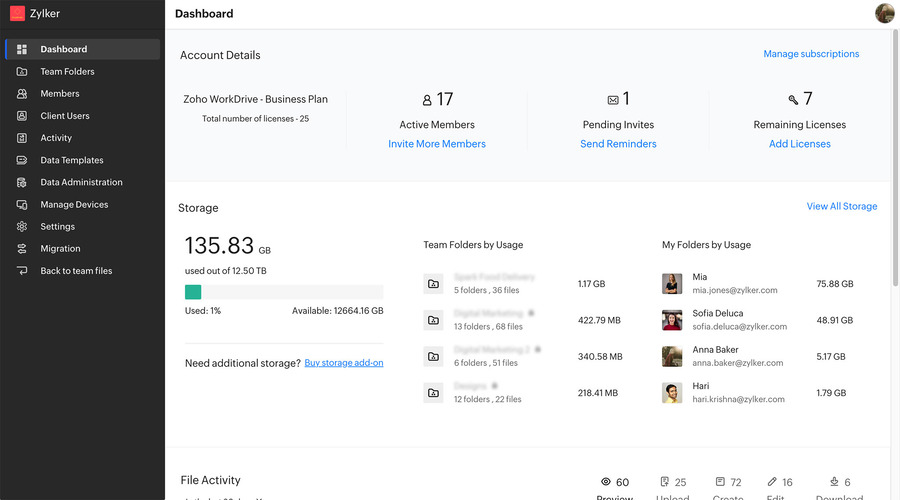
Zoho WorkDrive is a document management software that assists in collaboration, file organization, and storage. It guarantees safe cloud storage with well-defined collaborative capabilities, making it ideal for organizations of any size.
Features:
-
Centralized cloud storage for team files.
-
Collaboration with a team on documents in real time.
-
Permission management and access control of documents at an advanced level.
-
AI-powered file search for easy retrieval.
-
Integration with other applications in the Zoho suite and outside.
Pros:
-
Flexible pricing plans that come with a free tier.
-
Solid security capabilities, such as user authentication and document encryption.
-
File versioning and commenting have enabled great collaboration opportunities.
Cons:
-
Can prove to be difficult with the management of larger teams.
-
Limited features to competitors in comparison.
-
Storage is limited in the free version.
Pricing:
-
Paid plans begin at $3 per user a month.
-
Free plan with limited storage.
2. Adobe Document Cloud
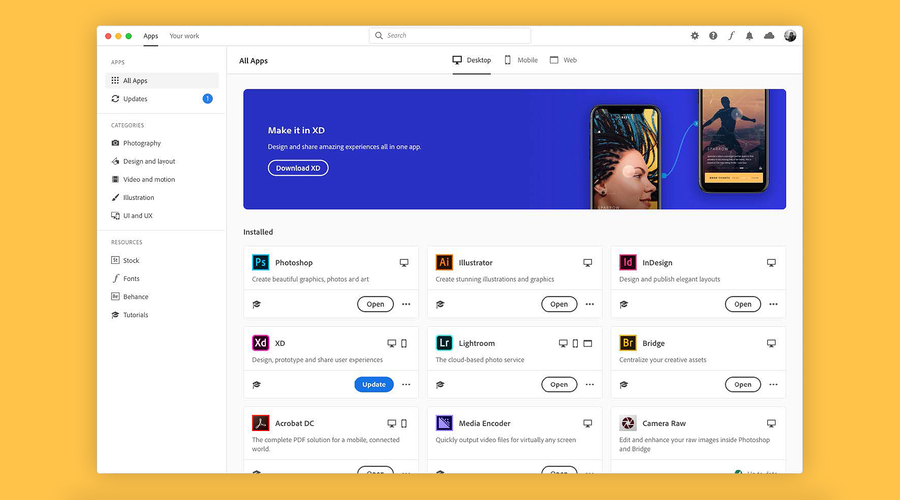
Documents can be edited, shared and stored with ease on the Adobe Document Cloud which is aimed at document and file security for professionals. It also comes with other Adobe tools such as documents editing and creation through Acrobat.
Features:
-
Robust PDF editing, signing, creation, and secure cloud storage that syncs across devices.
-
Document sharing and collaboration tools.
-
Integration with Adobe Acrobat and other Adobe applications.
-
Strong security features with two factor authentication.
Pros:
-
Standard PDF tools and editing capabilities.
-
Mobile application for easy access.
-
Secure sharing and signing options for documents.
-
Excellent customer support.
Cons:
-
Can be costly for small businesses.
-
PDF features may not serve all business purposes.
-
Lacks advanced tracking features for documents.
Pricing:
-
Plans start at $12.99 monthly for individuals.
3. Microsoft Sharepoint
Microsoft SharePoint is an advanced document management system that helps organizations with document storage, sharing, and collaboration. It integrates easily with other applications in the Microsoft 365 suite which is great for businesses already using Microsoft products.
.png)
Features:
-
Secure cloud document storage with versioning
-
Flexible document categorization and custom workflows creation
-
Microsoft 365 (Word, Excel, Outlook, Teams) integrations.
-
Shared documents can be edited simultaneously.
-
Access control and audit trails enable advanced security measures.
Pros:
-
The platform offers powerful document management and collaboration solutions.
-
Effective for large enterprises and teams.
-
Seamless with Microsoft tools.
-
Remarkable security and compliance capabilities.
Cons:
-
Small businesses can find initial setup and configuration to be cumbersome.
-
Complex for new users of SharePoint.
-
Costly for small businesses or startups.
Pricing:
-
Basic plans start at $5 a month per user (Microsoft 365 Business Basic).
4. Microsoft OneNote
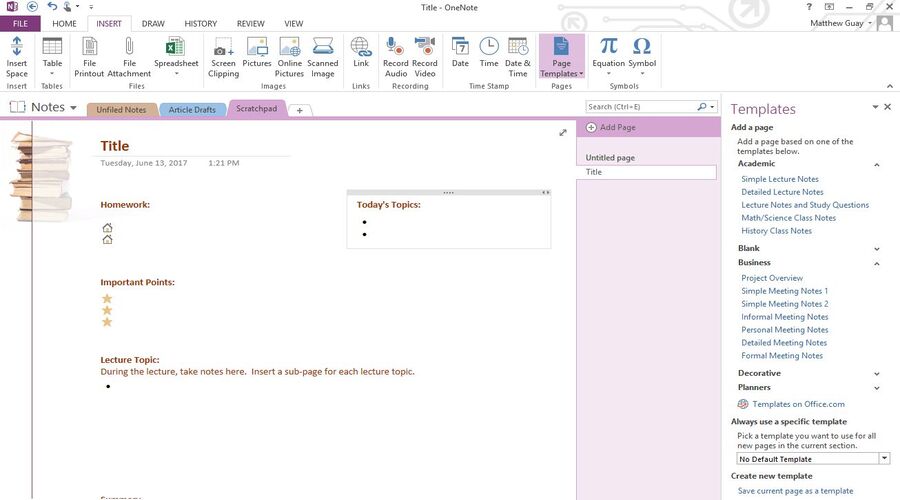
Microsoft OneNote is an efficient software for capturing, organizing, and managing notes and documents owing to its digital notebook functionality. It helps teams in capturing, storing, and organizing information. It is suitable for both individual and group work as it is a part of the Microsoft 365 suite.
Features:
-
Store notes, documents, and images in a cloud-based notebook
-
Share access to collaborate and work in real-time in notebooks
-
Microsoft Office tools and Teams Integration
-
Syncing across devices multifunctional support
-
In-app scanning documents and note taking
Pros:
-
Streamlined organizational structure through intuitive user interface
-
Free access for individual users or small businesses
-
Enhanced convenience as data synchronizes across multiple devices
-
Excellent integration with Microsoft Office tools and Teams
Cons:
-
Compared to other software, document management features are lacking
-
Using OneNote to manage large amounts of data can be cumbersome
-
Insufficient advanced security measures for sensitive documents
Pricing:
-
Free version available
-
Premium features require payment, Microsoft 365 plans start at $69.99/year
5. Jotform
Jotform is a very effective form of document management platform specifically to design and manage documents as well as storing collected data. This makes it suitable for businesses since contracts, forms, and client submissions can all be submitted and managed easily from a single and convenient platform.
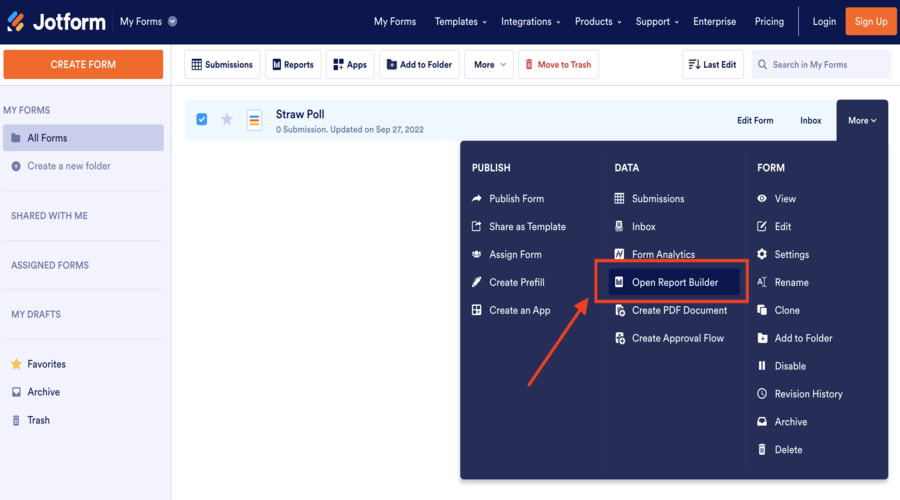
Features:
-
Document Generation using the Drag-and-Drop Form Builder.
-
Integration with widely used applications such as Google Drive, Dropbox, and Box.
-
Document Storage and File Uploads.
-
Collection of data is secure and complies with data protection laws.
-
Workflow Automation and Document Submission.
Pros:
-
Intuitive design and interface with no programming needed.
-
Well developed integration with cloud storage.
-
Secure data collection and document file management.
-
Ideal for processing contracts, forms, and client files.
Cons:
-
Rather limited in advanced document management features.
-
More advanced options are only available on higher-tiered packages.
-
Minimal ability to function without an internet connection.
Pricing:
-
Free plan available with limited features.
-
Paid plans start at $24 per month.
3. How to Select the Right Document Management Software?
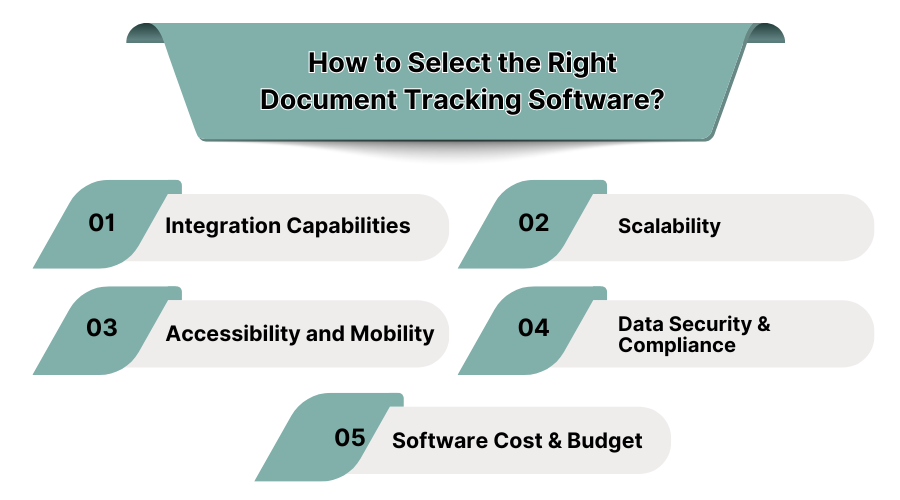
-
Integration Capabilities
While you shop for document tracking software, check for integration features with existing systems like CRM, ERP, and accounting software. This will enhance data sharing for improved business processes while reducing manual data handling.
-
Scalability
Pick a document tracking software that can adapt as your business expands. This will guarantee investment longevity since it will have the capabilities to support rising data, users, adding features, and business expansion over time.
-
Accessibility and Mobility
Check that the document tracking software supports mobile and cloud access. This improves access to essential documents, enhances changes and employee productivity, and ensures normal business operations even while on the road.
-
Data Security & Compliance
The software for tracking documents must utilize encryption and user authentications techniques to secure data and protect data from threats. It should also safeguard sensitive and legal data to ensure compliance with industry standards.
-
Software Cost & Budget
Assess the pricing models of the document management software within your budget. Make comparisons of the features versus the cost for each software’s setup, servicing, and maintenance fees, then select the solution that aligns best.
4. Why Important Best Document Management Software For Small Businesses?
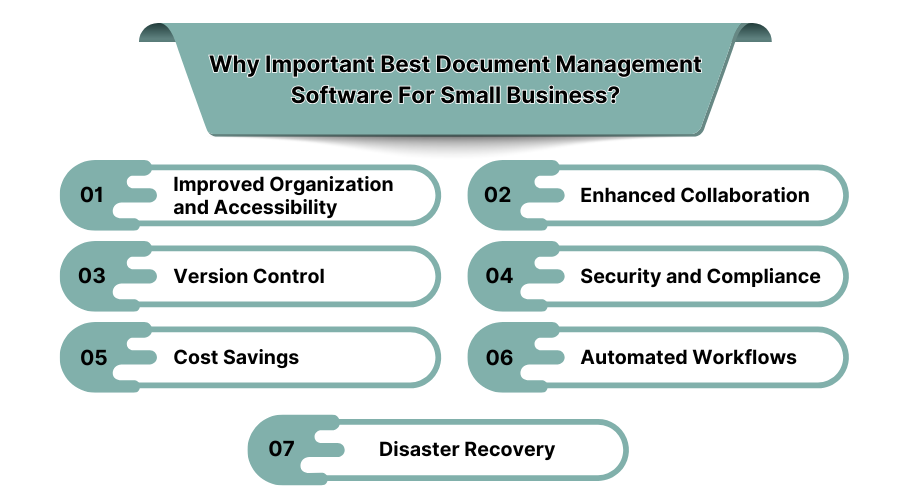
-
Improved Organization and Accessibility
Best Document Management Software for Small Business can significantly boost an employee's productivity using Features like Document Search, Note Books, and other advanced features that in turn enhances accessibility.
-
Enhanced Collaboration
Best Document Management Software for Small Business eliminates bottlenecks by allowing multiple employees to simultaneously make edits on the same document.
-
Version Control
The best document management software for small businesses provides comprehensive revision history tracking for documents which returns a great ROI in the long term.
-
Security and Compliance
Data Tracking software or Document Tracking software cover all information related to the data that an organization holds. As a result, all secretive business data is protected.
-
Cost Savings
Cost ineffective paper storage in physical forms is removed by document management software. For small scale businesses, this saves physical space as well as additional expenditures in the form of paper costs.
-
Automated Workflows
Distribution, archiving, and approvals of documents along with other related tasks are automated in the best document management software.
-
Disaster Recovery
Document Management Software enables easy data restoration in case of system failure, minimizing downtime and potential disruptions.
5. Advantages of Document Management Software
-
Less Storage Space
Document Management Software eliminates the need for physical storage facilities by converting hard copies into electronic formats which can be stored easily, accessed quickly, and organized efficiently without requiring additional infrastructure.
-
Offers Document Backup/Recovery
Document management technology provides backup recovery solutions that automatically generate copies of documents. This feature ensures secure storage across different locations which mitigates the risk of losing essential documents in case of system failures or disasters.
-
Improves Workflows
The automation of repetitive tasks makes document management easier, improving work processes within organizations. It improves sharing, tracking, interaction, and approval of documents, achieving higher efficiency in team collaboration and response times.
-
Promotes Better Version Control and Organization
The DMS Software gives users access to the most updated versions of documents. Document control reduces the possibility of having outdated, incorrect files, makes it easier to organize teams by standardizing their work, and improves cross-team consistency.
-
Enables Easy Regulatory Compliance
Documentation management software enables secure audit trails, file access logs, and secure storage which allow relevant business units to comply with documents and other industry-specific regulations. These solutions enable effective document management, tracking, and protection which meets compliance requirements.
-
Grants Wider Access to Documents
Access-based restrictions are lifted with cloud document management solutions, as users can view documents anytime and anywhere. Relevant collaboration features make it ideal for companies with remote or distributed teams that need near real-time file access.
-
Provides Better Security
High-level security through encryption, access controls, and user authentication is a hallmark of modern document management software. Sensitive information cannot be manipulated or viewed without proper authorization, and documents will always remain secure.
-
Saves Time and Money
Document management solutions automating document and file access, as well as reducing physical storage areas, saves time and costs. Businesses can reduce expenses due to manual document management, and teams can prioritize their efforts toward more important tasks.
-
Integrates with Vital Existing Systems
The best document management software links easily with other business systems such as ERP, CRM, and accounting software. These promote data sharing across departments, resulting in improved collaboration and operational efficiency.
-
Makes Document Retrieval Easy
Organized file structures and powerful search mechanisms make document retrieval from document management systems swift and straightforward. Reducing the amount of time spent searching for files translates to increased productivity.
6. What is the Importance Of Document Management Software?
-
Enhanced accessibility
Document management software improves security and ease of access to documents. Files can be retrieved and shared using desktops and mobile devices. This mobility accelerates decision making within an organization.
-
Improved Collaboration
Collaboration as a team for one objective is very important in business. Team members can now edit and share documents in real time improving collaboration which helps in completion of milestones without errors and delays.
-
Version Control
Document management systems keep track of all changes made and the previous versions of the document. As such, they make available the most updated and pertinent copy.
-
Security and Compliance
Through document management programs, businesses can put in place stringent security measures to guard sensitive business information. User access privileges, audit trails, and data encryption are a few features that help businesses stay compliant with legal requirements such as GDPR and HIPAA, among others. We also recommend checking these Compliance Management Software.
-
Streamlined Workflows
Business workflows are streamlined when the routine works, such as approvals, feedback, and document updates, are automated in a document management platform. This helps ensure smooth work transfer across multiple stages, thereby, eliminating work bottlenecks and enhancing overall efficiency.
-
Cost Reduction
Economically speaking, cost saving opportunities are identifying where a business is spending unnecessary funds. Having a small business and using document management software optimizes operational costs such as paper, printing, document storage, and administrative workloads.
-
Searchable and Discoverable
Fast retrieval of needed documents saves a lot of time and energy. document management tools and software allow for specific documents or information retrieval with the aid of powerful search engines.
-
Disaster Recovery
In most cases, SaaS document management systems come with automatic backups and disaster recovery options incorporated. This protects vital documents from losing data due to over technical malfunctions, natural disasters, human mistakes, and other errors.
7. Features Of Document Management Software
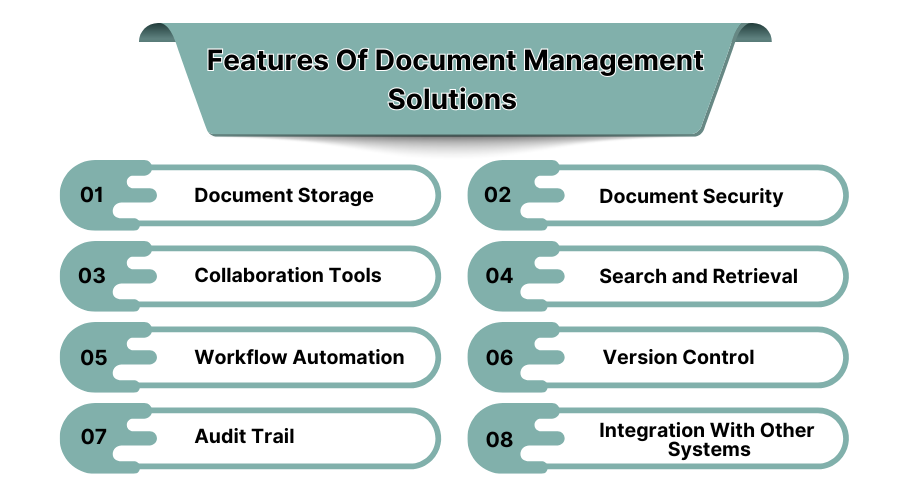
-
Document Storage
Business documents can now be stored in the cloud using document management software which allows convenient access and provides high-level security.
-
Document Security
The management solutions for documents offer strong protection using features such as encryption, multi-factor authentication, and restrictions based on user roles.
-
Collaboration Tools
Through the built-in collaboration tools, documentation management software allows employees to work on the same document at the same time.
-
Search and Retrieval
Enhanced searching and retrieval capabilities are offered by the software for managing documents. With the help of metadata, documents can be located quickly with keywords or tags, enabling faster searching for files and improving general productivity at work.
-
Workflow Automation
The various document management solutions such as approving documents, routing, and notifications are completed through automation. This helps to increase the operational efficiency by doing less manual work, lowering the possibility of human error, and speeding up the document lifecycle procedure. We’ve also listed the best workflow automation software of 2025!
-
Version Control
Maintaining document tracking and versioning is accomplished through the use of document history features. Users can easily revert to older copies and manage document related changes accurately, preventing the use of obsolete documents and ensuring accuracy in result sets.
-
Audit Trail
Document management systems capture each document's lifecycle from creation to modification through an audit trail. This ensures dependability, enhances governance, and allows businesses to monitor user activities alongside other organizational actions.
-
Integration with Other Systems
Best performing document management software integrates effortlessly with other existing business systems like CRM, ERP, and even project management systems.
8. What are the Benefits of Document Management Software?
-
Improved Organization
The software allows companies to maintain documents in a particular file order which is structured in a digital way. This, pretty much like workflow automation software, encourages good workflow because documents can easily be sorted, retrieved, and categorized digitally eliminating the physical mess and ensuring order.
-
Faster Retrieval
With Document management systems, locating and retrieving documents is way easier. Dialed in search options coupled with good document organization enable crucial documents to be accessed within seconds, ensuring time efficiency.
-
Enhanced Collaboration
Sharing, commenting on, and editing documents in real time promotes effective communication, and good collaboration which reduces the likelihood of mistakes being made on the various projects that are being executed or documents being handled within a project.
-
Reduced Storage Space
Converting documents from physical to digital form enables companies to slash the amount of storage space used. This not only saves space but cuts down on environmental pollution and lower overhead expenses as there is reduced paper usage.
-
Better Security
Document management system software enhances the security with which documents are kept. Sensitive documents can now be protected by a password, encryption, and gain control over who has access to it. These measures greatly increase data security and decrease the chance of unauthorized access to the sensitive data. You can still check out this Cybersecurity Software.
-
Streamlined Workflows
Document management software automates related workflows such as approvals, edits, and feedback. This lowers requirement for manual work, allowing more effective management of processes which leads to faster completion of tasks and improved response times.
-
Version Control
Document tracking software ensures all users work with the latest information. It minimizes the possibilities of mistakes while creating and maintaining a transparent audit log which supports compliance and quality control.
-
Increased Productivity
Document management tools help improve productivity by providing streamlined workflows, easier access to documents, and reduced manual document processes. This allows employees to focus on their core tasks, knowing that the documents are stored securely and ready for immediate access.
9. What is Document Management Software?
Document Management Software (DMS) is a system applied for capturing, storing, managing, and tracking numerous electronic documents. DMS replaces time-consuming and manual processes with automated workflows that enhance document retrieval, cooperation, and protection.
DMS provides version management, search capabilities, and controlled access through permission management. Most companies use SaaS DMS for their scalability and flexibility needs.
10. Conclusion:
Document management systems significantly boost productivity within an organization. On top of improving workflows and operations, best document management systems automate menial tasks. This way, employees can focus on higher-value tasks instead of retracing document workflows within an organization. Let SaaS Adviser guide you toward a document management solution that aligns with your business goals.
