
Best Data Entry Software in
Are you looking for Data Entry Software for your Business in ? SaaS Adviser brings you the best Data Entry Software to ease your worries. In order to make your work smooth and swift, SaaS Adviser has compiled a list of the best software available. Compare the Best software features, pricing, free demo, and trial to select the best Data Entry Software for your organization.
 Researched and Written by Akash Patel
Top 3 Featured Softwares


List of Top Data Entry Software

Get Free Consultation


TypeForm is a great tool for online businesses to collect data. It is responsive and easy to use on any device, be it desktop, tablet or smartphone. With the paid version, you can ...
View Profile

Zoho Forms is a versatile online form builder that allows businesses to create forms for various purposes, from simple contact forms to complex enterprise-level workflows. It enabl...
View Profile

Jotform is a user-friendly online form builder that empowers users to create fully customizable forms for a variety of purposes, including surveys, registrations, applications,...
View Profile

Cognito Forms is an online form builder that offers amazing security and integrations. It has a high level of encryption that keeps all the entry data safe. It comes with HIPAA com...
View Profile

ProntoForms is a field data collection platform that develops and provides low code development platforms for building apps serving the purpose of enterprise field service manageme...
View Profile

GoCanvas is a powerful form builder that can be used to create mobile forms for businesses. This tool eliminates the need for traditional paper forms and offers a more sophisticate...
View Profile

Forms On Fire is a form generation app that enables companies to capture information on the go. It works in an offline mode, enabling users to proceed with task monitoring and data...
View Profile

Formaloo

By Formaloo
Formaloo is a business data OS that helps to create beautiful forms, customisable apps without any code, and access-controlled databases. Trusted by more than 20,000 businesses in ...
View Profile

UiPath RPA is a cloud-based robotic process automation software solution that is specifically designed for government organizations and businesses. It allows users to connect their...
View Profile

SaasAnt Transactions
Supercharge your accounting with cutting-edge automation solutionsWhat is SaasAnt Transactions?SaasAnt Transactions is a powerful data management tool designed to streamline accounting processes, primarily for users of QuickBooks (Online and Desk...
View Profile

Google Sheets is a web-based spreadsheet application offered by Google as part of its Suite editor to subscribers. This application enables users to create, edit, manage and modify...
View Profile

Microsoft Excel is an intuitive part of the Microsoft Office 365 Suite, helping users create spreadsheets that can be used in recording data and modifying it as required. Excel fur...
View Profile

AccuMail frameworks
By SmartSoftCheck How AccuMail frameworks can help to automate Indian Business. SaaSAdviser provide their list of features, pricing, Free demo and Comparison with the best alternative
View Profile

Intellimas
By Singletree TechnologiesCheck How Intellimas can help to automate Indian Business. SaaSAdviser provide their list of features, pricing, Free demo and Comparison with the best alternative
View Profile

Amazon RDS
By Amazon Web ServicesLaunched in 2006, Amazon Web Services (AWS) started out exposing key infrastructure services to groups in the form of web offerings -- now widely called cloud computing. The final ...
View Profile

Kintone is a user-friendly, no-code enterprise application designed for teams. It comes with a visual application builder and enables organizations to manage data and workflows for...
View Profile

Docsumo
By Docsumo
What is Docsumo? Docsumo is an intelligent record processing (IDP) software program that allows corporations automate statistics extraction from unstructured files like invoice...
View Profile
AssetNet is a cloud-based data entry tool that can be used at any place and at any time. It is equipped with many features like data extraction, CMMS, and equipment maintenance. ...
View Profile

Ninox is a business process automation software that stores and organizes complex business data and lets users move from a traditional approach to a collaborative platform that is ...
View Profile

MoreApp Forms
By MoreApp Forms
MoreApp Forms is a web-based or hosted software that is easy to access through the internet. It can also be run on mobile devices easily. In addition to data entry features, the ...
View Profile

Table of Content
Keeping data accurate and operationally streamlined while manually reducing errors is a key challenge to most businesses. The data entry software allows businesses to automate procedures and along with permitting them to store and organize data. It is also helpful in securely and efficiently handling sensitive information. These tools assist companies with customer records, database management, and financial activities by making the input and processing of data easier.
There is also a growing need for enhanced systems as the need for data grows. Having these systems integrated with CRM, ERP, or cloud storage enables ease in real time processing along with automated validation and security compliance. Today more businesses prefer NLP and Mobile data entry aided by AI driven automation for better performance.
Being knowledgeable about the benefits, features, and types of data entry applications greatly helps businesses when making a decision to find the best data entry software. This tutorial gives you a glimpse into useful data entry software and tools available in the United States for 2025 and explains the most pertinent facts one should know when choosing a tool.
What is Data Entry Software?
Data entry software is an electronic tool that restructures the way data is captured, processed, and organized. By implementing this system businesses reduce the risk of manual input errors being made, increase the speed of data handling, and improve overall accuracy. Such programs grant businesses the ability to input, store, and retrieve data from various sources which in turn enhances security and aids in proper data supervision.
Businesses utilize data entry software for various business services like financial reporting, customer data processing, surveys, and document management. Users can enter information by typing, OCR scanning, voice recording, and even automatically filling fields.
The latest data entry systems support seamless integration with databases, cloud services, and workflow automation, giving organizations a more holistic and productive approach to data management.
1. Five Best Software for Data Entry in the USA
1. Cognito Forms
Cognito Forms is the best data entry software because of its drag and drop form builder, collection of data during form submissions, and cloud-based storage. It is best known for form building, information collecting, and automating systems. This solution allows both companies and people to refine the data entry processes while putting in the least amount of work.
Pros:
-
Easy-to-use interface for quick form creation.
-
Customizable templates for different use cases.
-
Supports automated workflows for approval and data processing.
-
Allows embedding forms on websites and emails.
-
Free version available for basic usage.
Cons:
-
Limited automation features in the free version.
-
No built-in AI-based data validation.
-
File upload restrictions in lower-tier plans.
-
Lacks advanced reporting and analytics.
-
Integrations require additional setup.
Pricing: Starts at $10/month.
2. Intellimas
Intellimas focuses on enhancing workflow efficiency and integrating SQL databases for large enterprises to establish data entry and management software. It works best with companies that require high data verification along with automation and integration with other enterprise software.
Pros:
-
Suitable for enterprise-level data entry needs.
-
Strong automation features reduce manual effort.
-
Customizable fields and reports for business-specific needs.
-
Integrates with existing databases and business systems.
-
Supports large-scale data entry with high accuracy.
Cons:
-
Requires IT expertise for initial setup and configuration.
-
No free version, making it less accessible for small businesses.
-
Pricing is based on usage, making cost estimation difficult.
-
Lacks built-in mobile data entry support.
-
Limited third-party software integrations.
Pricing: Custom pricing based on business requirements.
3. Process Runner
Process Runner is a SAP data automation software designed for easier bulk data processing and entry. It smoothly integrates with Excel and databases so there is no need for SAP entries. It also improves data accuracy with its AI-based error correction.
Pros:
-
Ideal for bulk data entry in SAP environments.
-
Reduces manual effort by automating SAP transactions.
-
AI-driven error detection enhances data accuracy.
-
Supports Excel-based data processing for ease of use.
-
Works well with large datasets for enterprise users.
Cons:
-
High learning curve for new users unfamiliar with SAP.
-
No cloud-based version; requires local installation.
-
Lacks integration with non-SAP business applications.
-
Expensive compared to general-purpose data entry tools.
-
Customer support response time may vary.
Pricing: Custom pricing available.
4. Forms on Fire
Forms on Fire is a solution for data entry that is mobile friendly, and is optimized for operations on the field. It permits offline data capturing alongside integration with the cloud. Users are able to capture, store and manage data in real time even in remote locations where the internet is not reachable.
Pros:
-
Ideal for field teams and mobile data collection.
-
Works without an internet connection, ensuring uninterrupted data entry.
-
Syncs automatically once an internet connection is available.
-
Customizable forms with rich media support (photos, GPS, barcodes).
-
Supports multiple integrations for workflow automation.
Cons:
-
Limited free version with restricted features.
-
Higher pricing compared to similar tools.
-
Not designed for bulk data entry or enterprise-wide use.
-
Learning curve for advanced automation features.
-
Custom workflows require additional configuration.
Pricing: Starts at $20/month.
5. Kintone
Kintone is a sophisticated data entry and workflow automation software that allows businesses to create customized forms, delegate repetitive tasks, and collaborate on data entry business processes. Excellent for those who need a data management solution that is adaptable and offers high-level security control.
Pros:
-
Highly customizable for different business needs.
-
Strong security features, including encrypted data storage.
-
Automates repetitive tasks to reduce manual work.
-
Supports team collaboration with shared data access.
-
Scales easily for both small teams and large enterprises.
Cons:
-
Pricing is higher for small businesses compared to competitors.
-
Setup and customization require technical expertise.
-
Limited free version with restricted features.
-
Advanced automation tools may require additional licensing.
-
No built-in AI-driven data validation for error correction.
Pricing: Starts at $24/user per month.
2. Latest Market Trends in Free Data Entry Software
The new technologies are constantly changing the data entry software industry. The trends for free data entry services is the shift towards automation and artificial intelligence integration. Let's find out some jaw-dropping trends in data entry section:
-
AI-driven Automation
All repetitive tasks such as data entry are automated which frees up manual work with the help of AI. AI validation automatically improves data quality by finding and fixing errors as they happen. Most free data entry services have incorporated AI tools to increase efficiency.
-
Natural Language Processing (NLP)
NLP allows for the processing of human language through data entry helps such as voice commands and transcription. This innovation reduces the time taken to input data and overall productivity, especially for employees working remotely.
-
Mobile Data Entry
There is an increasing adoption of data entry applications on mobile devices by businesses. Mobile cloud solutions allow users to enter data on their smartphones and tablets while on the go rather than being limited to desktops. This development trend benefits teams working on the go who need immediate access to data entry.
-
Disruptive Outsourcing
Automation has reduced in-house data entry which leads businesses to subcontract the work to data entry service providers. Businesses use cloud-based software to work with data captures from different countries. It has become easier for many companies which leads to greater productivity and flexibility in business processes.
-
Improved Data Quality Management
Advanced data entry software employs validation checks and duplication detection to ensure the accuracy of data captured in records. Automated cleaning tools further guarantee the integrity of data by flagging incomplete and inconsistent entries. Report generation and decision-making within organizations is becoming more accurate, thus driving investment in these tools.
3. What Should You Consider When Purchasing Data Entry Software?
Picking the suitable data entry software requires careful assessment of the business objectives, industry guidelines, and whether the system will work with other applications. As stated previously, not all data entry software solutions are the same, therefore, they should be evaluated in terms of their fit to an organization's workflow.
Find Out the Requirements of Your Business
-
Identify whether your business requires form-based data entry, accounting data entry, or bulk data processing.
-
Examine automation features, AI-driven validation, and OCR capabilities.
Ask the Expert
-
If you can, speak to Information Systems specialists, business analysts, or any data management expert in your organization.
-
Before adopting any system, check its case studies or reviews from reputable sites that might have them.
Compare the Quality, Cost, and Services
-
Search for One-time purchase, subscription packages, or free versions and check their pricing models.
-
Inquire from the service providers about the cost of more advanced features once the basic modules are paid for.
Ease of Use
-
Find data entry and capture software that is intuitive and user-friendly as well as easy to learn.
-
Use those data entry software programs and services that provide training and professional customer support assistance.
Software Connectivity
-
Check that the software integrates with the CRM, ERP, accounting, and cloud storage solutions.
-
Ensure that integration with other systems enhances the dynamic flow of work.
4. Advanced Tips and Tricks for Data Entry
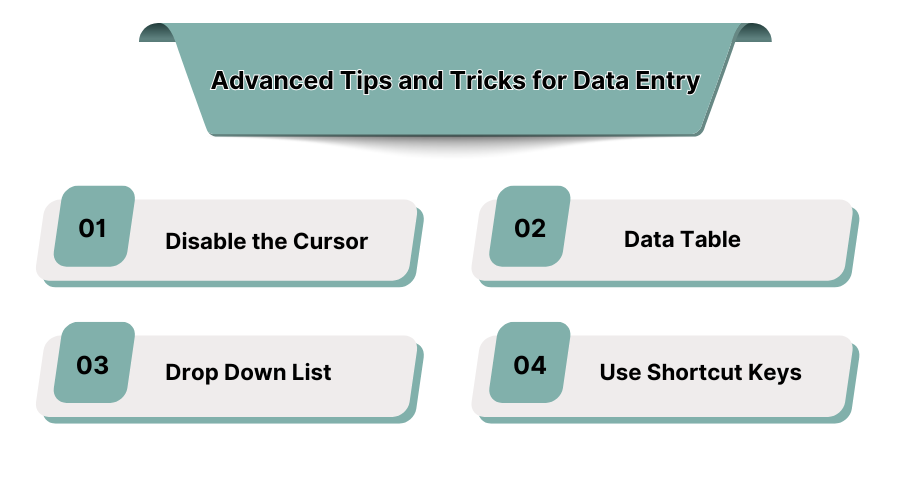
Incorporating certain practices in data entry can improve efficiency and accuracy. The following tips outline how to streamline the processes for data entry.
Disable the Cursor
When handling large datasets, the cursor should be disabled in areas that are not needed to focus on the task at hand. This eases navigation via keyboard. Thus, it will prevent unintended selections being made as well as cursor freezing in a field.
Data Table
Using structured tables improves organization and ensures data is entered consistently. Tables ensure that records can be sorted and filtered with ease. Data management and file organization is easy with the table functionalities found in spreadsheet software.
Drop Down List
Adding drop-down menus to predefined inputs ensures fast and efficient use of most data entry applications. These increase efficiency and accuracy by eliminating variance due to manual input as users are presented with choices.
Use Shortcut Keys
Manual entry can be a time-consuming and tiresome process. Therefore, we suggest you use these keyboard shortcuts helps achieve a more optimized approach to data entry:
-
Ctrl + C / Ctrl + V: Copying and pasting data.
-
Ctrl + Z: Instantly undoing an entry mistake.
-
Tab: Bypassing the use of a mouse pointer and moving to the next field.
-
Ctrl + F: Look for particular information in a large dataset.
-
Alt + Tab: For efficient multitasking, change to other programs quickly without losing workflow continuity.
5. How Does a Data Entry Application Work?
Data entry applications operate by automating the three stages of data: input, processing, and verification. These systems work in a specific sequence so that the data is collected and managed reliably.
-
Data Capture and Input
Gathers information from various sources such as documents, forms, spreadsheets, and online databases through scanning.
-
Data Entry Verification
Applies artificial intelligence validation, auto-correction, and duplicate detection to minimize human errors.
-
Data Processing and Organization
Processes the information by sorting and categorizing it for easy storage and retrieval.
-
Data Storage and Security
Monitors unauthorized access to sensitive data through encryption and storage protection.
-
Data Retrieval and Reporting
Allows users to have access to the records almost instantly to generate reports and analyze the business within seconds.
6. Types of Data Entry Software Programs
A business organization makes use of a paid or Free data entry software for more efficient management of data processes, minimization of errors, and lowering the manual effort. Different data entry programs have different purposes based on the specific requirements of a given area. Some programs take care of numbers, such as banking transactions. Others take care of bulk datasets, including surveys, consumer feedback, or even transcription services.
Transcription Data Entry Software
-
Transcription data entry software converts speech into text files thus allowing greater part of manual transcription work to be automated.
-
It is used within the health care, law, and business industries to record meetings, interviews, and court sessions.
-
Works in conjunction with voice recognition systems for greater accuracy and effectiveness at work.
Accounting Data Entry Software
-
Processes financial information, invoicing, payroll, and simple bookkeeping exercises.
-
Links with financial tools such as Quickbooks, Xero and Zoho Books to enable smooth management of finances.
-
Provides tax compliance, audit trail system, mitigation of errors on financial reports.
Form and Survey Data Entry Software
-
Retrieves information from the customer satisfaction surveys, HR Information Systems, and marketing research reports.
-
Provides response to reporting and categorization of responses without the need to monitor the process.
-
Assists businesses create structured feedback, integrates with CRM for enhanced business intelligence.
The selection of both free and paid data entry software depends on the amount of automation required, the level of integration needed, and the size of the business. For companies with extensive data sets, adopting advanced AI driven solutions makes sense, but for smaller businesses, simpler and less costly data entry programs might be beneficial.
7. Features of a Data Entry System

The global data entry software market is estimated to rise to USD 20.1 Bn by 2033, at 11.9% CAGR. The incorporation of automation, security and integration ensures seamless handling of data. Companies that depend on enormous datasets need a system that can capture, validate, and store information while minimizing errors. The modern world operates within an ecosystem of information that flows freely using interconnected systems. Setting up the right data entry system greatly improves productivity.
-
Data Capture and Transfer
Supports manual, semi-automated, and AI powered data entry allowing businesses to input information faster.
-
Data Entry Verification
Uses real time validation and duplicate detection to maintain data integrity.
-
Data Duplication Prevention
Remove redundant entries, maintaining a structured database.
-
Data Retrieval
Quick access to stored information using cloud or local storage.
-
Abbreviation Detection
Makes sure data is properly formatted for usage by recognizing industry specific short codes and abbreviations.
-
Document Identification
Scans and extracts text from PDFs, images, handwritten documents turning them into structured digital format.
-
Data Delivery
Allows for secure exporting of data to other platforms such as CRM, ERP, and analytics tools.
If your workflow includes data extraction, you can speedify it by using a data extraction software.
8. Conclusion
Picking the most appropriate software for data entry greatly increases productivity, precision, and security levels while doing business. Companies must remember to look for automation, integration, and cost effectiveness in a data entry system. For businesses looking to streamline data management with automation and AI-driven validation, explore expert recommendations at SaaS Adviser.
9. Benefits of Data Entry Programs

Data entry software improves productivity, enhances precision, and saves time and money. Organizations that rely on manual record entries very often encounter challenging issues such as a high degree of human error, repetitive tasks and slow computing speed. These automated data entry tools systematically arrange data files and eliminate these hurdles.
Increases Accuracy
-
Helps in using AI powered error detection mechanisms, validation techniques, and self-correction tools to ensure accidents are kept to a minimum.
-
Establishes clear structured data which avoids inaccurate entries or duplications.
Reduces Errors
-
Automates data input, preventing common human errors such as typos and formatting mistakes.
-
Facilitates improved datamation as well as higher levels of uniformity among numerous systems and devices.
Boosts Efficiency and Clarity
-
Improves the speed and accuracy of collecting and arranging data. This simplifies information retrieval and enables businesses to analyze data effortlessly.
-
Lessens the burden of manual documentation. This enables teams to focus on other crucial business activities.
Faster Turnaround Time
-
Eliminates stop gaps in workflows with automatic bulk data processing.
-
Cuts down the duration it takes to enter, check, and gather sizable datasets.
Greater Insight into Data
-
Gaining a deeper understanding of data is an important feature in almost any industry that makes use of pretty extensive amounts of data.
-
Allows users to do real-time analytics, customized reporting, and predictive data modeling. It helps track market trends, performance, and enhances decision making.
Decreases Paperwork and Costs
-
Keeps files in electronic format, instead of doing it away with storage space for hard copies, printing, and paperwork.
-
Ai assists organizations in saving time and money, through the automation of mundane practices like data entry, file creation, and editing.
Do you want to avoid any unnecessary troubles like your data being deleted by mistake that’s no longer accessible? You can start using data recovery software.
