What we'll cover
Share with your community!


Get Free Consultation


Asana vs ClickUp: Which AI Project Management Tool Wins in 2026?
 David N. Wilks
Here's the thing about picking an AI project management tool in 2026: the feature lists barely matter. What matters is whether the tool's whole approach fits the way your people already work. Asana bets that a project management tool should nail one job and then stay quiet. ClickUp bets the other way entirely. It wants to eat every other app on your invoice, so tasks, chat, docs, and AI all sit in the same place. Both bets pay off for the right team. So the Asana vs ClickUp question really comes back to one thing.

Looking for AI Project Management Software? Check out Software Adviser’s List of the Best AI Project Management Software in USA for your business.
What's actually getting in your team's way right now? We'll go through both tools section by section so you can call it without overthinking it.
What Are Asana & ClickUp? (Quick Overview)
What Is Asana?
Back in 2008, Asana arrived with a pretty narrow mission: give teams a way to wrangle complicated, scattered work without dropping the thread. You won't find clutter in the interface, folks usually find their footing within a day, and how it treats dependencies, deadlines, and who has bandwidth lines up with the way a project manager's brain already works. Skip ahead to 2026, and that early foundation has grown into a seriously capable AI project management tool. Hand Smart Projects has one prompt, and it sketches out a whole project framework for you. AI employee assistance is a bit like virtual staff you can assign work to. AI Studio lets you stand up no-code AI workflows just by writing out what you want in plain words. None of it strays off course either. It's all aimed at helping you run projects, not at elbowing out the other tools you already depend on.
What Is ClickUp?
ClickUp landed in 2017 going after something a lot more ambitious: a single workspace that absorbs everything else. Tasks, team chat, documents, whiteboards, screen recording, AI help, the whole lot lives under one roof. The AI side, called ClickUp Brain, taps a handful of models, GPT-5 and Claude Opus among them, and the AI Knowledge Manager combs through your entire workspace so the answers it gives are rooted in what your business is actually doing rather than thin air. Going the AI project management tool route, ClickUp trades away a bit of simplicity to get all that range. The muscle is real. So is the steeper climb to learn it.
Asana vs ClickUp: Quick Comparison Table
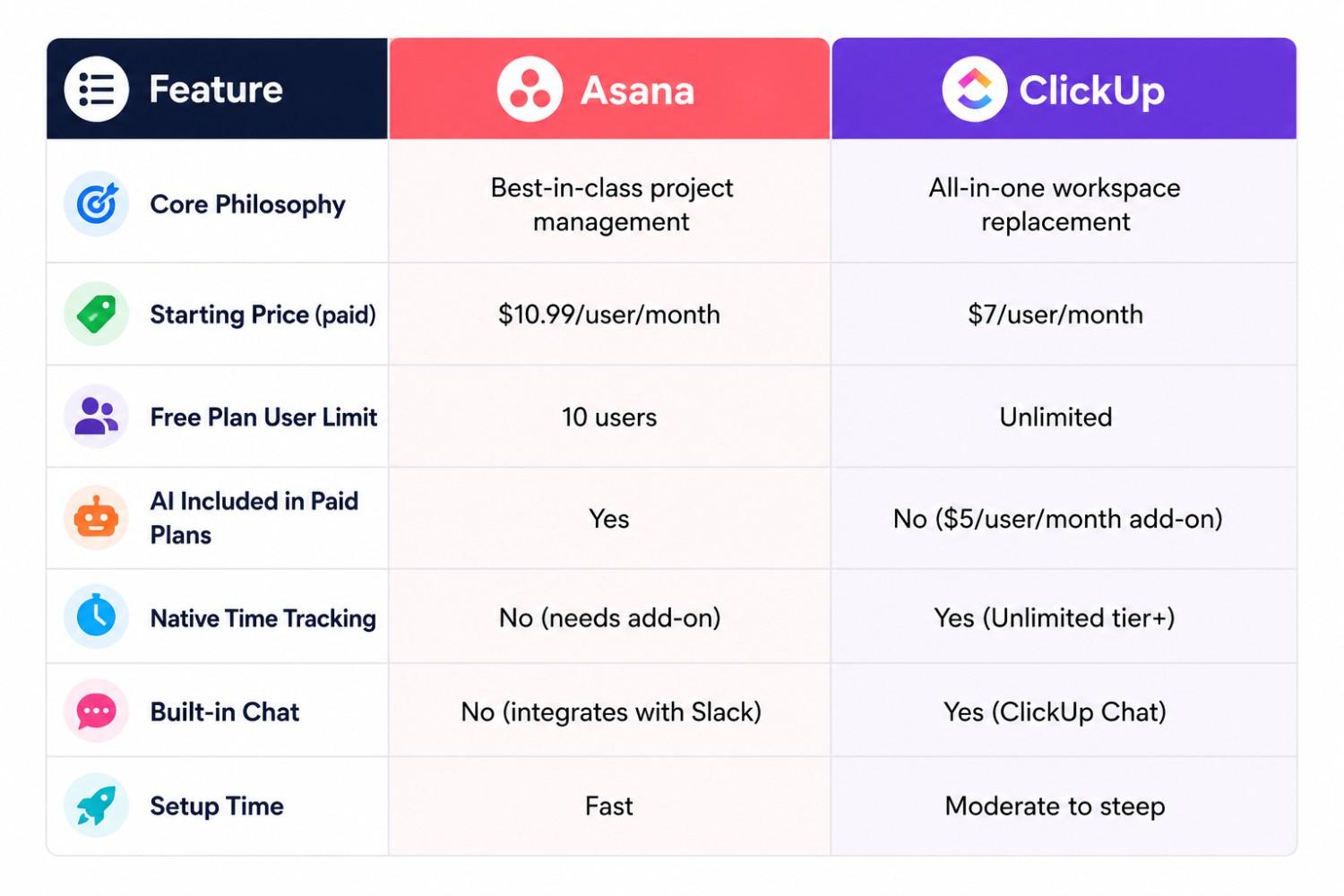
Feature-by-Feature Comparison
Task & Project Management
Asana lays tasks out in a way you may examine at a glance: workspaces sit up top, and beneath come groups, then initiatives, sections, responsibilities, and subtasks. Add milestones, dependencies, and timeline views to that, and it holds collectively, in spite of a group going for walks, a handful of workstreams facet by facet. ClickUp piles on a few more rungs, slotting in spaces, folders, lists, and checklists. You get more freedom to shape things that way, sure, but you also face more decisions before a single task ever gets logged. And here's a small one that bites people: ClickUp will let two folks own the same task, where Asana still draws a hard line against it. On a team where a couple of people genuinely split the work on something, that gap ends up mattering a lot more than it first appears.
Workflow Automation
Asana's automation comes into its own at the mid-tier and above, where a visual flowchart lets you build conditional rules. ClickUp puts automation in reach from the free plan, with ready-made templates for common patterns and custom logic once you're paying. If you want automation without an upgrade, ClickUp is the gentler on-ramp. If you'd rather have automation that simply behaves once it's set, Asana usually feels steadier. As AI project management tools, both now let you describe rules in plain language, which opens the door for non-technical users.
Views & Visualization (List, Board, Gantt, Calendar)
Both cover the standard views well: list, board, timeline, and calendar. ClickUp adds an activity feed, a map view for geographic data, and a team view showing what each person is working on in real time. Asana counters with Portfolio views for tracking multiple projects against goals and Workload views for visualizing team capacity, both at the Business tier. There's a pattern in that split: Asana's extra views are aimed at the people steering projects, while ClickUp's are aimed at the people grinding through the work itself.
Team Collaboration Features
Asana keeps the back-and-forth right inside the task, through comments, attachments, updates, and proofing. Want anything past that and you're wiring in Slack, Zoom, or Microsoft Teams. ClickUp bakes collaboration in from the start: Chat for messaging, Clip for screen recordings, Sync Ups for video calls, Docs for editing together. If shrinking the pile of tools you pay for is the goal, ClickUp quietly knocks a few line items off the bill. But if your crew already lives happily in Slack or Teams, Asana's lighter touch means you're not paying twice for the same thing.
Reporting & Dashboards
Status reports, workload summaries, portfolio progress, all of it comes together without you needing to know how to build a chart, and it's easy to drop in front of stakeholders. ClickUp's dashboards lean the other way: more customizable, packed with more data. That suits an operations team building out detailed views, but it can swamp a project manager who only wants to spot what's slipping. Which one works for you comes all the way down to who's clearly selecting it up to read, an govt who needs the gist fast, or an analyst who desires room to dig in.
Third-Party Integrations
Both tools connect with the names you'd bet on: Slack, Google Workspace, Microsoft 365, Zoom, plus some thousand more apps through local links or Zapier. Asana counts on those hookups to patch the holes it intentionally leaves, due to the fact that your chat or video tool never changed into the plan, first of all. ClickUp connects widely too, but with so much already living inside it, you tend to reach outside the platform less often. If your company already runs on a settled stack of software, Asana's integration-first habit usually slides right in. If you'd rather keep the moving parts to a minimum, ClickUp's everything-included design means fewer integrations to babysit down the line.
AI Capabilities Compared
Asana AI Features
Asana built its AI around project management specifically. Give Smart Projects one prompt and out comes the entire framework, tasks, subtasks, dependencies, timelines, the works. Smart Rules reads whatever you jot down in plain English and turns it into automation behind the scenes, so you never ought to wrestle with conditional-rule syntax yourself. Smart Summaries condense assignment status into brief, readable updates you may drop instantly into a stakeholder document. AI teammates are assignable agents that take on defined portions of structured work alongside humans. Here's what stands out: every paid Asana plan folds in these AI features at no extra charge, which makes it one of the more budget-friendly AI project management tool options out there.
ClickUp AI Features
ClickUp Brain is the platform's AI system, with access to several large language models including GPT-5, Claude Opus, o3, and o1-mini. The AI Knowledge Manager indexes your whole workspace so answers stay context-aware rather than generic. Brain handles standups, suggests task assignments, generates subtasks from descriptions, and writes progress summaries. The catch is cost. ClickUp Brain will run you $5 per user a month tacked onto any paid plan, and it's everyone or no one across the workspace. Put that against a 20-person team and you're looking at an extra $1,200 a year. As an AI project management tool, ClickUp hands you more model choice, but the privilege sits on a separate line item.
Pricing Comparison: Asana vs ClickUp
Asana Pricing Plans
Asana Personal costs nothing for up to 10 customers, and you still get limitless responsibilities and projects. Starter, which used to be known as Premium, is available for $10.99 per user a month on annual billing and brings in timeline perspectives and workflow automation. Advanced runs $24.99 per user a month and piles on portfolio management, workload views, and goals. Enterprise pricing is custom. The part worth remembering: every paid plan bundles the AI in at no extra charge, so what you see on the price tag is also what you pay for the AI.
ClickUp Pricing Plans
ClickUp Free Forever covers unlimited tasks, unlimited free members, basic automation, and limited storage. Unlimited at $7 per user per month removes most restrictions and opens full integration depth. Business at $12 per user per month adds advanced automation, timesheets, and goal tracking. Enterprise is custom. One thing to hold onto, though: ClickUp Brain is a separate $5-per-user add-on that gets applied to everyone in the workspace, so that headline price isn't really telling you the full AI cost.
Which Tool Is Best for Your Team?
Best for Small Teams
ClickUp Free Forever covers more ground than Asana Personal and has no 10-user cap. Small teams that need unlimited members and don't yet need automation get more from it, and they get a capable AI project management tool without touching their budget. But if clean structure and getting everyone up to speed fast is what you're after, Asana's interface gives you the smoother ride.
Best for Mid-Size Companies
At the mid-tier, that price gap pretty much disappears. Asana Starter is $10.99 with AI already baked in, while ClickUp Unlimited at $7 plus Brain at $5 also lands you at $12. Same number, different shape. So it lands on personal taste in the end: do you want ClickUp's extra views and the everything-under-one-roof consolidation or Asana's tighter hold on projects and the faster onboarding that rides along with it?
Best for Enterprise Teams
Asana's enterprise tier emphasizes security, compliance, governance, and clean stakeholder reporting. ClickUp's prioritizes customization depth and IT integration flexibility. Bigger organizations running complex work across lots of departments tend to find Asana scales more smoothly, while the ones determined to consolidate their tools usually drift toward ClickUp.
Best for Remote & Hybrid Teams
ClickUp's native chat, video, and docs cut down on context switching across a remote workday. Having tasks, communication, and documentation in one tab is a real operational benefit, and few pieces of project management software pull it off as completely. Asana needs Slack or Teams running alongside it to reach the same outcome.
Best for Agencies & Client Work
ClickUp's multiple assignees, deep hierarchy, and portfolio organization suit agencies running several clients from one workspace. Asana's cleaner client-facing reporting wins when it's time to communicate with external stakeholders. Both see heavy agency use; ClickUp leads on internal complexity, Asana on professional presentation.
Pros & Cons of Each Tool
Asana Pros & Cons
Pros
- Clean, Intuitive Interface Polished UI with smooth animations, keyboard shortcuts, and drag-and-drop that teams select up quickly with minimal schooling.
- Multiple mission views, an aid list, a board, a calendar, and timeline perspectives so teams can manipulate working in the manner that suits them best.
- Strong group collaboration, project remarks, document sharing, @mentions, and actual-time updates preserve all verbal exchange tied at once to the paintings.
- Reliable Workflow Automation Rules primarily based automation handles repetitive obligations like assignments, reminders, and degree changes without manual effort.
Cons
- Expensive for Advanced Features Timeline view, custom fields, reporting, and automation are locked behind paid plans that scale up quickly for larger teams.
- Steep Customization Learning Curve The platform gives a number of flexibility, however setting up and keeping superior workflows calls for a committed character to control it.
- Notification Overload Users frequently record reproduction emails, for example, receiving each an undertaking update and a venture notification for the identical motion.
ClickUp Pros & Cons
Pros
- The all-in-one workspace combines obligations, docs, desires, whiteboards, time monitoring, and dashboards in one platform, decreasing the want for more than one piece of equipment.
- Deep Customization Custom statuses, fields, views, and workflows permit teams to build a setup that suits nearly any procedure or industry.
- Generous Free Plan One of the maximum feature-wealthy loose stages available, with unlimited customers and tasks included for free.
- Built-in Automations and AI ClickUp Brain handle summaries, mission advent, and workflow automation, with Google Drive and other integrations triggering actions mechanically.
Cons
- Steep Learning Curve The sheer number of features and alternatives overwhelms new customers, with setup requiring big-time effort and an established method to keep away from chaos.
- Performance Lags Users document sluggish loading times and low lag, mainly in huge workspaces with many duties and lively automations.
- Mobile App Falls Short The cell experience lacks the total capability of the desktop version, making on-the-cross challenge management frustrating for a few users
Conclusion
If you need an AI task control device with fast setup and AI constructed at no more fee, Asana is the clearer choice. Teams that cannot spend weeks configuring software programs see fees almost right away, and the clearer reporting makes it cleaner to keep stakeholders aligned. If you want full workspace consolidation, a lower base cost per seat, multiple assignees, or native chat and video, ClickUp is the more capable platform for those needs. The honest summary of the Asana vs ClickUp question is this: most teams doing project management that doesn't also need chat, docs, and video built in will adopt Asana faster and stick with it longer. Teams determined to shrink their SaaS stack will find ClickUp's consolidation story worth the setup investment. Match the tool to your actual problem, and either one can be the right answer.
FAQ's
ClickUp is a great choice for small teams with its generous free plan, while Asana excels with its simple interface and faster adoption.
ClickUp offers an all-in-one workspace with built-in collaboration tools, while Asana focuses on streamlined project management and ease of use.
Look for task automation, AI assistance, collaboration features, reporting, integrations, and customizable workflows.
Yes, AI project management software can automate task assignments, status updates, reminders, project summaries, and workflow processes.
Choose a platform based on your team size, collaboration needs, workflow complexity, budget, and the level of customization you require.

Long live the pulse of real-time data; the typical annual staff survey is dead. With workplaces transitioning to hybrid models and the rise of quiet r [...]
David N. Wilks

Think about the last time you waited two days for customer service to answer an easy query. Now believe your customers having that identical problem a [...]
David N. Wilks

Costs are up almost everywhere you look this year, including rent, software subscriptions, wages, and on top of all that, competition for customers ha [...]