
What we'll cover
Share with your community!


Get Free Consultation


AI in Retail Stores: Computer Vision Checkout and Shelf Monitoring Explained
 Dokas mile
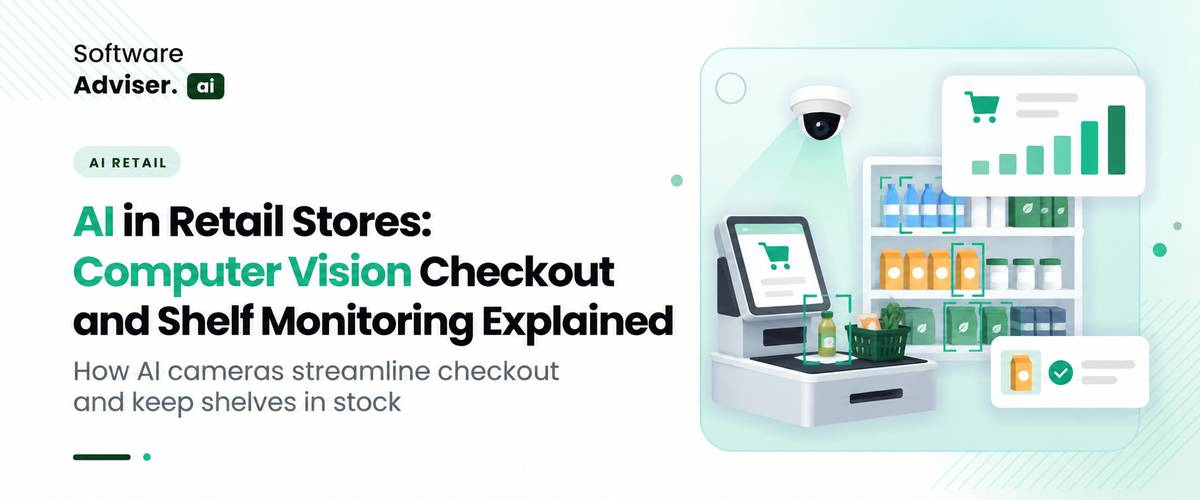
Two everyday problems show up in almost every store: a checkout line that never seems to move, and a shelf that looks empty when the product may be sitting in the back room. In retail stores, both are being addressed using cameras and AI, too.
This article covers how computer visual checkout and AI shelf monitoring functions, how each is lacking, and what to test before committing.

Quick answer
computer vision checkout is a system that tracks what a shopper picks up so they don't have to scan at the checkout. AI shelf monitoring keeps an eye on shelves and alerts to missing and/or misplaced inventory. Technology is similar, jobs are different.
How AI Interprets Images and Video
A computer vision system is an automated system that processes visual data from a camera or computer's visual system, with the assistance of machine learning models trained to identify objects, patterns and movements. It can recognize a product package, determine a hand approaching a shelf, or match the current shelf configuration to a desired shelf configuration.
Object detection is used to determine the location of an object in an image. Product recognition is extended to the identification of a product or product category, which is called product recognition.
These help with functions like product identification in retail, shelf availability and automated checkout. The system's performance is dependent on the quality of the training data, position of the camera, product catalog and operating environment.
Computer Vision vs. Traditional Retail Automation
Manual shelf audits are dependent upon staff walking the aisles and barcode scanning requires someone to scan each item. Cameras watch continuously. They are typically used in conjunction with existing AI retail POS software and inventory systems, not in place of them: The camera observes that a sale occurred, the POS records the payment, and the inventory system keeps track of the inventory.
How Computer Vision Checkout Works
Also known as checkout-free shopping technology, computer vision checkout enables shoppers to take and leave without scanning. The most popular example of such AI in retail stores is Amazon's Just Walk Out. Amazon says it's a combination of computer vision, sensors, and deep learning that monitors what people are picking up while shopping.
Product Detection and Shopper Interaction
This is how AI checkout systems identify products. Ceiling cameras track a person's movements and scan for a hand reaching up to a shelf. Amazon says its system doesn't require any specific knowledge of who the person is; nor does it contain any biometric data used to track the identity of the shopper. A lot of setups integrate a weight sensor in the shelf, due to the fact that the camera sometimes falls short if the items are similar in appearance or if an arm blocks the camera's view.
Building a Virtual Cart
A virtual cart is a running list of what the system believes each shopper has taken. Picking up an item adds it, and putting it back removes it. Some AI-powered checkout systems also use RFID tags, and weight sensors give a second signal about which item moved.
Payment and Receipt Generation
After the shopper is done, the system computes the final basket and checks out the shopper's payment based on the store's configuration. In some systems, customers can be billed at the time of their departure, while in others, they can pay at an exit station.
Example: A customer walks into a small convenience store, puts down a sandwich and a drink, and picks up the drink before exiting the store. The final selection must be accurately recorded in the checkout system. It cannot only recognize the initial product interaction, but also understand the return action.
Checkout-free shopping technology can reduce manual scanning steps, but retailers still need to evaluate transaction accuracy, payment integration, exception handling, and the customer experience.
Do You Know?
Amazon’s Just Walk Out does not rely on cameras alone. It combines cameras with weight sensors, and some setups add RFID.
Fit matters too. Amazon deleted its Just Walk Out service from its US Amazon Fresh stores in April 2024 and replaced it with Amazon Dash Carts, without altering availability at third-party stores like airports, stadiums, and campuses. This is more about store size and product selection, and not necessarily the technology.
How AI Shelf Monitoring Works
AI shelf monitoring, or retail shelf monitoring, uses images from fixed shelf cameras, ceiling cameras, robots, or staff phones. Computer vision for retail shelves then compares what it sees with what should be there.
Detecting Empty Shelves and Out-of-Stock Products
How computer vision detects empty retail shelves is simpler than full product recognition: an empty facing looks empty, so a model can flag a gap without knowing the product. Naming the missing product is a second step that requires matching the spot to the planogram or catalog. That distinction matters for out-of-stock detection in retail, because “something is missing here” and “this specific SKU is missing” are different findings.
Recognizing Misplaced Products and Planogram Issues
A planogram is the diagram that illustrates the position of products in a shelf. For planogram compliance, the system compares the products detected to the planogram positions and highlights any discrepancies, such as cereal placed in the snack section or a display incorrectly set-up for a promotion.
Sending Alerts to Store Staff
When a gap is detected, it turns into a task: an alert that appears on a dashboard or handheld device and is set aside for someone near the gap. This is where inventory visibility would be better in the retail sector – and only when employees can take action! It still needs to be confirmed as the cause; it may be in the back room, lost or the item may have been recorded as in stock but is not on the shelf.
Suppose there is a supermarket system which raises an empty facing to a popular cereal. One of the team checks the inventory system and restocks the shelf when units are found in the back room, before the next manual inventory audit. If you're running an AI inventory management software, that check can occur in one location.
Key Benefits of Computer Vision in Retail Stores
Faster Checkout and Reduced Waiting
Manual checkout steps can be eliminated in appropriate store formats by automated retail checkout. This can be especially helpful at convenience stores, stadium concessions, business stores, and elsewhere, where speed is important to customers.
The actual benefit depends on the store's customer volume, product range, system accuracy, and ability to handle exceptions.
Better Shelf Availability and Faster Restocking
Staff need not wait for the next aisle check, but can receive an alert when a shelf requires attention. Even then they have to make sure there is product in the stockroom before they can replenish it. The good news is that you get operational visibility, but no promises on having a full shelf. The availability of staff, stockroom inventory and replenishment with suppliers are still important.
More Consistent Merchandising
For retailers operating multiple locations, planogram compliance checks can help teams identify shelf arrangements that differ from the intended layout. This supports more consistent product placement and merchandising reviews.
Better Operational Insights
AI retail analytics can integrate with the POS and inventory data to provide a more comprehensive picture of store conditions based on visual insights. For instance, a retailer could look at the number of times the shelf has emptied and compare it to sales data to determine if certain products should be replaced more often. Such insights are best when the data is accurate, and the business has a clear action plan in place to follow up on the insights.
Computer Vision Checkout vs. Shelf Monitoring
|
Area |
Computer Vision Checkout |
AI Shelf Monitoring |
|
Main Purpose |
Track selected items and support payment |
Find shelf gaps and placement issues |
|
Typical Input |
Cameras, sensors, product catalog, session data |
Shelf images or video, catalog, planogram |
|
Main Output |
Virtual cart and transaction record |
Shelf alerts, gap reports, placement exceptions |
|
Typical Users |
Store operations and checkout teams |
Store managers and merchandising teams |
Challenges and Limitations of AI in Retail Stores
Product Recognition and Camera Blind Spots
The challenges of computer vision in retail are mostly physical. Similar packaging, overlapping items, glare, seasonal displays, and shoppers blocking the view all reduce accuracy.
False Alerts and Inventory Mismatches
An empty shelf does not prove the store is out of stock, and too many false alerts teach staff to ignore the system. Results from real stores also vary. Walmart ended a shelf-scanning robot program with Bossa Nova across roughly 500 stores in 2020, and the Wall Street Journal reported that Walmart found its workers could get similar results.
Privacy, Security, and Employee Concerns
Cameras raise legal questions for AI in retail stores in the US. New York City requires retail stores that collect biometric identifier information from customers to post signs, and Illinois’ biometric privacy law has produced heavy litigation. Most shelf monitoring does not need to identify anyone, so choose systems that do not, limit retention, restrict access, and tell employees what the cameras do and do not measure. Check requirements with legal counsel.
Setup and Ongoing Maintenance
Camera placement, catalog updates for new products, planogram changes, network reliability, and integration all take ongoing work. Camera-and-sensor checkout systems can also require extensive remodeling in existing stores.
Data quality matters just as much as camera quality. Checkout systems need an accurate product catalog and reliable links to payment and transaction records. Shelf-monitoring systems may also need up-to-date planograms and inventory records to identify misplaced products or distinguish an empty shelf from a genuine stockout. Before choosing a vendor, confirm which systems must connect, how often product data is updated, and who will maintain it.
How Retailers Can Evaluate Computer Vision Solutions
If you want to see what types of platforms exist, exploring AI image recognition software can help you understand the retail computer vision software options available.
Start With One Measurable Problem
Pick a single goal, such as cutting the time it takes to find shelf gaps or improving checkout flow in a small-format store. A store with a few aisles may get the same result from a daily staff walk, so it may not need this at all.
Test in Real Store Conditions
Run a limited pilot during normal hours, with crowded aisles, changing stock, and difficult lighting.
Pro-tip
Before any demo, list your 20 hardest products, such as look-alike packaging, shiny wrap, and tall displays, and ask each vendor to test on those first.
Measure Results Before Scaling
Define the measures before the pilot starts: alert precision (the share of alerts that were real), missed detections, time to restock, checkout completion time, uptime, and total implementation cost.
These results are measureable, aiding to help retailers determine if the investment is financially viable or not. Calculate the cumulative price tag on cameras, installation, software subscriptions, integrations and maintenance against tangible savings like cutting down on manual auditing time or manpower at the checkout. Also monitor to see if a quicker stocking reduces missed sales. Not all improvements are directed by AI; compare the results before and after the pilot and in similar stores.
Conclusion
There are two different types of physical retail operational challenges that can be solved using computer vision checkout and shelf monitoring.Computer vision checkout and shelf monitoring can solve two different types of retail operational challenges in physical retail. Check-out systems can be used to determine what products people are buying and shelf-monitoring systems can be used to monitor product placement and availability.
The utility of AI in retail stores relies on selecting an appropriate use case, establishing trustworthy data sources, and testing the AI technology in actual daily operations. For retailers, the first step is likely to be one measurable problem, a small-scale pilot, and a clear strategy for how to leverage the AI-generated alerts and make them actionable.
FAQ's
It is AI that interprets store images and video. Retailers use it for product recognition, checkout-free shopping, and shelf monitoring.
Cameras and sensors detect which items a shopper takes, build a virtual cart, and charge the shopper’s payment method when they leave.
Yes. It can spot empty spaces and, with product recognition, flag likely missing items. Inventory checks may still be needed to confirm whether stock exists elsewhere.
Not entirely. It automates scanning and shelf checks, but staff still restock, verify alerts, help customers, and handle exceptions.
It depends on lighting, camera angles, packaging, and store layout, so no single figure applies. Ask vendors for pilot results from stores similar to yours.
Shelf monitoring observes what is visible on shelves. Inventory management tracks recorded stock movements and quantities. They work best together.
Walk onto any American factory floor in 2026, and you may be aware of something distinctive. The machines look the same; the assembly traces nonethele [...]

David N. Wilks
The contemporary global commercial technology sector is operating within an increasingly complex digital landscape. Modern corporations routinely stor [...]
Dokas mile
Managing a chaotic calendar can feel like a full-time job. Between client onboarding sessions, internal team sâ [...]