
Best Time Tracking App & Software in
Are you looking for Time Tracking App & Software for your Business in ? SaaS Adviser brings you the best Time Tracking App & Software to ease your worries. In order to make your work smooth and swift, SaaS Adviser has compiled a list of the best software available. Compare the Best software features, pricing, free demo, and trial to select the best Time Tracking App & Software for your organization.
 Researched and Written by Akash Patel
Top 3 Featured Softwares


List of Top Time Tracking App & Software
Get Free Consultation


Clockly by 500apps

By Clockly by 500apps
Clockly is an online time management software that tracks employee wise working hours to increase productivity levels based on screenshots, online timesheets, payroll management ...
View Profile

Coexsys Timekeeping
By Coexsys Timekeeping
Coexsys Timekeeping is a software that helps businesses keep track of employee work hours, overtime, and leave periods. It also helps generate timekeeping reports that include re...
View Profile
TARGControl
By TARGControl
TARGControl software is a cloud-based solution used to manage employee data. It offers a multi-level enterprise structure to monitor the employees, check the lunch time, and more...
View Profile
Clockspot
By Clockspot
Track employee arrival and departure times with GPS, voice, or device tracking. Automate payroll reports and eliminate buddy clocking. See who is working in real time on the web....
View Profile

Timebase
By Timebase
Timebase is a software platform that allows you to track and manage your working time, as well as collaborate with your team members and measure progress with reports. You can al...
View Profile

Bill4Time
By Bill4Time
As the saying goes, time is money. And when it comes to your business, that couldn't be more true. Poor timekeeping can cost your business big time, with some businesses losing out...
View Profile

Timestead
By Timestead
Timestead is the perfect paperless job sheet application for your phone, laptop or tablet. Track all your work jobs and reduce your paperwork with a simple, hassle-free solution....
View Profile
Accu-Time Systems
By Accu-Time Systems
As the leading provider of biometric and non-biometric workforce management tools and integration software, ATS offers state-of-the-art solutions such as the PeoplePoint terminal...
View Profile

TimeTackle
By TimeTackle
TimeTackle software is used to manage priorities with audit calendars. The software offers Calendar Analytics to measure the time spent, aligning the schedule with priorities. Ti...
View Profile

ExakTime
By ExakTime
If you want to make your business more efficient, a cloud-based time tracking and scheduling solution is a great way to do it. This type of solution can accurately capture remote...
View Profile

StaffTimer is a time tracking tool that enables users to monitor their employees and keep projects on track. With better visibility into the performance of their employees along ...
View Profile
PlanArty
By PlanArty
PlanArty is a time management solution that helps freelancers and small business owners to strictly follow their busy schedules, track their time and work with more productivity....
View Profile

Paydirt
By Paydirt
Paydirt is a simple time tracker tool for freelancers and agencies that enables them to reduce the complexity of project tracking. Users receive the ability to track time, invoic...
View Profile

RemoteOne
By RemoteOne
With RemoteOne, freelancers and entrepreneurs can manage remote businesses with ease and superior productivity. The software allows users to track project times and budgets, send...
View Profile
TimeLedger
By TimeLedger
You can customize your reports to match the reporting system you already use, making it easier for your employees to get up to speed. You can also match the terminology used by y...
View Profile

Clockk is a time tracking app that automates your timesheets for you. It shows you which files you worked on, which web apps you used, and your calendar events, all in one place....
View Profile
Time Logger
By Time Logger
Timelogger is a time tracking app that is used by freelancers, clients, super admin, and small companies worldwide. It minimizes work disruption by using simple controls for cloc...
View Profile

Tack
By Tack
Tack software is a Time Tracking tool for teams and projects. The software offers tools to track working hours and analyze billable data for tracked hours. Share Report and can e...
View Profile
Wobbly
By Wobbly
Wobbly is a productivity tool and a time tracker that aims to turn teams into productive powerhouses. It has a simple and elegant time tracking functionality. Users can time thei...
View Profile

OfficeClip Timesheet
By OfficeClip Timesheet
OfficeClip provides a complete solution for businesses by tracking time for projects, managing expenses, and tracking time-off for employees. This allows businesses to accelerate...
View Profile

Table of Content
Find The Best Time Tracking App & Software
Remote managers, freelancers, and businesses seeking to improve their operational productivity need to choose a time-tracking application very carefully. Such tools assist in monitoring and reporting hours worked on various projects and tasks.
Users, whether they need only basic time-tracking capabilities or advanced collaborative time-tracking software with payroll functions, can experience a tremendous boost in productivity efficiency. Explore the best time-tracking systems available to improve employee productivity and organizational process efficiency.
1. Related Articles of Best Time Tracking App & Software
- 5 Best PSA Platforms with the Most Powerful Time Tracking Features?
- How to Reduce Development Time with AI-Generated Code?
- Time Tracking Solutions: The Key to Efficient Project Management and Accurate Payroll
- Choosing the Best Time Tracking Software
- Top 10 Time Tracking Software for Boosting Productivity
- Solving Common Challenges with Project Time Tracking Tools
- Dispatching Done Right: Improving First-Time Fix Rates with FSM Software
- 8 Surprising Time Tracking Software Secrets You Should Know
2. What Are The Types of Time Tracking App & Software?
-
Manual Time Tracking: Employees input their work activities and hours worked manually.
-
Automated Time Tracking: The application records work hours and work activities with the help of timers set in the software.
-
Biometric Time Tracking: Employees clock in and out using a fingerprint or face recognition system.
-
GPS Time Tracking: Monitors mobile devices for geolocation and timestamps.
-
Online Time Tracking Tools: Tools hosted on the internet and available on any device for logging time.
-
Project Management Time Tracking: Manages projects and tracks time spent on tasks with a single application.
3. Costs & Pricing for Time Tracking Software
The pricing of time-tracking software is dependent on features, deployment type, number of users (cloud or on-premises), and more. Basic time-tracking mobile applications do not charge or charge around $5 to $10/month per user for small teams.
The cost of software for organizations with additional advanced features falls between $20 to $50 per month per user. Custom enterprise-level price plans based on business dimensions and needs exist for companies that need specific arrangements.
Don't forget to evaluate your needs and seek pricing plans that deliver the highest value based on your team’s size and requirements. You can also read our guide on time tracking for project management to know some advanced management tips.
4. Latest Market Trends in Top Time Tracking App & Software
1. Mobile Apps And Geofencing
By 2032, the time-tracking software market is expected to grow to $11.48 billion from $3.38 billion in 2024. Geofencing mobile apps are increasing in popularity. Companies can determine the exact location of their employees and ensure they clock in or out as they enter each predefined work zone, increasing precision for remote workers or field employees.
2. Biometric Identification
Time-tracking software now integrates biometrics, including facial recognition and fingerprints. These systems help reduce time theft and buddy punching, thereby increasing the accuracy of time logs by confirming that employees are checking in and out correctly. Read our guide about biometric authentication through facial recognition software to know it better.
3. Energy Expenditure Tracking
Some sophisticated time tracking solutions are now adding the feature of monitoring energy spent. With these systems, time spent on activities and the actual physical movement or energy expended during working hours is monitored, giving employers an understanding of employees’ health and productivity.
4. Advanced AI And Automation
Automation and AI are reinventing time tracking. Tasks are automatically grouped, errors are highlighted, and improvements are suggested. There is minimal manual data entry, which saves time and reduces errors, effortlessly integrating time tracking into employee and project management.
5. Features of The Best Time Tracking App

1. Mobile Access
The absence of mobile access is a setback for the best time tracking system since the employees need to log their hours and track tasks while on the move. This is very important for employees working remotely or in the field since it offers the flexibility to ensure that accurate time logs are captured irrespective of location.
2. Location Tracking
Geolocation tracking allows businesses to keep track of employees or workers and the geographical locations in which they are situated. This feature is particularly important for mobile employees or contractors as it provides assurance that time logs are accurate and that employees are truly working on the required locations per each project.
3. DCAA Compliant
DCAA compliance is paramount for businesses dealing with government contracts. A DCAA-compliant time tracking system will make sure that all time entries match the work done, are able to be authenticated, and meet government requirements. This helps to streamline and make audits faster and more effective.
4. Workforce Time Clock
A workforce time clock feature enables employees to clock in or out of work from physical terminals or online platforms. This aids in automating time tracking processes to provide accurate time logs and hence minimize manpower time for payroll enhancement.
5. Leave Management
Employees can submit and manage their holiday and sick leave as part of the time-off policies in the time tracking system. This improvement guarantees that time off is properly monitored, which boils down to accurate attendance records and circumventing scheduling conflicts for businesses. Also, we suggest you implement an employee management software to manage it efficiently.
6. Cloud Integration With 24/7 Access
Employers who have remote workers will benefit greatly from the unlimited access to cloud-enabled time tracking systems as it can be used from anywhere at any time. Additionally, time logs are saved in the cloud, where they can always be retrieved, and this boosts efficiency as well as the availability of data.
6. Five Best Time Tracking Software in the USA
1. Deel – Best Time Tracking Tool for Global Workforce Management
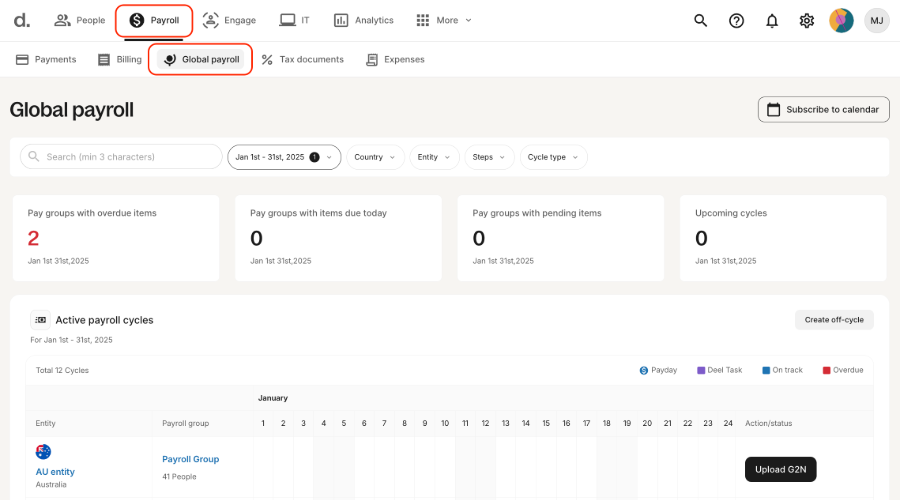
Trusted worldwide, Deel is a platform specializing in remote payroll management, compliance, and contractor time tracking. Equipped with time-tracking features, businesses can accurately calculate hours worked from anywhere in the world. This is especially beneficial for managing remote employees, freelancers, and contractors across various time zones. Deel also provides payment compliance for different countries and has partnerships with accounting systems for effortless payment integration.
Features:
-
Accurately tracks working hours for employees from different time zones
-
Comes with integrated global payroll and contractor management tools
-
Provides advanced dashboards and activity monitoring for increased visibility
Pros:
-
Great for handling remote employees and overseas teams
-
Global legal compliance and automated payments offer great convenience
-
Intuitive platform for employers and employees alike
Cons:
-
Not suited for contractors who need project-based time tracking
-
Can be pricey for smaller teams that only want to track time
Price:
-
The starting charge is $49 per month per contractor, with custom quotes available.
2. monday.com – Best for Time Tracking with Project Management
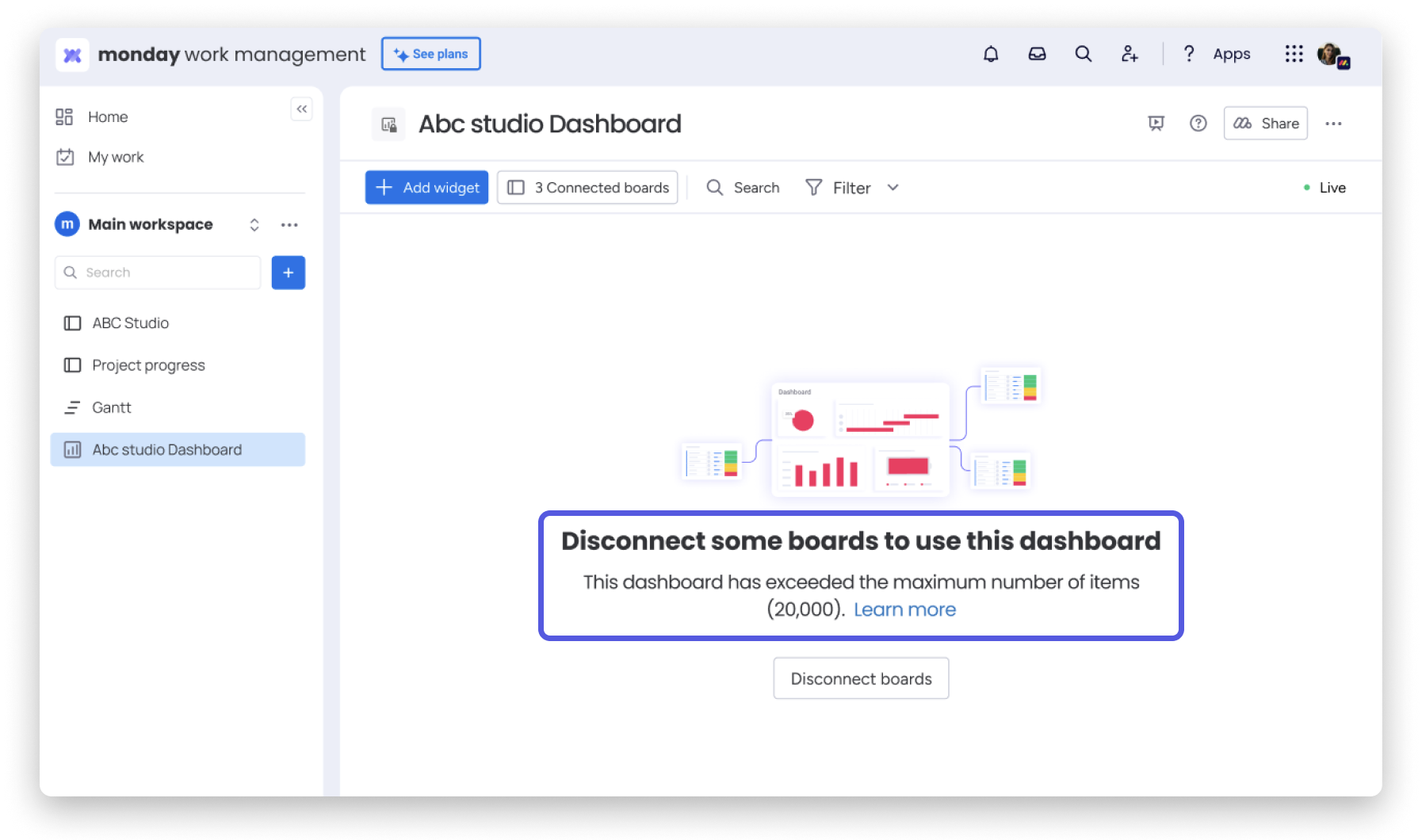
monday.com merges intricate time tracking with robust project management. Tasks achieved by individual team members can be tracked using a time tracker, which is visually represented on a dashboard, increasing efficiency and teamwork. It’s adaptable to a greater degree, which permits businesses to design tailored boards for time tracking, budgets, and deadlines. Especially useful for marketing, software development, design teams, etc.
Features:
-
Time tracking based on tasks accomplished within a project.
-
Visual dashboards with real-time updating.
-
Real-time progress tracking.
-
Works with over 50 apps such as Trello, Slack, and Google Calendar.
Pros:
-
Customizable and highly visual for any member of any team.
-
All in one time, team, project, and collaboration platform.
-
Allows automation for reduced manual tracking.
Cons:
-
The time-tracking feature is not available for the free plan.
-
It may require some training for new users.
Price:
Paid plans start at $9 per seat per month, paid annually.
3. Accelo – Best Time Tracking Tool for Service-Based Businesses
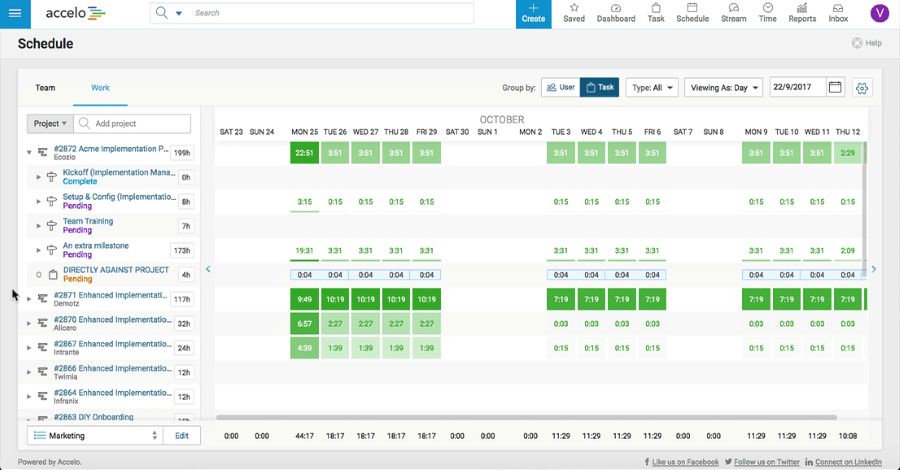
Professional service firms are catered to by Accelo’s fully integrated end-to-end platform. Exceedingly comprehensive time tracking is embedded within the client management, billing, and project tracking modules. Best suited for consulting firms, agencies, and legal practices, Accelo automates the entire client lifecycle while capturing the time and costs of all subtasks with precision.
Features:
-
Time tracking based on email, calendar, and task engagement while working on projects is done automatically.
-
Time-tracking smart sheets are automated. So are productivity reporting and timesheets.
-
Project and client management are done with integrated CRM tools.
Pros:
-
Agencies, consultants, and other client-facing teams benefit the most.
-
The integration of billing and time tracking is seamless and unparalleled.
-
Project tracking for clients is live with no delay.
Cons:
-
Business software for managing client relationships with their information can be daunting to interact with for first-time users.
-
Has a heavier focus on mid-range and larger teams.
Price:
-
Pricing starts from $39 per month for every user.
4. Replicon – Best Time Tracking Tool for Enterprises
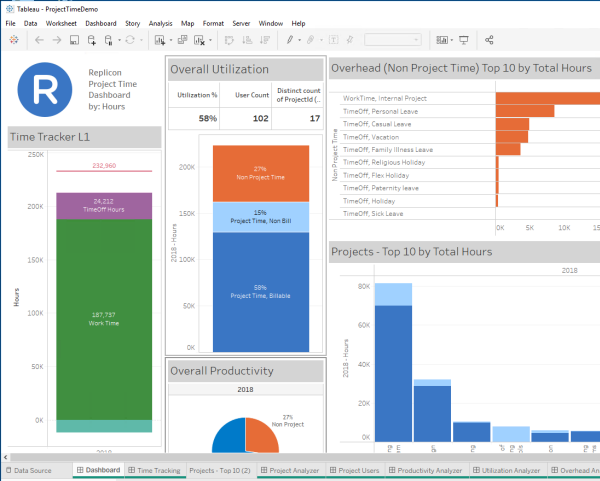
Globally integrated compliance supports multi-faceted international billing by using AI-driven time intelligence, which also simplifies resource forecasting, payroll, project tracking, and overall project management. It is an essential tool for corporations with large remote teams or intricate billing mechanisms.
Features:
-
Smart time capture with time approvals done via AI
-
Enforcement of policies through configurable workflows
-
Time tracking for projects, payroll, and resource planning
Pros:
-
Accommodates complex enterprise requirements and big teams
-
Strategic governance and compliance features that are exceptionally powerful
-
Can be changed to fit intricate business frameworks
Cons:
-
Overpriced for SMBs
May need support to onboard and configure the system
Price:
-
Pricing starts from $6 per month.
5. Monitask – Best Budget-Friendly Time Tracker with Monitoring
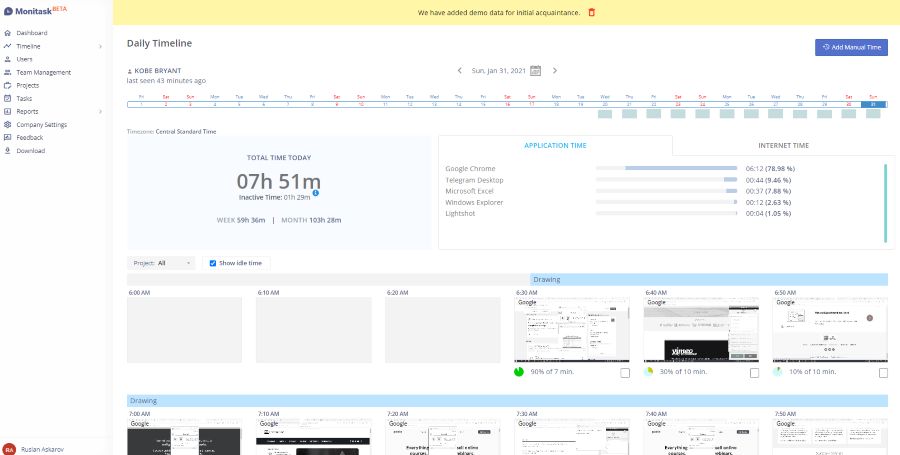
Monitask is a lightweight but powerful time-tracking tool that features employee monitoring. It captures the time, screenshots, activity levels, and application usage, which may be useful for businesses needing a basic productivity tracker at a lower cost. It works great for startups and remote teams.
Features:
-
Time tracking with periodic screenshots and activity monitoring
-
Real-time dashboard and reporting
-
Remote employee oversight support
Pros:
-
Basic features are easy to implement and cost effective
-
Effective for remote worker oversight
-
Provides basic productivity measurement tools
Cons:
-
Ineffective for comprehensive project tracking
-
Limited to no advanced integrations and automation tools
Price:
-
Starting from $4.99/month per user, billed annually
7. Challenges In The Best Online Time Tracking App & Software

1. Inaccurate And Fraudulent Time Entries
Inaccurate entries may happen because of human blunders with the use of online time tracking software, or may be the result of a dishonest practice known as buddy punching. With no sufficient authority and system, these mistakes may cause erroneous billing as well as payroll problems.
2. Manual Data Entry And Errors
A significant number of time-tracking systems need some sort of manual work to be done, which could cause some errors and discrepancies to arise. Such inaccuracies caused by incorrectly entered hours or mislabeling can lower the precision of data and consequently may cause delays or ineffectiveness of keeping the time records. Also, you can use a dedicated data entry software to ensure efficiency in the entire data entry process.
3. Difficulty Tracking Mobile Workers
For remote or mobile workers, tracking their time can be difficult, especially if they tend to work from multiple locations or outside the office. This requires time-tracking software that helps employees record hours while on the go, even when their connectivity is limited.
4. Lack of Project-Specific Insights
Some tools for time tracking can be lacking the features that allow for specific deep tracking of projects, and as a result, it appears impossible for the managers to know how the time is spent on different tasks. Without enough information, inefficient resource allocation, as well as poor overall project management, can be the result.
5. Compliance With Labor Laws
Adhering to local laws concerning labor may be a problem when using online time tracking systems. The systems must measure working hours, overtime, and breaks accurately to avoid legal problems regarding labor rights and standards.
8. Benefits Of The Best Time Tracking Software
1. Improved Production
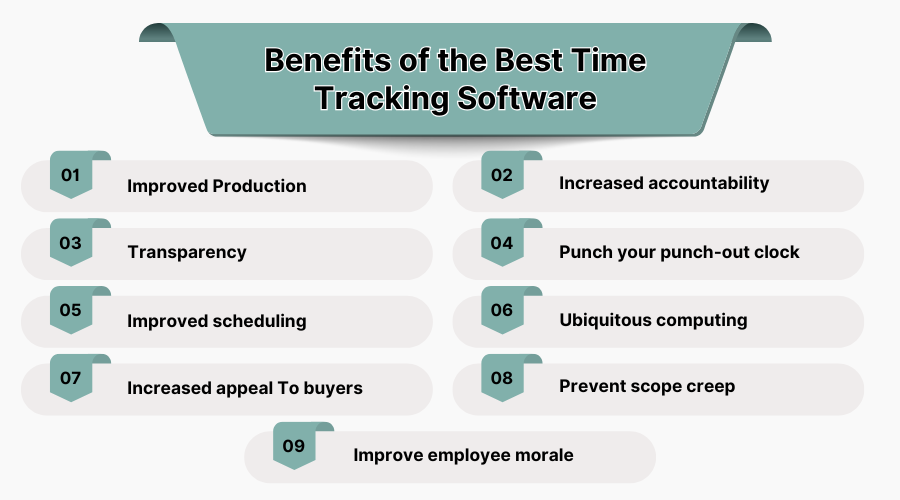
Employees are able to manage their time efficiently and thus boost productivity by focusing on every single task because of time tracking systems. Businesses also receive an improvement in workflow and task completion efficiency as time tracking systems provide valuable insight into how time is utilized by employees.
2. Increased Accountability
Efficiently monitoring work hours and the completion of tasks increases the employees’ sense of responsibility, which improves the quality of work done. The software for time tracking fosters accountability and responsibility as workers know there are deadlines to be met, which guarantees that they perform their share of the work.
3. Transparency
Time tracking software gives managers the bonus of having accurate insights into how much time is devoted to what tasks at hand. These insights promote transparency since employees can no longer falsify project progress, enabling managers to ensure resources are allocated efficiently as well as set fair expectations regarding the team’s performance.
4. Automate Your Time Clock System
Time tracking software improves accuracy and convenience for both employees and employers regarding attendance. Relying on punch-in systems can be inefficient due to the system’s possibility of having errors, unlike time tracking software that automates time entries accurately, so managing employee attendance is easier. You can use a workflow automation software to efficiently manage your team’s productivity.
5. Improved Scheduling
Automatic time tracking systems give managers an edge since they are now able to create better schedules by seeing how long tasks generally take. This limits overbooking, which makes sure that the right person is assigned to the right job at the right time, preventing resources from being wasted.
6. Ubiquitous Computing
An employee can use a computer or mobile device to log times using cloud-based time tracking software. This is useful for remote employees and multi-site businesses because time logs can be accessed in real time, and manual timesheets are eliminated.
7. Increased Appeal to Buyers
For service-based businesses, tracking time accurately translates to proper billing. Clients feel good when they receive reports justifying the time spent on their projects. This builds trust and improves client retention.
8. Prevent Scope Creep
Time tracking software allows scope creep to be controlled with precise time spent on tasks. Managers are able to track progress and adjust anticipations, which ensures tasks are completed within the timeframe and budget.
9. Improve Employee Morale
By giving a productive timesheet and recognizing output, employees' morale is boosted with the help of automated time tracking software. It ensures fairness in compensation, which makes employees more motivated and satisfied with their jobs.
9. Criteria For Selecting The Right Time Tracking App
- Ease of Use: The app must be intuitive so users can navigate it with ease.
- Compatibility: Make sure the software integrates with the tools and systems you already have.
- Mobile Accessibility: Pick a time-tracking application that can be used on mobile phones.
- Customization: Seek functionalities that can be modified to suit your business’s requirements.
- Reporting and Analytics: Choose the tool that provides thorough reporting and analysis as needed.
- Collaboration Features: The application needs to adequately facilitate team communication and collaboration.
- Pricing: Look for an app that you can afford while giving you the needed functionalities.
10. Conclusion
In-depth reviews and comparisons of various time-tracking software are provided by SaaS Adviser for the use of businesses seeking to enhance productivity and improve time management. Select a software suitable for your business and increase your team’s efficiency today.
11. What is Time Tracking Software?
The principle definition of tracking software is that it enables users to precisely measure the amount of time a person or group spends on certain activities, projects, or events. Users are capable of monitoring the working hours in real time, which improves billing accuracy, productivity, and efficiency.
Time tracking software is available at every level of complexity, from basic time capture functionalities to sophisticated applications with reporting, task and issue tracking, and payroll services. These tools are used by all types of companies regardless of size, freelancers, and remote workers to better manage time, optimize workflows, and invoice accurately.
