
Best Employee Monitoring Software in
Are you looking for Employee Monitoring Software for your Business in ? SaaS Adviser brings you the best Employee Monitoring Software to ease your worries. In order to make your work smooth and swift, SaaS Adviser has compiled a list of the best software available. Compare the Best software features, pricing, free demo, and trial to select the best Employee Monitoring Software for your organization.
.jpg "Shubham") Researched and Written by Shubham
Researched and Written by Shubham
Top 3 Featured Softwares


List of Top Employee Monitoring Software
Get Free Consultation

Checkr

Employee Background Screening for Companies
What is Checkr? Checkr is a cloud-based background screening platform designed to help businesses hire faster and more confidently. It uses modern technology, automation, and AI...
View Profile
Rivermate
Rivermate: Global HR and Employer of Record Platform
What is Rivermate?Rivermate is a global Employer of Record (EOR) and HR management platform that enables companies to hire, manage, and pay employees and contractors in multiple co...
View Profile

Table of Content
Find The Best Employee Monitoring Software
Employee tracking software enables companies to follow how their employees utilize their work time. It displays the applications used, websites visited, and the time spent on tasks. This allows managers to comprehend work patterns, optimize productivity, and enforce compliance with company policies.
It enables remote teams to monitor progress from multiple locations, thus facilitating remote work. If you want time tracking or screenshot capture, you need to understand your requirements before picking a tool. This article will discuss what this software does and what its benefits are to your business.
1. Latest Market Trends in Employee Monitoring Software
The Employee Monitoring Software Market was valued at USD 627.93 Million in 2023 and is projected to reach USD 1,729.34 Million by 2031, growing at a CAGR of 11.10% from 2024 to 2031.
-
AI And Machine Learning
Now, employee monitoring tools have incorporated AI and Machine Learning to recognize patterns, anomalies, and behavior forecasts. These technologies aid in automating productivity assessments, marking abnormal activity, and providing suggestions. AI contributes to measuring task completion by improving categorization, making smarter forecasting decisions, and enhancing accuracy in employee performance reporting. For more information you can visit our guide on How to Choose the Right Machine Learning Software in USA.
-
Productivity Scoring
Self-sufficient employees are now divided into productivity levels, which modern systems set based on time spent on activities, completed tasks, and behavioral data. These measures allow managers to assess efficiency without controlling every minute. With productivity scoring, transparency is established which incentivizes employees to alter their workflows and structured accountability enhances performance over time.
-
Face Recognition
Certain applications now provide face recognition capabilities for biometric logins and attendance that comes with an added advantage of capturing user face pictures at remote locations. This strengthens security and authenticates user identity during remote engagements. It mitigates proxy logins, reinforces accountability, and fosters compliance in sensitive work contexts where precision and secure access are essential.
-
Gen AI
Empower AI systems to automatically detail summaries from reports and employee activities as well as generate employee summaries. This lessens the administrative burden on managers as well as simplifies working with the data. Gen AI aids in drafting communication and trend forecasting, as well as automating feedback and other routine tasks for remote and hybrid teams..
-
Privacy-First Focus
Monitoring tools are now enhanced with privacy features such as employee consent, opt-in access control, and reporting without attribution which evolve with data protection regulations. An approach that prioritizes privacy helps maintain trust, legally protect a business, and facilitate active performance monitoring without infringing on boundaries or damaging employee confidence.
-
Mobile Accessibility
There are enhancements in the mobile compatibility of performance monitoring software, which now allow managers to check dashboards, adjust alerts, and control Watching over Everything from a distance. Employees are also able to view their personal performance metrics. With mobile devices, privacy is maintained while access promotes flexibility, especially for distributed teams.
2. How To Choose The Right Employee Monitoring Software For Your Business
-
Identify Your Needs
Reflect on whether you want to track time, activity, productivity, or security. Also consider the nature of your team—remote, hybrid or in-office. Meeting these objectives allows you to select precise software features that suit your organizational needs and industry-specific compliance regulations.
-
Evaluate Ease of Use
For both employees and managers, the software structure should have a clean interface. Poor adoption can stem from overly intricate systems. Intuitive dashboards accompanied by seamless navigation and streamlined setup foster positive onboarding and regular engagement and reduce staff resistance.
-
Check Compatibility And Scalability
Check how well the system works with your current software tools such as HRMS, project management, and CRM systems. Additionally, examine the future scope of company growth. The software should effortlessly accommodate team size expansions or shifts in work models.
-
Prioritize Security And Compliance
Providing audit logs, role-based access, and employee data encryption guarantees the prevention of compliance gaps. Data breaches are avoided while meeting local labor and privacy laws.
-
Consider Customization And Reporting
Focus on systems that allow customization of dashboards, workflows, and reporting to meet your organizational needs. Ensured customization in addition to advanced reporting capabilities provides automated performance insights essential for process optimization and strategic decision-making during evaluations, eliminating the need for manual tracking.
-
Evaluate Customer Support And Training
Training and support must be reliable for the platform to be implemented successfully. Look for these vendors who provide live support, help centers, training videos, and onboarding assistance. You can use customer support software for the same.
3. Conclusion
Monitoring employees helps augment productivity and scale operations while keeping data security needs in consideration. SaaS Adviser compiles the best tools with comprehensive features, reviews, and pricing to streamline selection for comparison.
4. Related Articles of Best Employee Monitoring Software
5. Challenges In Best Employee Monitoring Software
-
Employee Privacy Concerns
Software monitoring can be a big problem if it keystroke logs, captures screens, or collects data on personal gadget activities due to privacy concerns. In the absence of clear limits, consent, and boundaries, employees may feel uncomfortable, which could lead to dissatisfaction and stress. Moreover, legal issues may arise if monitoring policies are not effectively communicated or enforced. Integrating an Employee Advocacy Platform can help balance transparency and engagement by allowing employees to actively participate in sharing and promoting company initiatives while respecting privacy boundaries.
-
Trust And Transparency
If monitoring is put in place without an explanation, it can create feelings of distrust, which can negatively impact morale. Data collected needs to clearly communicate purpose and usage to employees while rationale on what information is provided, tracked, and controlled is essential to trust. Failure in covering this area can damage relationships, fostering a culture of fear instead of accountability or target-focused performance.
-
Over-Reliance On Metrics
Overemphasis on productivity can become counterproductive due to the amount of time taken to achieve outputs, as screen time does not equate to meaningful work. The issue arises when human judgments are replaced with software data. Assumptions based on time logs or patterns of software usage need to be avoided by balancing quantitative metrics with meaningful qualitative performance evaluations. Integrating an Employee Reward Program ensures that recognition and incentives are based on both measurable results and quality contributions, promoting a more balanced and fair evaluation system.
-
Potential For Misuse
Surveillance technologies make it easy to capture sensitive information regarding workers. In the absence of controls, management and IT personnel might misuse this information. Data could also be captured and used inappropriately to make decisions about evaluating employees. Access and policy frameworks must be put in place to safeguard the ethical, legal, and responsible use of employees management software.
-
Technological Challenges
The installation and the maintenance of monitoring software may have problems such as high expense, integration with current systems, or other adjacent services. Employees may also permanently experience interruptions in service or slow system throughput. These issues require active monitoring and responsive information technologies support, as well as employee experience software with streamlined interfaces for all to ease cross-team collaborations.
6. Features Of Best Employee Monitoring Software
-
Time Tracking
Tracking time helps monitoring employees by allowing them to record the time spent per task, project, or breaks. It gives clear attendance and working hour insights including overtime. Unlike billing logs, time logs help with payroll responsibilities, project planning, and performance reviews in a controlled manner which is beneficial for remote or hybrid work models. You can use time tracking software for the same.
-
Activity Monitoring
This activity monitoring feature tracks logged computer work through applications, websites visited, and time spent idle during work hours. This allows managers to understand daily habits and software use patterns. Activity data guarantees employees stay on tasks and show efficiency in assigned jobs, while also revealing inefficiencies, distractions, or procrastination that slows down productivity or timely completion of projects.
-
Productivity Analysis
These tools also enhance the evaluation of productivity by also evaluating how much time is allocated to productive work compared to non-productive work. By use of custom categorized productivity, these tools generate reports capturing activities highlighting trends, work habits, and improvement opportunities. You can use productivity software for better efficiency.
-
Screen Recording And Snapshots
Manned supervision can result in screenshots taken at regular intervals or full session recording of desktops. With this, a visual description of the activity log is accrued assisting with compliance, training, and behavioral audits. This is particularly helpful within the high security settings or when reviewing work done in client-servicing roles and remote work task verification.
-
Keystroke Logging
Monitors typically log and scrutinize input keystrokes for the purposes of ensuring compliance with procedures, progress, or productivity. Though controversial, it aids in observing task completion and probing for insider threats when managed properly. It requires a clear policy on privacy safeguards alongside transparency to be legally and ethically responsive in sensitive workplaces.
-
Integration With Project Management Tools
Monitoring of employees is especially done with software that incorporates other systems like Trello or Asana. Such integration merges time with tasks done providing a holistic basis for evaluating performance. It accomplishes real-time synchronization, efficient work engagements, and minimization of manual entries.
-
Alerts And Notifications
Pre-set custom alerts trigger managers in case of unusual behavior such as long periods of inactivity, site access beyond what is permitted, or external device usage. Such notifications enhance response rates to possible risks or violations of company policy. They can also serve as reminder alerts or achievement of set targets enhancing oversight without close supervision.
-
Data Security And Privacy Controls
Security systems focus on safeguarding sensitive employee information as well as preventing unauthorized access to the systems. Includes encryption, scoped use audits, role-based access, audit trail, and compliance settings among proper security. Such activities ensure the sensitive data of activities is protected ethically, securely locked, and accessed only under defined policies by authorized users. You can use cloud security software for the same.
7. What is Employee Monitoring Software?
Employee monitoring software is an application that assists employers in verifying the time that employees spend on various tasks within office premises. It has the capability of recording computer activities, internet browsing, application usage, and time spent working on various tasks. When integrated with the best HR database software, some tools take periodic screenshots and monitor mouse and keyboard activity over time.
This allows achieving better productivity and effective supervision as employees will be obligated to observe company policies. Such software is applicable both at the office and within remote teams. Employers are provided with detailed reports enabling the fostering of constructive work habits and resolving problems swiftly. Integrating Employer of Record Software ensures that these practices are applied consistently across global or remote teams, maintaining compliance while supporting effective workforce management.
8. Five Top Employee Monitoring Software In USA
1. Terryberry – Best for Recognition-Based Performance Monitoring
Terryberry is not a traditional employee surveillance tool but focuses on boosting workplace engagement by tracking recognition, goals, and performance outcomes. It's perfect for organizations that value motivation and culture alongside productivity.
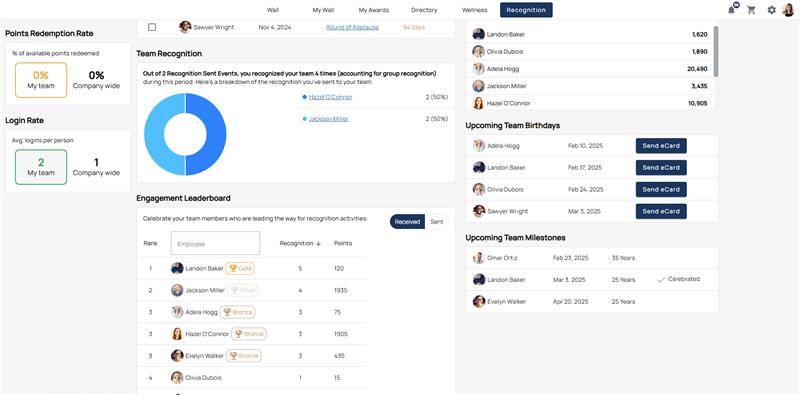
Features:
-
Customizable recognition and rewards system
-
Performance goal tracking with built-in progress tools
-
Manager and peer-to-peer recognition tracking
-
Employee engagement surveys and feedback analytics
-
Comprehensive reporting on performance-based recognition metrics
Pros:
✔️ Encourages employee engagement software through recognitionIn any organization, one of the threats that is ever-present is the internal attack of data misuse. These systems track permissions, accesses to files, and unusual activities like large file copying and sensitive folder access after hours. Alerts initiate prior action with IT before irreversible actions are executed. Integrating an Employee Incentive Program can encourage employees to adhere to security protocols, rewarding compliance and fostering a culture of responsibility alongside monitoring.
✔️ Provides HR-friendly performance insights
✔️ Fosters a culture of appreciation and positive reinforcement
Cons:
❌ Not suitable for task-level or real-time tracking
❌ Doesn’t support screen or activity monitoring
Pricing:
Custom pricing; varies based on modules and organization size
2. Connecteam – Best for Mobile Teams and Task Monitoring
Connecteam is a flexible employee management solution tailored for mobile-first companies. It combines communication, task tracking, and time logging, making it ideal for managing remote field staff or distributed teams.
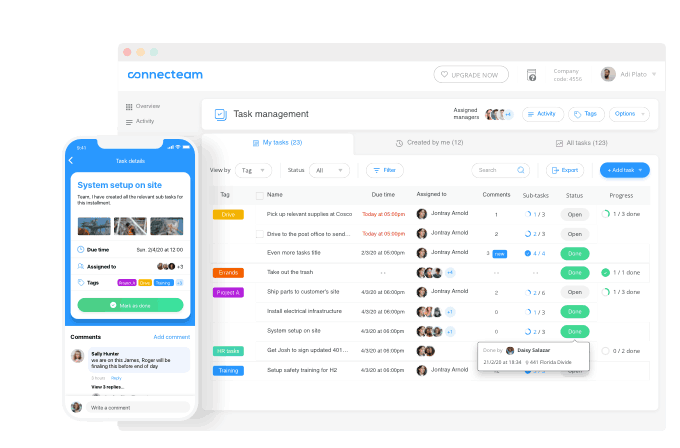
Features:
-
GPS-based time clock and location tracking
-
Digital checklists and workflow automation
-
Internal chat, announcements, and surveys
-
Daily logs, shift planning, and job scheduling
-
Customizable forms for task submissions and audits
Pros:
✔️ Great for managing remote or field-based teams
✔️ Combines time, task, and communication in one tool
✔️ Easy-to-use mobile interface for employees on the go
Cons:
❌ Limited monitoring of desktop usage or screen time
❌ Reporting capabilities may lack depth on basic plans
Pricing:
Free for up to 10 users; premium starts at $29/month (for 30 users)
3. BambooHR – Best for HR-Driven Employee Performance Monitoring
BambooHR is a human resource management software that operates in the cloud and focuses primarily on employee records, performance evaluations, and engagement. It does not provide live monitoring which can be a downside, but it’s perfect for tracking progress over time through structured feedback.

Features:
-
Performance management with goal setting and feedback
-
Self-assessment and manager evaluation workflows
-
Centralized employee profiles and role tracking
-
Onboarding, offboarding, and document management
-
Integration with payroll and applicant tracking
Pros:
✔️ Excellent for long-term HR-led employee tracking
✔️ Focused on employee development, not just oversight
✔️ Helps automate performance review processes
Cons:
❌ Doesn’t support screen monitoring or activity tracking
❌ Not designed for real-time productivity management
Pricing:
Starts at approximately $6 per user/month; custom pricing based on features selected
4. Hubstaff – Best for Remote Productivity and Time Monitoring
Hubstaff is known as one of the top remote team monitoring tools. Freelancers, small businesses, and enterprises can use Hubstaff because of its real-time productivity insights, screen capture tools, and detailed timesheets.
_11zon.png)
Features:
-
Automatic time tracking with idle time detection
-
Optional screenshot capture at custom intervals
-
Activity tracking via keyboard and mouse movements
-
GPS and geofencing for location-based teams
-
Project budgeting, invoicing, and payroll features
Pros:
✔️ Detailed productivity analytics with visual proof of work
✔️ Trusted tool for managing remote freelancers and contractors
✔️ Supports multiple integrations with project tools
Cons:
❌ May feel invasive depending on team culture
❌ Internet required for full functionality
Pricing:
Starts at $7 per user/month (Basic); custom pricing for enterprise
5. Zoho Workplace – Best for Collaboration and Light Work Monitoring
Zoho Workplace is a complete suite for office collaboration with light employee monitoring features. It's ideal for teams focused on productivity through internal tools like email, documents, and shared calendars rather than direct surveillance.
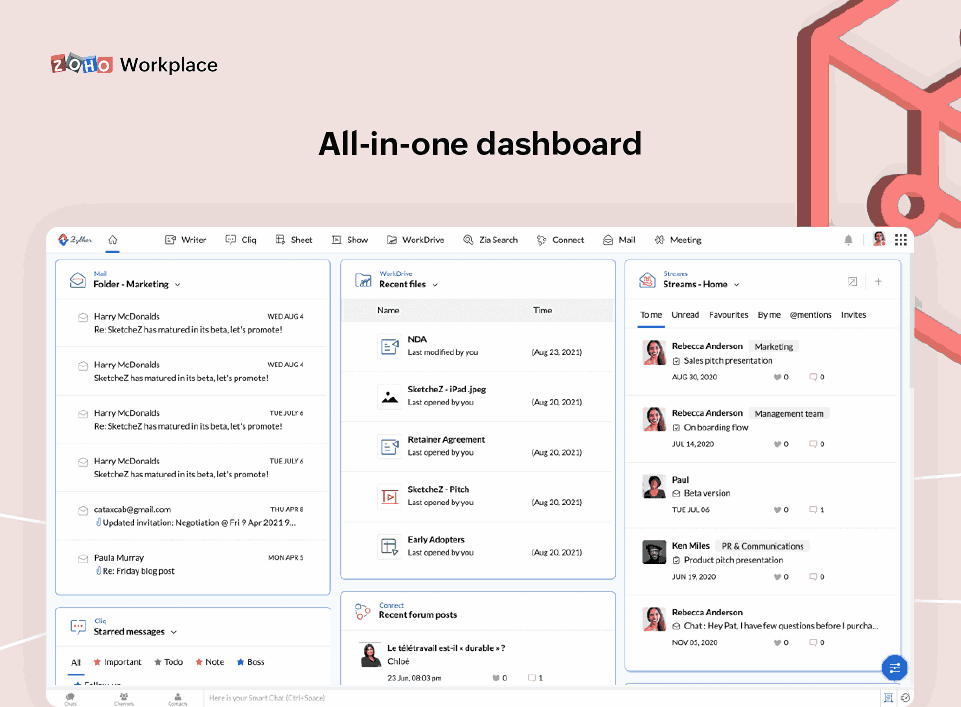
Features:
-
Document and email tracking within the Zoho ecosystem
-
Shared calendars, group chats, and meeting tools
-
Task assignments and status updates
-
Integration with Zoho CRM, Projects, and People
-
Basic productivity tracking through usage logs
Pros:
✔️ Perfect for internal team collaboration
✔️ Integrates with other Zoho business tools
✔️ Affordable and scalable for small businesses
Cons:
❌ Lacks deep monitoring features like screenshots or activity logs
❌ Not ideal for high-security or policy-controlled environments
Pricing:
Starts at $3 per user/month (Standard); other plans available based on app needs
9. Benefits of The Best Employee Monitoring Software
-
Increased Productivity
The use of employee monitoring systems assists in determining how time is utilized in the workplace. Application access, idle periods, and task achievement rates can be viewed by managers. Visibility aids in the managing of distractions and goal setting among teams, which increases work output without the need for micromanagement. Pairing this with Employee Scheduling Software ensures that workloads and shifts are organized efficiently, further optimizing productivity and maintaining balanced work schedules.
-
Enhanced Security
The systems enhance security by preventing information theft, malware attacks, and unauthorized access. Organizations can monitor user activities and track website visits, file transfers, and USB usage, enabling them to identify risky behavior early and protect sensitive business data.
-
Prevention of Insider Threats
In any organization, one of the threats that is ever-present is the internal attack of data misuse. These systems track permissions, accesses to files, and unusual activities like large file copying and sensitive folder access after hours. Alerts initiate prior action with IT before irreversible actions are executed. Integrating an Employee Incentive Program can encourage employees to adhere to security protocols, rewarding compliance and fostering a culture of responsibility alongside monitoring.
-
Time And Resource Management
Time tracking tools assist in projects and breaks verification enabling managers know time allocated towards various tasks. The aids in ensuring appropriate workloads are assigned, accurate task planning is done and overall company resources are not underutilized.
-
Remote Employee Monitoring
In this age of digitalization, remote working has become the new norm. Employers need to be alerted in real-time so that they may be kept in the loop. With the help of monitoring software, businesses can gain information regarding login and logoff times, productivity, and online activities. This goes a long way in enhancing collaboration among teams regardless of their geographical locations.
-
Employee Accountability
Organization of work is underpinned by the increased use of employee surveillance. When employees know that they are being ‘watched’, they are likely to stay on task and meet deadlines. Reporting on employee activity fosters an organizational culture where performance and non-performance can be measured. Integrating Employee Onboarding Software ensures that new hires understand expectations from day one and are guided through monitoring policies, helping them adapt smoothly to the company culture.
-
Protection of Company Reputation
Documents being leaked, x-rated behavior, or milestone documents being delayed can severely tarnish a company’s public persona. These activities can be avoided through employee monitoring which helps regulate internal conduct, ensures policies are adhered to, mitigates exposure, and preventable scandals.
-
Employee Training And Development
Surveillance technologies show ways of performing tasks inefficiently as well as ones which are seldom performed. This information can inform training and upskilling sessions designed to address gaps for the employees so that they can perform their roles with more confidence, agility, and commitment.
-
Addressing Insider Threats
In the event of a security or misuse breach, monitoring systems provide detailed and comprehensive logs alongside reports highlighting activities. This diagnostic capability provides insight into what occurred, when it occurred, and who was involved to aid investigations and anticipate and avert such occurrences in the future. Integrating Employee Referral Software allows HR to maintain oversight of referral activities while ensuring that data security protocols are followed throughout the hiring process.
10. Criteria for Selecting The Right Employee Monitoring Software
To select employee monitoring software in the USA, consider your company’s workforce size, remote work structure, and applicable privacy legislations. To start, consider the software's compliance with local laws concerning data protection and privacy. It is paramount to have employees’ work time, screenshots, website, and apps usage recorded.
The software needs to be user-friendly and compatible with desktops and laptops. Reports and alerts should be automated with options to customize for precision. The best software also helps leaders analyze recorded insights into work patterns. Select software that achieves an equitable level of monitoring and trust with employees. Integrating Employee Recognition Software ensures that while monitoring occurs, positive performance is consistently acknowledged, fostering motivation and a culture of appreciation.
