
Best Education Software in
Are you looking for Education Software for your Business in ? SaaS Adviser brings you the best Education Software to ease your worries. In order to make your work smooth and swift, SaaS Adviser has compiled a list of the best software available. Compare the Best software features, pricing, free demo, and trial to select the best Education Software for your organization.
 Researched and Written by Akash Patel
Top 3 Featured Softwares


List of Top Education Software

Get Free Consultation


EDLIGO Talent Analytics

By Education4sight
Check How EDLIGO Talent Analytics can help to automate Indian Business. SaaSAdviser provide their list of features, pricing, Free demo and Comparison with the best alternative
View Profile

AssetWhere
By Education Horizons
Check How AssetWhere can help to automate Indian Business. SaaSAdviser provide their list of features, pricing, Free demo and Comparison with the best alternative
View Profile

MarkersPro
Secure, Flexible & All-in-One School Management SoftwareMarkersPro is a cloud-based school management system to automate and streamlines all processes on a single platform with specialized modules to meet your needs
View Profile

myTask2do
Team and task management simplified.myTask2do is a comprehensive task and project management software developed by iXora Solution, designed to streamline workflows, enhance productivity, and facilitate seamless team ...
View Profile

Codedamn Create
BUILD AND SELL INTERACTIVE CODING COURSESWhat is Codedamn Create? Codedamn Create is a cloud-based platform designed to help developers, students, and tech enthusiasts build and deploy full-stack web applications...
View Profile

HubSpot Academy
GROW YOUR BUSINESSHubSpot Academy is the worldwide leader in free online training for inbound advertising, sales, and customer service professionals. They specialize in specific accreditations, ...
View Profile

Cloud Academy
Empower your teams with Skills Readiness to learn, practice, & master everything multi-cloudCloud Academy is the best way to close tech talent gaps, providing the simplest AI-assisted training solution that enables relevant, customized upskilling at scale. Through hands-o...
View Profile

LinkedIn Learning
By LinkedInLinkedIn Learning, the leading online mastering platform, allows groups to grow learner engagement and expand the capabilities they want nowadays and the following day. With over 1...
View Profile

CentraHub Edu
Acquire | Fee | AcademiaCentraHub EDU is a multi-functional, cloud-based education management system designed particularly for schools, colleges, and institutions.
View Profile

Blooket
Level up classroom engagementWhat is Blooket?Blooket is an interactive, web-based game-based learning platform that combines educational content with fun, engaging quiz-style gameplay tailored for students...
View Profile

Course Hero
Find materials for your course at your school
What is Course Hero?An online learning platform called Course Hero provides users with access to study materials tailored to their specific course, including notes, practic...
View Profile

Saba Cloud
Cornerstone Opportunity MarketplaceWhat is Saba Cloud? Saba Cloud is a comprehensive talent management software designed to help organizations manage learning, performance, engagement, and development in one uni...
View Profile

Follett Aspen SIS
A flexible SIS that grows with youA cloud-based technology called Aspen SIS is used to store and manage student data. It offers ways to store information, including class schedules, school activities, eligibility f...
View Profile

NoRedInk
Build better writers
What is NoRedInk? NoRedInk is a U.S.-based online platform that helps students strengthen their writing and grammar skills through personalized, adaptive learning. Popular...
View Profile

Classplus
Are you ready to be a Solopreneur?Classplus was born in 2018 to essentially embody the future; the future being SaaS, online/hybrid schooling, and a completely new financial system. Thus, our effort has always ...
View Profile

eGurukul
Welcome to India's leading PG coaching platformThis changed into made feasible with the help of the Original Gurus and a devoted team that in no way stops giving their nice.Foster a culture of genuine studying and care, cen...
View Profile

First In Math
Why it worksOnline Program is a unique academic device that offers college students with mathematics capabilities that closing a life-time. By giving them a amusing, yet powerful way to pr...
View Profile
.png "Prep27")
Prep27
Best AI based PTE,IELTS website to practicePrep27: Your All-in-One Solution for PTE & CD-IELTS Preparation. Experience tailored learning, advanced AI features, and realistic simulations on a single platform. Achieve suc...
View Profile

JPG TO TEXT
JPG to text converterJpgtotext.com is a web tool that converts text in images to editable text. Users upload images, and the platform uses OCR technology to extract and convert the text, making it easi...
View Profile

Education Management Software
PARTUM Your Perfect Business PartnerSchools need comprehensive and reliable software solutions to effectively manage and organize their school operations. That’s why Partum Softwares provides feature-...
View Profile

Table of Content
Find The Best Education Software
Computer assisted instruction also known as ‘CAI’ or more broadly educational software is an important technology in contemporary educational digitalization. It's useful both in K-12 schooling and in higher education because the appropriate software can facilitate learning through process simplifications along with improvement in efficiency.
Schools and universities along with companies use these softwares in order to improve retention and engagement of learners as well as personalized training programs offered online and offline.
When learning software is carefully selected, personalization in tutoring can be greatly enhanced which results in better results. Allow yourself to be exposed to some of the best programs in the world designed primarily for the students' achievements.
1. Challenges in Education Software:
1. Accessibility and Digital Divide – The lack of uniform access to tools and resources creates disparity learning gaps, particularly hindering students in digitally remote or economically disadvantaged regions from fully leveraging educational technologies.
2. Data Privacy and Security – Saving student information on online education platforms is fraught with challenges such as the threat of data breaches and potential unauthorized access.
3. Budget Constraints - Limited educational technology in certain schools is a direct result of their inability to afford premium software and licensing costs.
2. Future Direction of Educational Computer Software
1. Hybrid Learning Models
Blended learning is the integration of face-to-face and online learning which allows convenience to the students and teachers. The cloud-based infrastructure and virtual classrooms make it possible to offer individualized teaching where learners can learn at any time and place.
2. AI and ML Advancements
AI and machine learning advance adaptive learning, automate evaluations, and provide analytical insights. These technologies tailor education by monitoring students’ activities and recommending specific study programs. For example, you can use an AI writing assistant software to help create assignments and get homework ideas for students.
3. Growth in Educational Technology Startups
Innovation is now more affordable, scalable, and user-friendly than ever due to the creativity of EdTech startups. The integration of cloud technology alongside AI and learning games is revolutionizing the ways learners and instructors engage with educational materials.
4. Greater Focus on STEM Education
Coding classes, virtual laboratories, as well as AI-based simulation lessons are used to aid educational software which focus on STEM centered subjects. Such tools enable students to acquire essential problem solving and technical skills for their prospective careers.
3. List of Top 5 Educational Software in USA:
1. Canvas: The LMS for Easy Learning and Productivity
Canvas is a comprehensive Learning Management System (LMS) that facilitates teaching and learning in educational institutions and businesses. It provides tools for the creation, management, and delivery of educational content.
Features:
- Course creation and management
- Assignment distribution and grading
- Communication tools (discussion boards, messaging)
- Integration with various third-party applications
- Mobile accessibility
Pros:
- Robust feature set suitable for diverse educational needs
- Extensive customization and integration capabilities
- Strong community support and regular updates
Cons:
- Steeper learning curve for new users
- Some users report the interface can be overwhelming
Pricing:
-
Canvas operates on a subscription model, with pricing varying based on institution size and specific requirements. A free version with limited features is available for individual teachers.
2. Wisenet: Cloud-Based Educational App
Wisenet is a cloud-based educational management system designed to automate administrative functions for training and educational institutions, enhancing overall productivity and compliance.
Features:
- Student management
- Course scheduling
- Compliance tracking
- Communication tools
- Reporting and analytics
Pros:
- Automates administrative processes, reducing manual workload
- Ensures compliance with regulatory requirements
- Accessible from any device with internet connectivity
Cons:
- May require training for staff to utilize all features effectively
- Pricing details are not publicly disclosed, necessitating direct contact for quotes
Pricing:
-
Pricing is customized based on the organization's size and needs. Interested parties should contact Wisenet directly for a quote.
3. Google Classroom: Best for K-12 and Higher Education
Google Classroom is a free web-based application that integrates other Google tools to enable paperless communication between teachers and students. It is commonplace within K-12 and higher education.
Features:
- Assignment creation and distribution
- Real-time feedback and grading
- Integration with Google Docs, Sheets, and Slides
- Classroom collaboration through Google Meet
- Mobile app accessibility
Pros:
- User-friendly and intuitive interface
- Seamless integration with Google Workspace
- Cost-effective solution for educational institutions
Cons:
- Limited customization and advanced LMS features
- Dependent on internet connectivity
Pricing:
-
Google Classroom is free for educational institutions. Additional features are available through Google Workspace for Education, with plans starting at $3 per student per year.
4. Kahoot!: Best for Gamified Learning and Engagement
Kahoot! is a game-based learning platform with tools that enable anyone to create, share and play learning games or trivia quizzes in a matter of minutes. It is intended to increase student engagement.
Features:
- Quiz creation and customization
- Live games and challenges
- Integration with various educational tools
- Analytics and reporting
- Mobile app for on-the-go learning
Pros:
- Highly engaging and interactive for students
- Encourages participation through gamification
- Easy to use for both teachers and students
Cons:
- Limited depth in content delivery
- Free version has restricted features
Pricing:
-
Free basic version available. Premium plans start at $3 per user per month, offering advanced features and functionalities.
5. Moodle: Computer Software for Learning Management
Moodle is an open-source learning platform that provides educators with a single safe, secure, and integrated system to create customized learning environments, making it easier to foster learning.
Features:
- Course management
- Progress tracking
- Collaborative tools and activities
- Customizable site design and layout
- Plugin availability for extended functionalities
Pros:
- Highly customizable and scalable
- Strong community support
- Cost-effective with no licensing fees
Cons:
- Requires technical expertise for setup and maintenance
- User interface may seem outdated compared to other platforms
Pricing:
-
Moodle is free to download and use. However, costs may arise from hosting, customization, and maintenance services.
4. Features of Software for Education in the USA
1. User-Friendly and Easy UI
Teachers and students can effortlessly navigate an educational program as long as its interface is clearly designed. A well-placed UI avoids obstructions in the learning process, improves the efficiency of learning activities, and accommodates people with diverse levels of technological sophistication.
2. Customized User Experience
Paths to Personalized Learning caters to specific requirements so students can learn at their own pace. AI-enabled content, tailored assessments, and customized interactions make learning more effective and more focused on the needs of the students.
.jpg)
3. Easy to Scale
An institution’s needs advance with its population and the available courses, and the enhancements offered by the EdTech tools in use. Cloud-based solutions guarantee no major infrastructure or systems changes when expanding.
4. Uncluttered Graphics
Clear and uncluttered minimalistic visuals enhance attention and focus while improving their readability. Uninterrupted and precise typography together with color coded sections guarantees a distraction free experience for learners on all kinds of devices.
5. Offline Working
Students can access materials using different devices so long as they have bandwidth. Offline accessibility assists learners in remote settings with limited connectivity by allowing content downloads syncing of progress later.
6. Alerts and Course Updates
Course alerts and notifications are effective tools enabling students and instructors to automatically receive paradigm shifts in schedules, new tasks, or any deadlines. Prompt notifications improve learners' tracking ability while enhancing institutional course control. Communication is smooth and course management is efficient.
5. Cons of Educational Software in the USA
1. Distractions
The availability of internet-enabled devices gives students chances to engage with social media and other non-relevant content. Therefore, self-contained educational technologies require additional features for preventing distractions outside of learners' focus areas.
If not monitored properly, students can misuse technology which may result in low productivity and learning that is not meaningful. Most software has options that are devoid of distractions as well as parental settings; however, controlling the use of technology remains a challenge.
2. Cost
Paying for high-quality educational software often entails subscription fees, purchasing new hardware, and additional training. Some middle and secondary institutions might not have the budget for the initial cost.
Options without charge do exist, however, they may not have certain advanced features or custom support. Additionally, there can be significant costs associated with software updates and access to premium content.
.jpg)
3. Technical Issues
Connectivity issues, software bugs, and network incompatibility may affect learning. There is a need for substantial IT support and infrastructure spending in schools to guarantee smooth software implementation and lesson distraction mitigation. Not every student has access to fast internet, creating equitable learning opportunities.
4. Dependency
Excessive technological reliance tends to overshadow traditional learning techniques, such as hands-on activities or face-to-face interactions. Without sufficient exposure to non-digital interfaces, students struggle with critical thinking and non-digital socialization. While technology enhances learning, excess screen time may hinder student health and social interaction skills.
5. It’s Hard to Choose the Most Suitable Learning Software
Sifting through education program software options is simplified with the number of platforms available. Schools examine compatibility, intuitiveness, and curriculum applicability. A misinformed decision may lead to resource wastage and poor learning outcomes. However, if you have a large education institute, we highly recommend choosing an education ERP software.
6. What is Education Software?
In 2025, the global eLearning market is projected to reach $325 billion. Learning tools designed specifically for educational purposes are categorized under education software. They include learning management systems (LMS), e-learning tools, and other assessment tools.
The aim of these products is to foster active engagement from students, teachers, and institutions by managing educational content, monitoring progress, tracking engagement, and more. For every course, program, and institution, education software custom-tailors to various needs by offering interactivity and simulations alongside real time collaboration features.
Integrating with other software frameworks is essential to work toward a more educational friendly interface, presenting schools and businesses with endless possibilities for distance learning and knowledge management. As technology developments take place, so does the value and ease of accessing quality educational programs.
7. Why is Educational Learning Software Important?
Most engaging and interactive learning software improves the ease of knowledge retrieval and aids in learning by making it more flexible. Educational computer software addresses diverse learning needs with multimedia materials, quizzes, and interactive lessons.
Educational software fosters better communication and collaboration between the students and educators, improving feedback circulation. Educators and corporate businesses integrate program software for educational purposes to optimize training sessions, manage progress, and evaluate performance.
Remote education systems support students in participating in lessons regardless of their location, encouraging the habit of continuous learning. The best practices in educational software development include data security, content customization, and smooth integration capabilities to other systems.
Choosing the right educational software enhances experiences, results, and the retrieval of education and information while boosting overall learning resources accessibility.
8. Pros of Education Software in the USA
Before checking on the best educational software, let’s first understand the benefits.
1. Content Organization and Access
With the use of education software, students and teachers can easily access needed materials because it is electronically centralized. All libraries, study materials, are available in the cloud, and can be segmented in the LSM so students do not have a hard time looking for their materials.
Stand-alone textbooks are gradually being replaced by information systems which improves retention of knowledge. In addition, through streamlined access, teachers do not need to put in extra effort during content updates.
2. Behavior Tracking
With educational software, a teacher can obtain analytics concerning student engagement, attendance, as well as participation. Behavior tracking features help teachers determine students who underperform in a class and target such students with special assistance.
Learning outcomes and classroom management can be improved with the use of the school data. These tools help identify student behavior patterns so they can be intervened proactively.
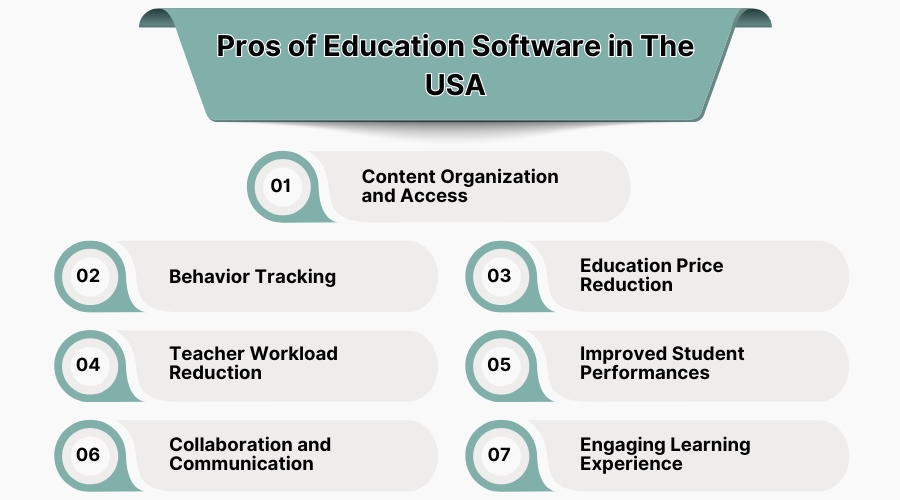
3. Education Price Reduction
Due digital learning tools, printed textbooks, classroom supplies, and even physical infrastructural facilities are made optional. Schools and students are able to save money with the existence of e-books and online courses.
Quality education is being made accessible through budget-friendly or no cost alternatives offered by educational software. There are savings for schools in terms of printing costs while students save from the required materials.
4. Teacher Workload Reduction
Through the educational software, teachers have a simpler time grading, assigning, and tracking attendance thanks to automation features.
AI technologies help with lesson planning and curriculum editing, easing administrative burdens. Teachers spend less time on busywork and paperwork, allowing more time for student engagement and personalized instruction.
5. Improved Student Performances
Students' performance is enhanced by adaptive learning programs that tailor lessons to boost students’ progress. Comprehension and engagement are supported by gamified learning, instant feedback, AI assessments, and skill-building interactive lessons.
Data insights enable educators to shift from a one-size-fits-all approach to personalized instruction suited for learners at different academic levels. Additionally, automated data tracking systems offer lessons in self-analysis where students pinpoint and monitor their own academic milestones. Also, you can track your employees and staff with the help of employee scheduling software.
6. Collaboration and Communication
Education software promotes teachers-students collaboration during and after class. Students get access to virtual classrooms and discussion boards where real-time messaging boosts communication.
Cloud-based applications enable remote collaboration on group assignments, improving cooperation and motivation to learn. Instant feedback provided by instructors and peer-to-peer instruction available among the students foster collaborative learning. Tools for collaborative editing support classroom debates, creating an active participation from the students and making learning enjoyable.
7. Engaging Learning Experience
Incorporating educational software facilitates students learning through videos, quizzes, and virtual experiments putting students in a simulated hands-on engaging environment. Instructional videos offered through the educational learning software helps to incorporate and improve the retention rates of information as content becomes interactive, complex topics get simplified, and motivates learners to become independent.
9. Conclusion:
The new technology improves accessibility, engagement, and efficiency which changes learning for the better. Schools, colleges, and various organizations receive new software solutions that help improve education and collaboration. Check out the link to SaaSAdviser and get the most suitable educational software for your needs. Always stay one step ahead in the world of digital education.
