
What we'll cover
Share with your community!


Get Free Consultation


HubSpot vs. ChatGPT: Choosing the Best Free AI Email Generator for Marketers
 David N. Wilks
Modern email marketing moves too fast for manual drafts. Whether you are running a lean startup or scaling an enterprise enterprise, writing unique copy for dozens of segments can quickly stall your growth.
Enter the AI email generator. These tools help marketers move from a blank page to a finished draft in seconds. However, choosing the right tool is vital. Some platforms generate generic text that requires heavy editing, while others integrate with your existing workflow to deliver personalized, high-converting copy.
This guide breaks down the top tools on the market—specifically HubSpot AI vs. ChatGPT vs. Canva AI—to help you find the best free option for your marketing and sales campaigns.
 Looking for AI Email Generator Software? Check Out TechImply’s Top AI Email Generator Software.
What Is an AI Email Generator and How Does It Work?
An AI email generator is a software tool powered by artificial intelligence—specifically large language models (LLMs) and natural language processing (NLP)—designed to write human-like email copy based on user prompts.
How AI Email Generators Create Professional Emails
These platforms analyze thousands of successful email campaigns to learn patterns in effective messaging. When you supply input data (such as your target audience, campaign goals, and main offer), the email generator AI predicts and arranges the most relevant words to match your requirements. It handles everything from subject lines to clear calls to action (CTAs).
Types of Emails You Can Generate With AI
A modern email AI generator is versatile enough to build a wide range of operational and marketing messages:
- Marketing emails: Product launches, promotional offers, and seasonal discounts.
- Sales emails: Cold outreach, product demo invitations, and pitch decks.
- Newsletters: Curated industry insights, company updates, and educational blog roundups.
- Follow-up emails: Nudges for abandoned shopping carts or checking in with cold sales leads.
- Customer response emails: Automated help desk answers or thank-you responses following a purchase.
Benefits of Using an AI Email Generator for Marketers
- Saves time: Cuts down the time spent staring at a blank screen, allowing you to generate functional first drafts instantly.
- Improves personalization: Lets you quickly tailor specific value propositions to different customer niches without manual writing.
- Creates multiple variations: Generates alternate text layouts and angles, making it simple to execute split-testing (A/B testing) for your campaigns.
- Helps optimize campaigns: Sharpens your subject lines and focus words to improve overall open and click-through rates.
Why AI Email Generators Are Transforming Email Marketing
Using AI for email marketing is no longer just an optional efficiency trick; it has become a central part of competitive campaign strategies.
How AI Helps Marketers Create Better Email Campaigns
Traditional marketing often relies on broad data and static templates. AI changes this by analyzing user performance metrics to adjust tone, structures, and messaging angles. Instead of sending out identical messages to your entire database, you can run hyper-targeted campaigns that speak directly to the user's specific pain points.
AI-Powered Personalization for Higher Engagement
Basic personalization usually stops at inserting a recipient's first name using a dynamic tag (e.g., Hello, {{contact.firstname}}). Advanced AI tools process historical CRM context—such as pages viewed, past purchases, or customer lifecycle stage—to customize the core offer itself. This deeper personalization can directly improve your click-through rates.
The Role of AI in Email Automation and Customer Communication
By connecting AI text generation with automation workflows, platforms can send triggered emails that respond directly to real-time user behavior. For example, if a prospect downloads a whitepaper, an automated system can write and deliver a tailored follow-up message immediately, maintaining active communication without demanding manual effort from your team.
HubSpot AI Email Generator: Features, Benefits, and Limitations
HubSpot has evolved its software suite into an agentic system powered by HubSpot AI (including its Breeze AI agents). Rather than operating as a standalone tool, its writing tools are built directly into the core platform workspace.
What Is HubSpot AI Email Generator?
The HubSpot AI email generator is a native feature found within HubSpot's Marketing Hub and Sales Hub. It is built to create copy directly inside the platform's drag-and-drop email builders, landing page tools, and automated workflows.
[HubSpot Platform Workspace]
└── Smart CRM Data ──> [Built-In Breeze AI] ──> Inline Generated Drafts
Key Features of HubSpot AI Email Generator
- AI email copy creation: Generates full body text, headlines, and calls-to-action using simple slide-out prompt windows.
- Marketing campaign support: Connects your email copy with related marketing assets like landing pages and social media ads.
- CRM integration: Pulls in user attributes from the HubSpot Smart CRM to ensure the context matches your target audience segment.
- Email automation: Inserts AI-generated copy straight into multi-step marketing automation workflows and active sales sequences.
- Personalization: Uses customer traits, active contact lists, and lifecycle stages to write targeted messages automatically.
Pros and Cons of Using HubSpot AI for Email Marketing
Pros:
- Zero friction: There is no need to copy and paste text between external browser tabs; everything happens directly within the email template editor.
- Data awareness: It uses your actual customer data to shape the language and alignment of the email.
- Integrated reporting: You can view your AI-generated email performance metrics alongside your broader business revenue analytics.
Cons:
- Ecosystem dependency: The writing tool is designed specifically for the HubSpot platform; it loses its core workflow advantages if you use a different ESP (Email Service Provider).
- Prompt style: It is optimized primarily for structured business templates, making it less flexible for complex, unstructured creative prose.
ChatGPT Email Generator: Features, Benefits, and Use Cases
OpenAI's ChatGPT is an open-ended conversational tool that has become popular among marketers as a highly flexible ChatGPT email generator.
What Is ChatGPT Email Generator?
Unlike integrated software apps, ChatGPT functions as an unconstrained chat interface. Marketers use it to brainstorm ideas, build detailed campaign frameworks, and write email drafts across different styles and formats.
How ChatGPT Creates Different Types of Emails
By giving the chat prompt detailed information about your brand voice and goals, you can use it as a multi-purpose writing tool:
- Marketing emails: Brainstorms multiple thematic hooks, hooks for story-driven marketing, or flash sale announcements.
- Sales emails: Acts as a sales email generator by using specific persuasion frame methods like PAS (Problem-Agitate-Solve) or AIDA (Attention-Interest-Desire-Action).
- Follow-up emails: Creates polite multi-stage follow-up steps for non-responsive prospects.
- Professional replies: Serves as a ChatGPT email response generator to turn informal bullet points into structured client communications.
Pros and Cons of ChatGPT for Email Writing
Pros:
- High creative flexibility: It adapts well to complex styling directions, creative metaphors, and unique brand voices.
- Deep iterative editing: You can refine your drafts step-by-step (e.g., "Rewrite this option to sound 20% more casual and move the main offer closer to the top").
- No platform lock-in: The generated copy can be copied out and used across any marketing platform, software tool, or regular inbox.
Cons:
- Manual copying required: You must manually copy the text out of the chat interface and paste it into your delivery software.
- Lacks live customer context: ChatGPT cannot read real-time user behavior, CRM trends, or actual email open rates unless you manually paste that data into the prompt box.
HubSpot vs ChatGPT: Which AI Email Generator Is Better?
When comparing HubSpot and ChatGPT, the right choice depends on your existing tech setup and how you prefer to handle your campaign workflows.
HubSpot AI vs ChatGPT Feature Comparison
|
Feature |
HubSpot AI Email Generator |
ChatGPT Email Generator |
|
Workflow Location |
Built directly inside the email editor |
External chat interface |
|
Customer Data Connection |
Direct access to live CRM data |
Requires manual input |
|
Styling Versatility |
High consistency for business layouts |
Highly adaptive for creative/long prose |
|
A/B Testing Framework |
Built into the active campaign tool |
Must organize variants manually |
|
Campaign Asset Linking |
Connects to ads and landing pages |
Handles text generation only |
HubSpot vs ChatGPT for Email Marketing
For regular marketing campaigns, broadcast announcements, and automated onboarding tracks, HubSpot AI holds a clear advantage. Its ability to generate copy inside your live templates—while automatically logging tracking metrics and customer interactions—removes repetitive manual setup steps.
HubSpot vs ChatGPT for Sales Email Generation
When it comes to cold outreach and building individual B2B sales leads, the choice becomes closer. A dedicated sales email generator needs to be sharp and highly specific to an individual's background.
HubSpot allows you to drop AI drafts directly into automated personal sales sequences. However, ChatGPT can be very helpful for fine-tuning individual high-value sales pitches, as it allows you to easily paste a prospect's LinkedIn profile details directly into the chat box to find tailored messaging hooks.
HubSpot vs ChatGPT for Email Personalization
HubSpot excels at scalable personalization because it reads live data segments automatically (such as targeting users based on explicit triggers like "Visited pricing page twice"). ChatGPT can provide highly tailored single drafts, but it requires you to provide all the context manually for each variation.
Best Free AI Email Generator: HubSpot AI vs ChatGPT vs Canva AI
If you are a marketer looking for an AI email generator free tier option, your three best options are HubSpot, ChatGPT, and Canva. Let's look at how they balance cost and utility.
Is ChatGPT the Best Free AI Email Generator?
The free version of ChatGPT is highly capable for standard writing tasks. It provides open-ended access to generate text, fix grammar issues, and adjust tones without requiring a paid subscription. However, it requires a lot of manual copying and pasting, making it less efficient for running high-volume campaigns.
Is HubSpot AI Email Generator Free?
Yes, HubSpot offers a completely free AI email generator tool within its free software tier. You can sign up, pick a basic marketing template, and use the built-in AI writing commands without entering a credit card. The main trade-off is that the free tier includes standard HubSpot branding on sent emails and limits daily usage amounts.
Canva AI Email Generator vs HubSpot AI vs ChatGPT
Canva has expanded its visual workspace into email design with Canva Email, using its Magic Write assistant to function as a Canva AI email generator.
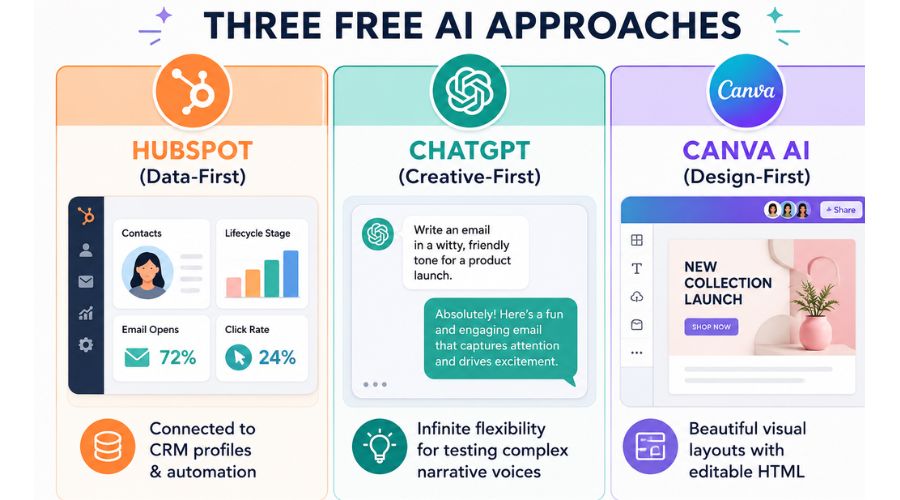
Canva allows you to create highly visual, design-forward marketing layouts. You can use its AI to write copy directly inside an image-rich newsletter design, then export your work as clean HTML or send it out through direct integrations like Mailchimp or Gmail.
The free version of Canva gives you 50 lifetime Magic Write queries, with higher limits reserved for Pro accounts.
Which Free AI Email Generator Should Marketers Choose?
- Choose HubSpot AI if you want to connect your copy with automated workflows, track customer metrics, and build regular data-driven newsletters.
- Choose ChatGPT if you need a flexible assistant to build creative concepts, edit long text blocks, or practice writing varied cold sales outreach messages.
- Choose Canva AI if you are a visually focused marketer who wants to create striking, image-heavy newsletter layouts without needing to code custom HTML.
How to Use an AI Email Generator to Create High-Converting Emails
Regardless of which tool you choose, the quality of your output relies heavily on your generation process. Following a structured approach keeps your messages accurate and relevant to your audience.
1.Define Your Email Goal and Audience:Set your baseline context first.
Before opening any AI tool, clarify exactly who you are targeting and the single action you want them to take. For instance, aiming to get a software trial user to book a live demo requires a completely different tone than sending a discount code to a retail buyer.
2.Create an Effective AI Prompt:The input determines the quality of the output.
Avoid vague, single-sentence instructions like "Write a marketing email for my software brand." Instead, provide clear context:
Example Prompt: "Write a 3-part cold sales outreach email sequence targeting Operations Managers at mid-sized logistics companies. Focus on how our platform reduces delivery scheduling errors by 22%. Keep the tone professional but clear, and ensure the first email ends with a short, low-friction question asking for a 10-minute introductory call."
3.Generate, Edit, and Personalize Email Copy:Never hit send on an unreviewed AI draft.
Let the tool generate your initial options, then step in as the human editor. Check that the facts are correct, remove repetitive phrases, and inject your specific brand voice. Make sure to double-check that any dynamic personalization tags align correctly with your sender data.
4.Optimize Subject Lines and CTAs:Focus on the elements that drive metrics.
Ask your AI tool to generate 5 separate subject line choices based on the final email body text. Select options that generate natural curiosity or clearly highlight a core benefit without sounding like spam. Ensure the email body leads directly to a single, obvious call-to-action button or link.
HubSpot vs ChatGPT: Which AI Email Generator Should You Choose?
Choose HubSpot AI If You Need:
- CRM integration: You want your customer data profiles to guide your text personalization automatically.
- Marketing automation: You want to drop copy directly into live multi-stage communication tracks.
- Campaign management: You prefer to track open rates, click metrics, and conversion data directly alongside your copy editor.
Choose ChatGPT If You Need:
- Flexible email writing: You want to test unique messaging structures, narrative styles, or experimental angles.
- Sales emails: You need to rapidly write individual variations for direct sales prospecting.
- Creative variations: You need an open-ended brainstorming partner to generate hundreds of different headlines and hooks.
Final Recommendation for Marketers
If you are managing a growing brand, you do not necessarily have to pick just one tool. Many effective marketing teams use ChatGPT to run initial content brainstorming and map out creative concepts, then paste those polished ideas into HubSpot to execute, automate, and track their live email campaigns. Find the balance that keeps your workflow moving fast while keeping your messaging human.
We have passed over the threshold into AI driven IT project management changing the way technical teams ship software and manage infrastructure, movin [...]
David N. Wilks

For decades, the annual review was treated as gospel — one meeting, once a year, where a manager handed down a verdict on twelve months of work. Mos [...]
David N. Wilks

A startup’s life or death question in 2026 will be about speed and accuracy and a traditional CRM just won’t cut it. Today’s AI-empowered CRM so [...]