Finding the best WordPress hosting can be daunting. However, it matters more than people may think, and its importance affects the long-term success of your website directly. This can be quite intimidating, as there are a lot of options available, coupled with jargon and big promises.
Still, you don’t need to be technical to make a smart call there, and the best WordPress hosting doesn’t necessarily mean the richest in features. It all comes down to what you need and therefore your interpretation of “best.” You then decide what type of hosting you think is appropriate for your website and traffic and your anticipated growth. This guide will help you find the best hosting for all types of websites, so you can choose the best one for your desired function.
What Really Matters In Hosting
Before you dive into the options for hosting, it helps to understand the basics. Is every site one-size-fits-all? Not at all, but these features can be advantageous for any site, which is why they should be considered.
-
Speed: If a page does not load within a couple of seconds, visitors will leave. If you have good caching and fast servers, it makes a significant difference; you will notice lower bounce rates.
-
Reliability: When your site is down, it’s money lost, and customers are driven away. Your credibility is also at stake. Therefore, hosting that offers decent uptime is essential.
-
Security: No longer are backups, malware scans, and SSL certificates a luxury. If your competitors have them, there is no reason why you shouldn't. They secure your website and help it look professional.
-
Support: You need support from someone who knows WordPress.
-
Scalability: When your site gains popularity, the last thing you want is for your host to buckle under sudden pressure. That’s why whatever your solution is, it needs to be scalable.
-
Cost: The value of web hosting can vary widely depending on what you get out of the money spent on hosting.
Once you have a clear understanding of what matters most to your website, you can start considering the type of hosting that best suits your needs.
WordPress Hosting for Every Type of Website
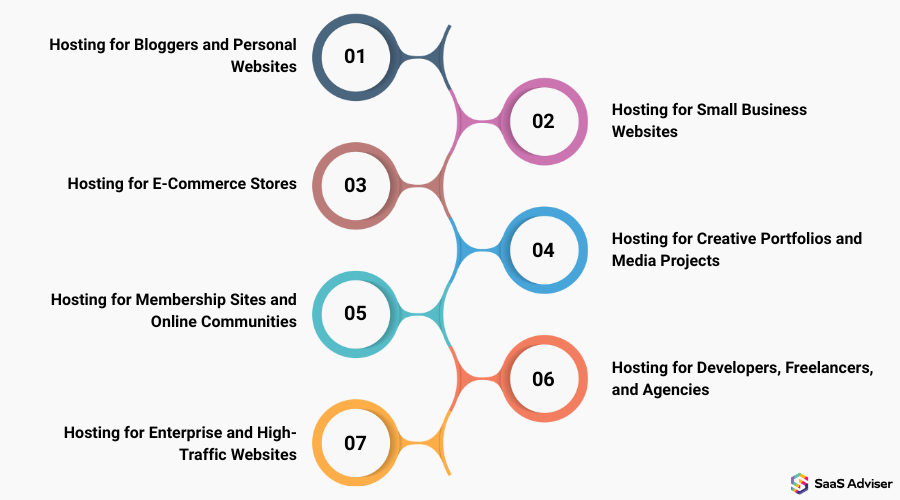
Now, let’s study the different websites that require hosting support.
1. Hosting for Bloggers and Personal Websites
If you have a personal blog or portfolio, you don’t need a server that runs a Fortune 500 company. Your focus should be on reliability and simplicity. All you’re looking for is something that works without you needing to regularly update or tweak settings, right?
Shared hosting or cheap managed WordPress hosting works very well for most bloggers. With shared hosting, costs are kept to a minimum because server resources are shared among many individuals. It works when the traffic is low. Managed WordPress hosts do a lot more than just offer you space on a server since you get support that’s only focused on optimizing the performance of your site, making writing easy, and leaving website management to the experts.
You’ll need automatic backups, good caching, and preferably a support team that responds quickly when things don’t go as planned. If traffic begins to increase, or you start trying out media-heavy posts, online courses, or other campaigns that could boost the demand for your website’s resources, it might be time to consider upgrading.
2. Hosting for Small Business Websites
Small businesses need support beyond what bloggers do. They want speed, professionalism, and security. A slow-loading website during busy times reflects poorly on your business. For such users, managed WordPress hosting is the best solution. It automatically takes care of updates, security, and performance tuning. That way, you can get back to running your business. If you’re looking for more control over resources and performance, the next step is opting for a Virtual Private Server (VPS).
Features to look for are daily backups (that include your SSL certificates), a staging area where you can test changes before making them live, and support that actually helps you manage WordPress. Once you start adding e-commerce features or running marketing campaigns, it’s crucial to have a host that can manage sudden traffic spikes without impacting operations.
3.Hosting for E-Commerce Stores
If you run a website that handles transactions, hosting becomes crucial. A sluggish checkout or a site that’s down can lose you real money. Specialized e-commerce hosting or cloud hosting takes care of many of these issues. Fast checkout, security, and scale are only feasible with proper groundwork. Some hosts even manage PCI compliance automatically; that way, you know whether your store is up to industry standards without second-guessing.
Frequent, reliable backups are essential. Should a plugin update break your store or you experience an unexpected traffic spike that overwhelms the server, you'll be grateful you chose a hosting provider prepared for these issues. Cloud hosting also includes automated scaling, which can be a lifeline during holiday sales or new product releases.
4. Hosting for Creative Portfolios and Media Projects
Photographers, designers, and other creative professionals have special web hosting needs. Your website should be able to do justice to visuals while minimizing lag. You can spot lagging images or choppy galleries as soon as you open a website, and making a good first impression is an important consideration when showcasing your creativity.
For many content creators, well-optimized shared hosting or lean managed WordPress hosting is more than sufficient. It boasts features such as image optimization, CDN integration, enabling faster delivery worldwide, and simple dashboards. Staging environments can be helpful if you update your portfolio often and wish to experiment with changes before pushing them live.
Most commercial sites do not attract massive traffic, so you don’t need a high-end server. However, if you plan to host large galleries, videos, or private portfolios and want to make money, there may be a better plan for you.
5. Hosting for Membership Sites and Online Communities
Membership sites and communities are far more critical than you think. Logins, forums, and dynamic content are some of the issues that can stress your database or server. You want a host that can handle that complexity well.
For this, you need quality cloud hosting or high-performance managed WordPress hosting. Such recipes give you scalable database storage, caching for logged-in users, and added security layers specifically designed for membership plugins and learning management systems.
If your site will be receiving loads of visitors, hosting might not even be an option: it can be the difference between downtime and a frictionless surfing experience. Adding features like live chat, webinars, or interactive courses increases the need for resources, so it’s important to take into account growth.
6. Hosting for Developers, Freelancers, and Agencies
Developers and agencies have their own requirements and priorities. They need control, flexibility, and support to maintain multiple sites. VPS, cloud hosting, or dedicated servers can provide you with that control. Verify SSH access, Git integration, and staging areas, as well as support for WP-CLI, before signing up. All this enables you to test, deliver, and maintain a client’s website more efficiently. The more clients you serve or the heavier the projects become, the more critical a strong or flexible setup becomes.
7. Hosting for Enterprise and High-Traffic Websites
Enterprise websites need scale and reliability. And when balancing high-volume international communities and mission-critical businesses, downtime is not an option. Consider dedicated infrastructure or enterprise cloud hosting. This can include solutions such as load balancing and multi-regional deployments with disaster recovery plans, along with a dedicated support team.
Enterprise hosts are held to increasingly stringent compliance standards, ensuring your site is both fast and secure. Even if these features seem like overkill for a smaller site, they are critical when downtime or breaches can result in financial loss.
Budget Considerations
Choosing hosting often requires balancing cost with performance and features:
-
Tight budget: Shared hosting or entry-level managed WordPress.
-
Balanced cost and peace of mind: Standard managed WordPress hosting.
-
Growing business or moderate traffic: VPS or premium managed plans.
-
High-traffic or mission-critical websites: Cloud or dedicated hosting.
The cheapest option upfront may prove more costly in terms of problems and lost opportunities.
Common Hosting Pitfalls to Avoid
Even reputable hosts can have quirks. Watch for:
-
Hidden renewal fees: Introductory rates can increase dramatically.
-
Resource limits: CPU throttling or storage limits that aren’t clearly stated.
-
Plugin restrictions: Some managed hosts block caching or backup plugins.
-
Support quality: Not all 24/7 support is equal; ensure WordPress expertise is provided.
Reading the fine print and testing support responses early can save you frustration later.
A Simple Checklist Before You Choose
Before you commit to a plan, ask yourself:
-
How fast do I expect my traffic to grow?
-
Do I want someone else managing updates and security?
-
Will I run e-commerce or membership features?
-
Do I need developer tools or multiple site management?
-
How much can I realistically spend each month?
Answering these questions makes the decision far less daunting and ensures the host fits your actual needs.
Final Thoughts
If you’re a beginner, managed WordPress hosting offers the best of both worlds in terms of ease and quality. That way, you can focus on the things that matter, such as content creation or growing your audience reach, and leave the technical chores to someone else.
Hosting options are not permanent. Your website will grow, and you’ll have different requirements. The key is to select a host that meets the needs of both your website and business, keeps it running smoothly and securely, and ensures that you can expand in the future.
Hosting companies are designed to meet the various hosting needs of websites, including those for blogging, e-commerce, membership sites, and portfolios, among others. Choosing the right hosting options makes everything else so much easier.