

Ever noticed your phone or computer slowing down over time? That might be due to cache data. Sometimes we do not clear our cache memory (history) which in the end causes performance issues not only on the app or the website but also on the computer. According to the research, sometimes the speed of the app and website is slowed down due to the cache data. Moreover- the cache can even take up crucial place and lead to the performance issues. The meaning behind the phrase "Cache" is an always writable cache in the GNU/Linux kernel that improves performance. So can I delete it and how to do this? The essence of the cache (cache) is that it is a kind of temporary storage of data. It is used by the server itself. Almost all server operators use this feature.
 Looking for Operating System? Check Out SaaS Adviser’s To Best Operating System
What is Cached Data?
Cache data is a temporary storage that is used for the purpose of making applications, websites, and browsers run faster by keeping information that is frequently accessed. Based on the cache definition, it is a high speed storage layer that holds onto data for quick retrieval, therefore, it reduces the necessity of downloading the same content till it is required.
So, what does cache mean in everyday use? This way of saying means that your device saves images, scripts, and your login data which in the end, speeds up your device. Although this exponentially increases the efficiency, sometimes, the files that are cached will become obsolete or occupy a lot of places, which may result in potential slowdowns. Regular cache management ensures smooth operation and optimal device performance.
How Does Cached Data Work?
Cached data performs its function through a process of storing frequently accessed files, such as images, scripts, and website data, on your device for a limited time. In other words, instead of downloading it again, your device retrieves this rather stored data whenever you revisit a website or reopen an app. The result is a significant increase in the speed and performance of loading, which in turn leads to low bandwidth, and a better user experience. This efficiency in data retrieval extends to various modern tools beyond basic apps and websites. For instance, reliable online fax services leverage a similar caching mechanism: they store your documents securely in the cloud, enabling instant viewing, sending, or receiving without repeated downloads or additional hardware, further boosting productivity while conserving bandwidth.
Nevertheless, the files stored as cache may lose their validity after a certain period and may result in traffic jams or crashes. In such situations, a cache cleanup or use of an Android cache clear app can be of great benefit by getting rid of any unwanted stored data while keeping the necessary files.
What Will Clearing Cached Data Do?
Clearing cache data helps you get rid of all the little temporary files that apps and websites store, which makes space, and the device work better. But what does clearing cache do? It is the removal of the old and corrupt files that cause apps to get stuck, crash, or show the old data. Technically, personal data removing in most cases implies deletion of all logins, preferences, and files. If the question posed is how to clear cache on an Android phone or how to clear app cache on iPhone, I can say that most of these devices are equipped with this function built into them and therefore it is quite easy to execute. Regularly clearing out the cache, would solve this problem and would also contribute to maintaining speed and avoiding unnecessary storage gain.
Should You Keep It or Clear It?
Your device’s performance relies on whether you should keep or clear cache data. This is exactly why those cache files come in handy. They are temporary storage. Storing them improves load times of the pages you visit most often. However, cache may cause storage issues and lagging issues eventually. So, in case your device runs properly, there is no need for clearing cache immediately. On the other hand, clearing cache is a good solution, if your apps are stuttering, and storage is almost full. Wondering what does clear cache mean? It removes temporary files without affecting personal data. If you are asking, "Can I safely delete cached storage?", the answer is yes—most times it is safe. The normal cache erase can maintain the best condition of the device, however, the process should be done occasionally, for example when the performance becomes a problem.
How to Clear Cached Data?
Clearing cached data helps free up storage and improve device performance by removing temporary files. But how does clearing cache work? It deletes stored data like images, scripts, and app files that are no longer needed, allowing your device to refresh with updated information.
1. Clearing Cache on an Android Phone
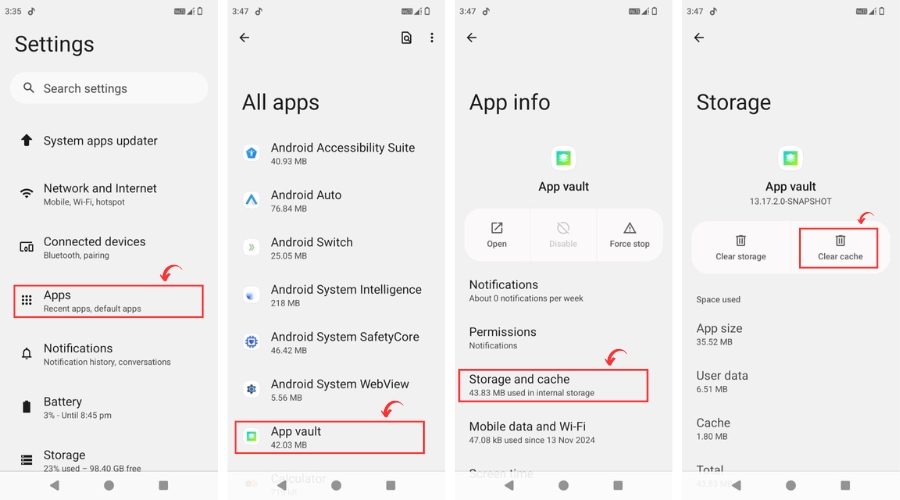
To clear cache on an Android phone follow this:
- Open Settings and go to Apps.
- Select the App you want to clear.
- Tap Storage & Cache.
- Tap "Clear Cache".
This removes temporary files without affecting personal data.
2. Clearing Browser Cache (Google Chrome & Others)
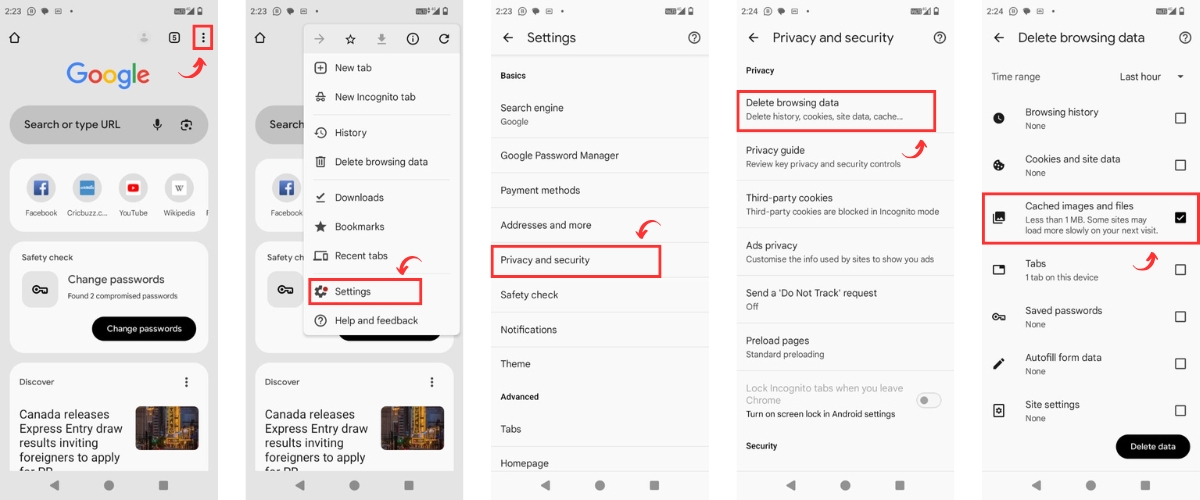
If you're wondering, "Is Google Chrome cache storage safe to delete?"—yes, it’s safe. To clear it:
- Open Chrome on your device.
- Tap the Menu (⋮) in the top-right corner.
- Go to Settings > Privacy & Security.
- Select Clear Browsing Data.
- Check "Cached Images and Files" and tap Clear.
3. Clearing Cache on Mac or PC
For Mac users, you might ask, "Is it safe to delete contents of Mac cache files?" Yes, but be cautious when removing operating system software cache. Navigate to:
- Open Finder.
- Click Go in the menu bar.
- Select Go to Folder.
- Type ~/Library/Caches and press Enter.
- Select and delete unneeded files. To automate the process, you can use a dedicated Mac cleaning tool, which helps ensure that important system and app cache files aren’t accidentally deleted.
For Windows PCs, you can clear cache app data PC by using Disk Cleanup or manually deleting temporary files from C:\Users\YourUsername\AppData\Local\Temp.
Clear out the cache from time to time so that your device can work without any hitch and avoid unnecessary storage buildup. However, what will deleting cache do? It won’t erase personal data but will remove temporary files, making apps and websites reload fresh data.
Conclusion
Cache data is important for your device to use and can also help you load your apps or websites faster. But, when not managed properly, it can render the device slow. but, what does it mean to clear cache? Simply put, it's a quick fix to free up storage and refresh app performance. If your device is slowing down, a cache cleanup can help. Whether you need to clear cache on an Android phone or clean up your browser, doing so regularly ensures smooth operation. Still, wondering what happens if you clean your local storage data cache? You get back valuable storage space, reduce glitches, and improve speed—all without losing important files. So, should you keep it or clear it? The answer depends on how your device is performing, but when in doubt, a cache cleanup is a smart move!
Clearing cache gets rid of temporary files apps and websites save, so they can load fresh data and run smoother.
It means deleting stored temporary data that apps and browsers use to speed up loading times. This does not erase personal files or settings.
Go to Settings > Apps > Select an App > Storage & Cache > Press "Clear Cache." This removes temporary app files without affecting your personal data.
Only temporary files like images, scripts, and app data are deleted. Your personal files, logins, and settings remain unchanged.