.jpg)

The VoIP options are tons, and it might be a little overwhelming to select the right features. But in all sincerity, the right tools can completely transform the way you communicate, manage your people, and serve your customers. Whether you are new to the market or have been in it for a while, VoIP functionality can enable you to save money, get a clearer call, and allow your team to work comfortably from anywhere.
 Looking for VoIP Providers? Check Out SaaS Adviser’s List of best VoIP Providers for your business.
 This guide will take you through the major features of VoIP phones, their advantages, and how you can select the best VoIP features to use in your business. We will discuss all the basics of VoIP phones up to advanced call features and provide you with helpful hints so that you can get the most out of your system and ensure that your business communications continue to run smoothly.
What are the VOIP Features?
VoIP features are simply features that allow you to make and receive calls online rather than on regular phone lines. You have convenient features such as call forwarding, having your voicemails delivered to your mailbox, video calling and conference calls- so you can always be in touch with your team or customers no matter where you are. You also get call recording, auto-attendants to answer and route calls on your behalf and call analytics to help you keep track of everything. In essence, VoIP makes your business more flexible, enhances call quality, simplifies the management of calls, and allows you to reduce costs.
Benefits of VOIP Features
Many businesses today are looking for smarter, more flexible ways to handle calls, and VoIP features offer exactly that.
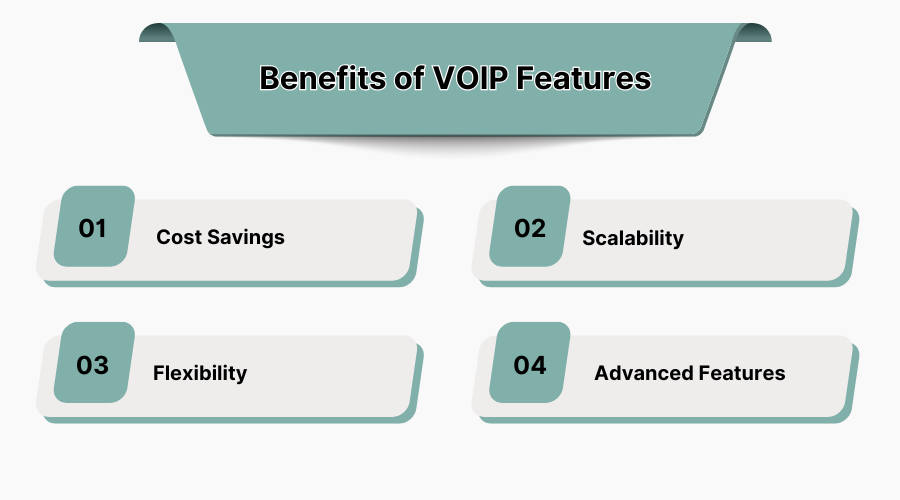
1. Cost Savings
The biggest benefit of VoIP over IP is cost savings. Free VoIP features can rid you of great phone bills for long-distance calling, therefore making it within the budget for businesses of any size.
2. Scalability
As your business grows, your phone system should grow with you. One of the key advantages of VoIP is scalability. You can easily add or remove lines and users without heavy costs or complicated setups.
3. Flexibility
VoIP features allow all your team members to work from anywhere and still use their office numbers on their laptops or even mobiles. It does not matter whether you are at home, traveling and need a Canadian phone number or in the office; you would never stay out of touch when such important calls are being made.
4. Advanced Features
From forwarding calls and voicemail-as-email to videoconferencing and auto-attendants, VoIP features arm your business with some seriously advanced weaponry for smoother, more professionally run communications that in turn help service your customers better.

Did You Know?
Businesses that switch to VoIP can save up to 60% on their phone bills while getting access to advanced features traditional phone systems can’t offer.
Top VoIP Features To Look For

1. Core Call Handling
Here are a few VoIP features that allow ambient call management, ensuring that business communication is smooth and transparent:
- Voice Calls: Make and receive clear voice calls over the internet, keeping communication expenses low without losing touch with customers and teams, as they occur quite frequently in business.
- Caller ID: View the identity of a person who dials you up in order to filter your urgency for the call.
- Call Forwarding: Allow the calls to follow a user by redirecting them to some other device or number so that important calls are never missed, even if the recipient is away from your desk
- Call Transfer: It's a feature to transfer an incoming call smoothly to your associate or another department so that your customers reach the right person without hassle.
- Call Routing: Let your calls be routed directly to the concerned individual or department according to predefined rules, making it easier for your team to handle those calls.
- Three-way Calling: Discuss issues or updates with several team members or customers by adding a third person to an ongoing call easily.
- Conference Calling: Conduct team meetings or discuss clients over the phone; there’s no need for a separate conference calling application.
- Call Park: Put calls on hold and allow another team member to pick up the call and handle the call from another phone during your busy time.
2. Customer Service
-
Auto-attendants: Auto-attendants answer calls and lead the caller to the right department or person with no need for a receptionist, showing your firm as professional and well-organized. Businesses can also explore advanced solutions like an AI phone receptionist to automate and personalize caller interactions even further.
-
IVR (Interactive Voice Response): The IVR (Interactive Voice Response) system lets clients talk with a menu by using their keypad or voice, helping them get answers or connect with the right group fast, even beyond business hours.
-
Call Queues: During busy hours, put incoming calls in line and let the customer wait with continuous updates about their position in the queue while ensuring that no call goes unattended.
-
Custom Music on Hold: Play music or custom messages to customers while they are kept on hold. Share important updates or promotions as the wait becomes enjoyable for them.
-
Voicemail: Record missed calls and messages to return at your convenience, thereby ensuring that you do not miss out on any customers who called during the after hours or when your staff is occupied.
3. Productivity & Collaboration
-
Video Conferencing: Host face-to-face virtual meetings with your team or clients. Collaborate in an effective way and build strong connections without needing separate video tools.
-
Instant Messaging: Quickly send messages to team members for updates and decisions fast track rather than emailing, keeping communication in real time.
-
Business Text Messaging: A subtler way to remind clients of an appointment and update or support them quickly is through SMS; this allows them to contact you at their convenience.
-
Online Faxing: Send and receive faxes through the internet; your very important papers can thus be dealt with securely by your team without needing a fax machine.
4. Advanced call management
-
Call Recording: Recording of calls to review conversations later for training quality assurance or dispute resolution so that nothing important is missed.
-
Call Analytics: Analysis of call data such as call volumes, durations and the peak times will give insights relating to your team’s performance as well as patterns of customer calls.
-
Call Screening: Knowing who is calling before answering. deciding which calls you want to take and which ones should be directed to voicemail.
-
Anonymous Call Rejection: If numbers are hidden or anonymous calls will be automatically barred. This is very perfect in reducing spams and unwelcomed interrupters for the team.
-
DND (Do Not Disturb): Silent incoming calls during focused working hours or meetings. Control your availability while still capturing voicemails for follow-up.
5. Bonus Features
-
Number Porting: Easily port your current business phone numbers to the new VoIP service, so your customers can continue reaching you without any confusion.
-
Hot Desking: Any employee becomes capable of logging in with any VoIP phone at any desk and hence allowing the workforce the freedom to hot desk and stay connected.
-
Mobile App: Empower your teams with VoIP features even on their mobile phones and tablets allowing them to make and receive calls, check voicemails, and message customers from anywhere.
-
Unified Communications: Unify voice calling, video conferencing, messaging, and file sharing in one place so your team can easily manage all communications.
-
CRM Integrations: Linking the VoIP solution with CRM for automated call logging, viewing of customer details while calling, and smoothening of sales and support processes.
Myth: VoIP call quality is poor.Reality: With a stable internet connection, VoIP often delivers clearer calls than traditional lines.
How to Select the Best VoIP Features for Your Business?
1. Analyze Your Workflow
Take a look at the calls and communication your team is engaged in presently. Do you need call recording, voicemail to email, or video calls on your really busy days? Figuring out your workflow is what steers you clear of coughing up money for features you might not use and zeroes in on what will actually make a difference in your day-to-day.
2. Consider Your Business Size
A small business may not need as many VoIP features, and a larger team may need those advanced features, like in the case of call analytics or auto-attendants to handle the inflow of calls. Keeping your system matched to your size will keep your communications straight without being too complexing in your setup.
3. Think About Growth
Choose VoIP features that can grow with you. If you’re looking for prospective growth choose a system that is easily upgradable in terms of users and lines whenever it is required, so you do not land up changing the whole system at a later date and your business stays prepared for newer opportunities.
4. Evaluate Customer Needs
Consider how your customers get to you. Do they require speedy call-backs, SMS choices, or call routing to the correct department to enhance their experience? It’s the right tools that help meet customer expectations, and thus build trust and retain them.
5. Assess Team Mobility
If your company has remote or traveling employees, the VoIP functions should be such that they can receive business calls on their mobile phones and laptops so that not every important incoming call is missed. This helps keep your company operational no matter where it is operating.
6. Look At Integration Possibilities
Once you have a hosted VoIP service, be sure that you're VoIP system is enabled. Test drives of the service should not overlook one full integration – with your CRM, helpdesk, or other tools you find yourself reaching for regularly – so that all is interconnected and orderly. Integration will cut down on manual work and keep your data synced across your organization.
7. Balance Cost and Benefit
Cost savings are just one of the advantages of VoIP, but make sure what you are receiving is worth it. VoIP features have to represent real added value and not force you to overpay for tools you won’t use. Spending highly and smartly entails having a clear understanding of your needs.
8. Start with Essentials
Don’t go for all at once. There’s no need to run out and buy the whole VoIP feature set for your business. Pick the basics that you need now, and as you grow and your needs change, add the rest later. By doing so, you keep it simple and start to learn and understand what will be best for your team.
Conclusion
VoIP is not just another tech upgrade; it’s a business advantage. All the right VoIP features will slash costs, elevate customer service, and make your business that much more flexible in what increasingly proves to be a very necessary world. From basic VoIP phone features like call forwarding and voicemail-to-email, to cutting-edge voice over IP features including call analytics and integrations, each one of these features empowers your team and enhances the experience for your customers.
As you explore the features VoIP offers, align them with your business goals and workflow. The benefits of voice over IP are clear: better communication, stronger team collaboration, and a scalable system for growth. Ready to transform how you connect? Start using the VoIP call features that help your team work smarter and keep your business ahead.