

AI-generated images have taken over the Internet in recent years and are now making their way into public spaces. We see them in banner ads, social media posts, and even on billboards. But often these pictures look too generic and unrealistic, undermining credibility and turning away potential customers.
To truly take your content to the next level with AI imagery, it’s important to follow some rules. This guide shares six key tips on how to use AI-generated business pictures in your content. Keep reading to learn the dos and don’ts that will help your visuals stand out.
Why Use AI Image Generators to Create Pictures For Business?
AI tools offer businesses and information technology teams unprecedented opportunities to produce high-quality content without significant investment, both in terms of time and resources. An advanced image generation solution is fast, affordable, and easily scalable.
If you don’t have enough funds to pay photographers or designers, consider using sites like Depositphotos for cost-efficient visual production. Their tools give you the ability to respond quickly to market needs, whether it’s new trends, seasonal promotions, or marketing campaigns.
Beyond efficiency, AI-generated content helps companies stand out. Artificial intelligence has unlimited creative potential and can create anything you could imagine, from abstract concepts to fantasy worlds. However, the rise of AI-generated visuals also makes it important for brands to verify authenticity when necessary, which is why tools like an AI image detector are becoming more relevant in creative and business environments.
Who Should Use AI Technologies: Small Businesses or Large Corporations?
The size of your organization shouldn’t influence your decision to use AI-powered generators, as these tools offer value to businesses of all kinds. Artificial intelligence can adapt to the needs and goals of any organization, large or small.
Small companies can leverage free tools to generate AI business photos and compete with bigger players. On the other hand, large corporations can develop a business technology strategy that incorporates AI to scale content production and deliver personalized content for diverse audiences.
Should AI-Generated Business Photos Be Free?
AI-generated photos for your business cannot be free, as quality and commercial safety come at a price. Free tools may seem attractive, but they often have limitations. This includes low resolution, a limited number of generations, and copyright restrictions.
Investing in reputable platforms, ensures that you get high-quality visuals that are safe to use for commercial purposes. If you don’t want to put your brand at risk, it’s worth paying for AI image generation services.
How to Write Effective Prompts For AI Generators
Creating compelling AI-generated images starts with crafting clear and detailed prompts. Think of a prompt as a set of instructions you’re giving to the AI; its ability to interpret your request accurately depends entirely on how well you communicate. You can create Ai Posters, thumbnails, banners etc. Writing effective prompts is both an art and a science, requiring creativity, specificity, and a bit of experimentation.
Here are some practical tips to help you master this skill.
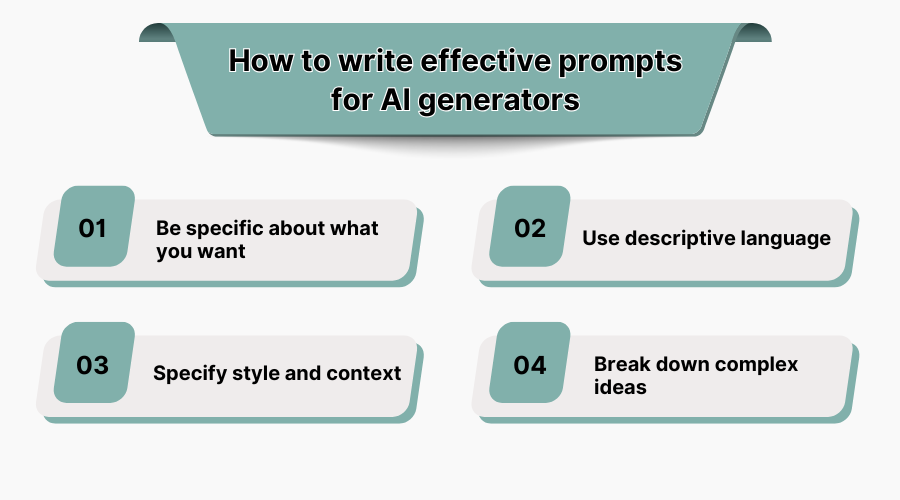
1. Be Specific About What You Want
The more precise your description, the better the AI can generate what you’re looking for. Avoid vague terms like “a beautiful landscape” or “a modern office.” Instead, include specific details such as colors, lighting, objects, and mood.
-
Vague prompt: "A futuristic city at night."
-
Specific prompt: "A neon-lit futuristic cityscape at night with towering skyscrapers, flying cars, purple and blue hues in the sky, reflections on wet streets, and a sense of bustling activity."
The second version gives the AI much clearer guidance, resulting in a more accurate and visually striking image.
2. Use Descriptive Language
Paint a vivid picture with words. Incorporate adjectives, textures, and stylistic references to guide the AI toward your desired aesthetic.
-
Basic prompt: "A woman working on her laptop."
-
Enhanced prompt: "A confident young woman with curly brown hair sitting at a wooden desk in a bright, minimalist home office, wearing casual business attire, typing on a sleek silver MacBook Pro, soft natural light streaming through large windows behind her."
This level of detail ensures the AI understands not just what’s happening but also how it should feel and look.
3. Specify Style And Context
AI generators often allow you to mimic certain artistic styles or visual contexts. If you want something photorealistic, abstract, or inspired by a particular artist, make that explicit.
-
General prompt: "A mountain range."
-
Stylized prompt: "A dramatic mountain range during sunrise rendered in the style of Ansel Adams photography, with high contrast black-and-white tones and sharp details of snow-covered peaks."
You can also reference popular aesthetics, such as “cyberpunk,” “watercolor painting,” or “retro 80s poster.”
4. Break Down Complex Ideas
If you’re aiming for a complex scene, break it into smaller components within your prompt. This helps the AI prioritize key elements without getting overwhelmed.
-
Overloaded prompt: "A futuristic classroom with robots teaching students and holograms floating around while sunlight shines through futuristic windows."
-
Structured prompt: "A futuristic classroom interior featuring humanoid robot teachers interacting with human students, holographic displays showing educational content above desks, large panoramic windows letting in warm sunlight, clean white walls, and interactive touchscreens mounted on each student's desk."
By organizing the information logically, you increase the chances of getting a coherent result.
6 Best Practices For Using AI Imagery in Content
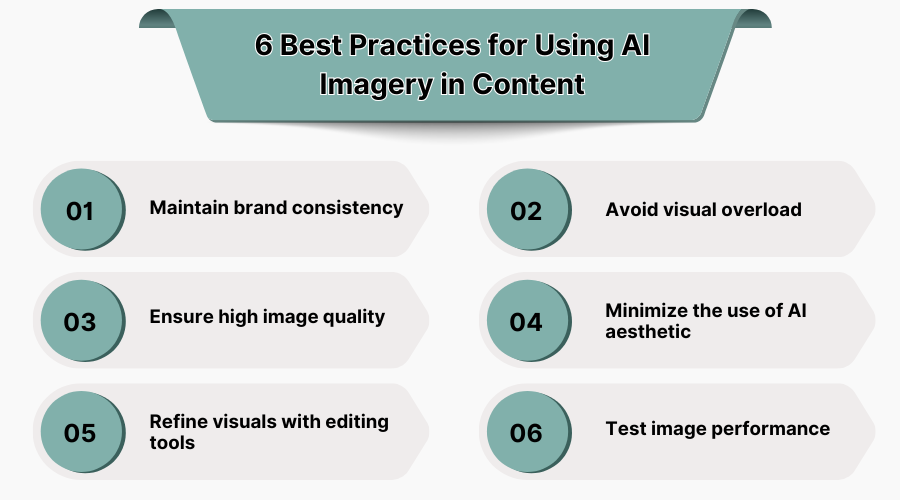
1. Maintain Brand Consistency
The images you use should always match the visual style of your brand. This means keeping a consistent color palette, tone, and design language across all visuals. Experts say you can increase revenue by up to 23% if you maintain consistent branding.
In order to receive pictures that are in line with your brand’s visual style, you should first create detailed guidelines for image selection and editing. Having this document will make it easier to write AI prompts and edit generated images to match your brand.
2. Avoid Visual Overload
While AI tools make it easy to generate dozens of visuals at once, more doesn’t always mean better. Too many graphics can quickly clutter your content or distract from the main message. Balancing your images with white space and clear text can help you avoid visual overload.
Many AI generators offer post-editing features that allow you to adjust size, color, or add text to your visuals. If you create a well-balanced layout, it will improve the readability of your message and make your content more visually appealing.
3. Ensure High Image Quality
The importance of high-quality imagery cannot be overstated. High-resolution graphics not only look more professional, but they also encourage users to engage with your content and make purchases.
In fact, 94% of customers are more likely to buy a product or service from a company that has high-quality images. Therefore, you should choose AI generators that provide high resolution images or enhance them with AI-based image upscalers to avoid pixelation.
4. Minimize the Use Of AI Aesthetic
The widespread use of AI generators has led to an explosion of identical AI-style pictures. They look overly surreal, with a dreamlike aesthetic and a glossy finish that can come across as too artificial.
If you want your content to look professional, be intentional about the visual style of your images. Photorealistic imagery will look more trustworthy to potential customers. However, if your communication strategy allows for more creativity, you can also create AI art.
5. Refine Visuals With Editing Tools
Many creators treat AI-generated images as final content pieces. However, they can also be improved using built-in editors or traditional editing tools, such as Photoshop or Lightroom. You can make simple adjustments, including background removal, cropping, or color correction.
Pictures created with artificial intelligence can also serve as backgrounds for other design elements. You can overlay text, icons, logos, or product mockups onto them to create custom creative assets for your brand.
6. Test Image Performance
AI-powered image creation is perfect for learning what content your customers prefer. Since these visuals can be produced quickly and in various styles, they offer a great opportunity for A/B testing.
Simply create several different versions of marketing materials and show them to different groups of users to see which visuals drive more engagement or conversions. This will allow you to gather insights and adapt your visual strategy to make it more effective.
Making AI Image Generation a Long-Term Strategy
To make AI image generation a sustainable part of your business, focus on these key principles:
-
Align with brand identity: Ensure AI-generated visuals reflect your brand’s tone, style, and messaging. Create consistent guidelines and templates for cohesive outputs.
-
Train your team: Invest in training employees to use AI tools effectively and experiment with new creative possibilities.
-
Prioritize quality and authenticity: Always review AI outputs for realism and relevance. Use AI to enhance creativity, not replace it.
-
Stay ethical and transparent: Be open about AI usage and avoid misleading visuals. Follow ethical practices in data and content creation.
-
Leverage data-driven insights: Test and analyze AI-generated visuals to understand what resonates with your audience, refining your approach over time.
-
Adapt to technological advances: Stay updated on new AI tools and trends to keep your strategy innovative and competitive.
-
Balance automation with human input: Use AI for efficiency, but rely on human expertise for storytelling, customization, and emotional connection.
-
Build flexibility: Regularly assess and adapt your strategy to align with changing trends and audience preferences.
By thoughtfully integrating AI into your workflow, you can enhance your content, engage audiences, and drive results while maintaining brand integrity. The future belongs to those who embrace AI strategically and purposefully.
Conclusion
As AI-generated images become more important in content creation, businesses need to approach them with creativity and a clear plan. Adding AI to your strategy is not just about following trends. It’s about making sure it fits your brand’s mission, values, and what your audience expects from you.
AI is here to stay, and it’s changing the way we tell visual stories. But having AI tools is not enough. You need to use them well. A generic AI image might not stand out, but with care and purpose, it can become professional, engaging, and meaningful to your audience.

.jpg "What Are the Primary Business Benefits of an ERP System?")

 and resource management software – what’s the difference.jpg "Professional Services Automation (PSA) And Resource Management Software What’s The Difference?")