You’ve got deadlines, a small team, and a content calendar that keeps demanding more. So you use AI to move faster like ChatGPT, Jasper, Claude, or whatever gets words on a page.
But readers can feel when something sounds flat. Google might not penalise Artificial Intelligence content outright, but generic copy doesn’t perform, doesn’t engage, and definitely doesn’t build trust.
The problem with AI content isn’t AI itself, but rather the mechanical voice of an auto-generated, unedited draft. The answer isn't an editorial staff to edit these drafts; it’s to find a combination of content, production speed, and scale that feels like it was really written by a person.
To make AI-written content relatable is to take that raw draft and infuse it with warmth, character, and real life experience. This is what will convert a “typical blog post” into something readers retain or act upon.
AI-Generated Content Detection And Recognition
An effective way to begin humanising your copy is to become familiar with the characteristics of AI-generated content versus human-created writing.
How AI Detections Discover Machine-Generated Content
Detection tools such as GPT-zero and Originality.AI scan for patterns that humans do not naturally repeat at any consistent rate. These patterns include consistently long or short sentences, predictable transitions, and balanced length of paragraphs versus the size of the document. Large Language Models typically follow the patterns associated with: 'safely' used, familiar structures and average length sentences.
Two signals matter most:
-
Perplexity: How predictable the wording is
-
Burstiness: How much sentence length varies
Low perplexity and low burstiness usually point to machine-written text. Humans naturally shift rhythm, add side comments, shorten or stretch thoughts, and inject personal perspective.
The Business Impact of Flagged AI Content on SEO and Trust
Being flagged as AI-generated isn’t the real problem — the impact is. If content feels generic or impersonal, readers bounce faster, spend less time on your site, and rarely convert. Google's E-E-A-T framework rewards content that sounds like it comes from real experience. AI alone rarely nails that.
Quality, believable content will earn the audience's trust. This trust will be critical in competitive niches, especially in the long term. Creating your content with a degree of humanization will set you apart from the competition, no matter how many tools they use.
Making Artificial Intelligence Content More Human-like
You don’t need a linguistics degree to pull this off. Seriously, you just need a few rounds of tweaks to turn an AI draft into something that actually sounds like someone talking. Time-crunched? Generate the draft, run it through an AI to human text converter tool if you like, and then hit it with these tricks.
-
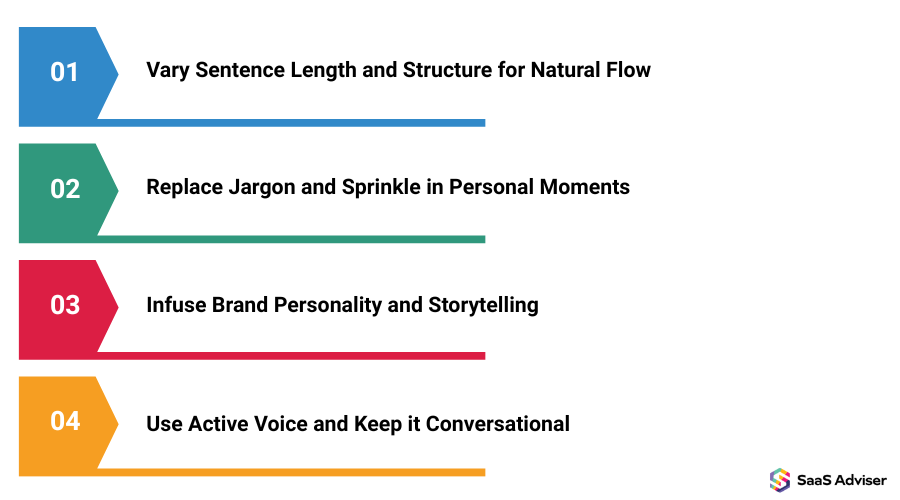
Vary Sentence Length and Structure for Natural Flow
Humans don’t type with a drumbeat. Some lines are short and punchy. Others stretch on, weaving in details, examples, maybe a twist you didn’t see coming. Read it out loud. If it all hums at the same pace, slice a sentence, glue another together, toss in a clause or two. Rhythm matters. A paragraph should jump, pause, and sprint—sometimes in the same breath.
-
Replace Jargon and Sprinkle in Personal Moments
Corporate-speak kills curiosity. Swap words like “leverage” or “optimize” for things you’d actually say. Talk about the time a project exploded in your inbox, or a customer reaction that made you grin. Tiny human moments. Missteps, surprises, lessons that stung a bit. They stick. They make the reader nod.
-
Infuse Brand Personality and Storytelling
AI writes neutral. It’s bland. Spice it. Make it warm, sarcastic, nerdy, whatever fits. Turn a dull point into a slice of experience. Let the reader feel a situation, hear it, see it, maybe even laugh at it. A paragraph should flicker like a neon sign, some sentences humming, others bursting with imagery or tiny details.
-
Use Active Voice and Keep it Conversational
Drop “it is recommended.” Say “you can.” Ditch passive constructions. Replace “this was built” with “we built this.” Contractions, questions, short exclamations—they all help. A paragraph should feel like someone leaning over your shoulder and whispering secrets, occasionally nudging you, occasionally nudging themselves.
Prompt Engineering Templates for Cleaner AI Drafts
High-quality first drafts save hours. Better prompts lead to outputs that are already close to the rhythm and voice you want. But even then, a human pass—one that slices, stretches, loops, and rearranges—turns the dry stuff into a text that’s alive. Burstiness and perplexity aren’t just style words. They are the tools that make sentences breathe, stumble, dance, and sometimes dazzle with unexpected turns.
Step-by-Step Prompt Examples for Brand-Consistent Content
A vague prompt creates vague content.
Basic prompt:
“Write a blog post about email marketing for startups.”
Better prompt:
“You are a marketing consultant writing to start-ups—SaaS founders. Write 400 words on email marketing. Why is segmentation better than a one-off email campaign? Give a real-world example in a popular context and avoid the following buzzwords like robust and cutting-edge. End with a takeaway..”
You can layer on:
-
A style cue (“sound like a founder updating the team”)
-
Constraints (“use second-person and active voice”)
-
A simple story prompt (“include a two-sentence example of a segmentation fail”)
The more context the model gets, the less mechanical the result.
How to Engineer Prompts That Reduce Robotic Patterns
If you don’t tell the AI what to avoid, it defaults to bland patterns.
Helpful anti-pattern rules:
-
“Vary sentence length widely.”
-
“Avoid starting sentences the same way.”
-
“Avoid phrases such as "today's world’”
-
“Write as if you are explaining the information to a friend who is intelligent but may not understand some of the technical aspects of your topic.”
A little bit of few-shot prompting will be beneficial, as you can determine what type of tone you want the AI to adopt. If you provide a paragraph as your desired tone, you can simply ask the AI to use that tone for your new piece of writing on any subject.
Iterative Prompting: First Draft to Human-Like Text
An Iterative Prompt to take your first draft to a more human-like text takes time and work to develop; the first output should be treated as a rough draft. Use the right refinement prompts for the right stage of your writing project.
Examples of useful refinement prompts:
-
“Make the intro more conversational.”
-
“Add one short example in the middle.”
-
“Replace passive voice where it feels stiff.”
-
“Tighten the conclusion and make it more actionable.”
A short loop — generate, review, refine — gets you far better results.
SaaS Humanizer Tools: Features and Selection Guide
If you’re publishing at scale, doing everything manually won’t hold up. Humaniser SaaS tools help fill the gap.
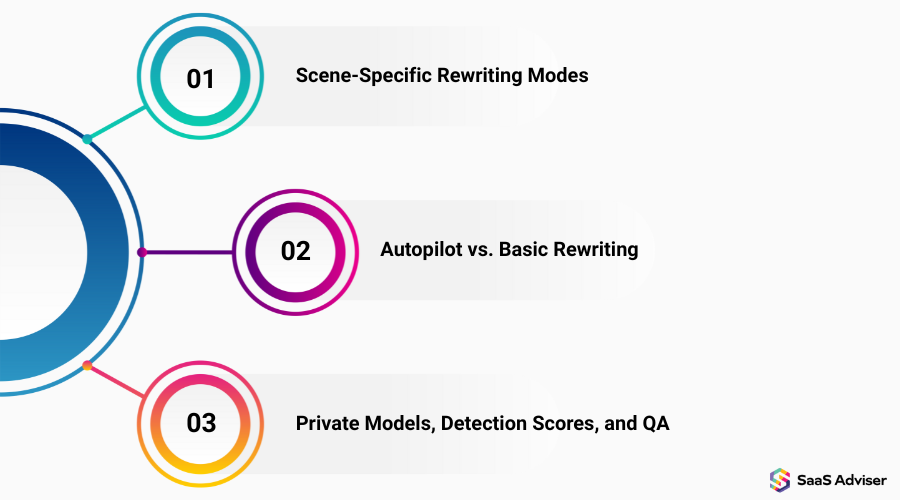
Scene-Specific Rewriting Modes
Different pieces need different tones. Good tools let you switch between conversational, formal, academic, or blog-friendly modes, so rewrites actually fit the use case.
Autopilot vs. Basic Rewriting
-
Basic modes lightly adjust words and sentence structure.
-
Autopilot-style modes rewrite more deeply, smoothing flow, tone, and rhythm.
Use deeper modes for long-form content and lighter modes for quick updates or social posts.
Private Models, Detection Scores, and QA
If you handle sensitive information, prioritise tools with private models and transparent data policies. Useful extras include detection scores, readability checks, and alerts for passive voice or repetitive patterns.
Cost-Benefit Analysis: Humanizer SaaS vs. Hiring Editors
Both cost money, but they scale differently.
Calculating Word-Credit ROI for Startup Budgets
Humanizer tools usually charge per word or via monthly credits.
Example:
-
10,000 words edited by a freelancer: $300–$500
-
Same 10,000 words through a humanizer tool: $10–$20
A human pass still matters — but your total cost stays low. If you publish more than a few thousand words a month, software typically wins on price and speed.
Pricing Tiers and When Premium Features Make Sense
Common tiers:
-
Basic: $10–$30/month
-
Pro: $50–$150/month
-
Unlimited: $200–$500/month
Start small, upgrade only when you’re producing content weekly or handling sensitive drafts that benefit from private models.
Integration & Workflow: Building a Human-in-the-Loop System
Tools matter, but systems matter more. A simple workflow keeps everything consistent.
Connecting Humanizer APIs to Your CMS and Content Stack
If you use a CMS like WordPress or Webflow, you can automate sending drafts to your humanizer tool and receiving polished versions back. You don’t need heavy integration — something lightweight is enough for most teams.
Designing a Repeatable Workflow: AI Generation → Humanization → Human QA
A clean three-step loop works for most startups:
-
AI generation: Create a solid first draft with a strong prompt.
-
Humanization: Run it through your tool of choice and check detection.
-
Human QA: Fix accuracy, add voice, tighten the flow, and finalize.
Once documented, anyone on your team can follow the same process.
Measurement & KPIs for Humanized Content
Track simple metrics:
-
Readability: Target reading level is between grades 8-10
-
AI Detection Score: No more than 20%
-
Engagement: Includes average time spent on page, scroll depth, & conversions
Additionally, by A/B testing humanized amendment versions against lightly edited drafts over a two week period you will gather substantial quantifiable data & measurable results. These insights are vital for optimizing your broader AI marketing strategy, ensuring that automated campaigns translate into genuine audience connection and higher conversion rates.
Keeping Your Content Safe and Compliant
Humanizing content often means sending internal drafts to third-party tools. That comes with responsibility.
Why Private Models and Data Policies Matter
If your drafts include customer data, internal insights, or research, choose tools with strong privacy controls. Ask about data storage, deletion, and whether your inputs ever train shared models.
Anonymize what you can, review vendor policies, and loop in a compliance expert if your industry requires it.
Accessibility and Inclusive Language in Humanized Content
Humanized content isn’t just friendly. It’s inclusive. Words matter. Pronouns, descriptors, phrasing—each can include or exclude. Person-first language, straightforward wording, alt text that explains a chart or screenshot instead of lazily labeling it “chart”—these small choices ripple. Your text can invite readers in, or quietly push them out.
Best Practices: Combining Automation with Human Editing
Humanizer tools help a lot, but they’re not replacements for judgment.
The Human-in-the-Loop Workflow for Maximum Quality
The strongest system combines:
-
AI for structure and speed
-
Humanizer for flow and tone
-
Human editor for nuance, accuracy, and voice
Skipping the final human step leads to errors and off-brand copy.
When to Edit Manually vs. Re-Humanise Automatically
Manual editing works best for short or highly technical content. Re-humanize long posts, high-volume content, or drafts that score high on detection tools. A quick scan gives you the answer.
Quality Checkpoints and Editorial Standards
Before publishing:
-
Detection score under 20%
-
Readability at Grade 8–10
-
Facts verified
-
Strong internal/external links
-
Clear CTA
-
Brand voice consistent
-
No passive voice in the opening
-
No tired AI buzzwords
One person should own the final approval.
Building a Scalable, Authentic Content Engine
Humanizing AI content isn’t about fooling detectors — it’s about sounding like a real team with real experience. Blend AI speed with human judgment. Try one experiment this week: take a single post, humanize it, tighten it for 15 minutes, and ship it. If it performs better, bake that loop into your workflow.
A consistent process turns content into an asset that compounds over time.