

In our increasingly digital world, data isn’t just a resource—it’s the heartbeat of modern life and business. From sensitive legal contracts to treasured family vacation photos, we rely heavily on the files stored in our devices. But what happens when a hard drive fails, a file is deleted by accident, or ransomware locks down your system?
Whether you’re a freelance designer or a growing business, data loss can bring everything to a halt. Reacting swiftly—but smartly—can make the difference between complete loss and full recovery. Let’s explore what causes data loss, how to avoid critical mistakes, and when to involve professionals to get back on track.
Understanding the Root Causes of Data Loss
Before diving into solutions, it’s important to understand the common culprits behind data loss. Recognizing the source helps in choosing the right recovery method and avoiding further damage.
Common Causes:
-
Hardware failure: All storage devices have a finite lifespan. Over time, mechanical components in hard drives can fail, often without warning.
-
Accidental deletion or formatting: A wrong click can result in files being deleted or entire drives being formatted.
-
Malware or ransomware: Increasingly sophisticated cyber threats are designed to steal, encrypt, or erase data.
-
Power surges/outages: Sudden loss of power or voltage spikes can corrupt files and damage storage devices.
-
Natural disasters: Fires, floods, or even high humidity can physically destroy storage hardware.
Understanding the cause is crucial—it guides your response and determines whether a DIY approach is feasible or if professional intervention is necessary.
First Response: What NOT to Do After Data Loss
When data disappears, the first instinct might be to fix it fast. But rash decisions often make things worse. Here’s what you should avoid doing immediately after noticing data loss:
-
Don't continue using the affected device. New data might overwrite the files you're trying to recover.
-
Don't run unverified recovery tools. While there are good tools available, many can worsen the situation if used improperly, especially if hardware damage is involved.
-
Don’t attempt to open or repair hardware yourself. Exposing internal components without proper tools or training can permanently damage the device.
Instead, stop all operations, document what happened, and assess the situation calmly before proceeding.
Exploring Your Recovery Options: DIY vs. Professional Help
Depending on the severity and nature of the data loss, you have two main paths forward: DIY solutions or seeking help from professionals.
When DIY Might Work
If you’ve simply deleted a file or formatted a drive by mistake—but the hardware is still functioning—recovery software might help. These tools scan for recoverable data that hasn’t yet been overwritten.
However, caution is key. If the software asks to install on the affected drive or if you're unsure about the file system type, it’s best to hold off and consult an expert.
When to Choose Professional Services
For more complex or high-stakes scenarios, professional recovery services offer the safest and most effective DLP solutions. This is especially true for:
-
Physically damaged drives
-
SSDs with firmware issues
-
Server or RAID configurations
-
Ransomware-encrypted data
-
Business-critical or legal files
Services specialize in advanced recovery, using tools and techniques unavailable to the average consumer. Their cleanroom environments and secure protocols are designed to minimize further damage and maximize recovery potential.
What to Expect from a Professional Recovery Provider
Not sure what a professional service entails? Here’s a quick overview:
-
Initial Diagnosis: Most providers offer a free or low-cost evaluation to assess damage and provide a recovery estimate.
-
Clear Quotation: A detailed report outlines the cost, timeframe, and expected recovery rate. Always look for providers with a "no data, no fee" policy.
-
Safe Environment: Physical recovery often takes place in ISO-certified cleanrooms to prevent contamination or additional damage.
-
Data Security: Leading providers encrypt your recovered data and offer secure return options, maintaining strict confidentiality.
-
Support: Expect regular updates throughout the process, plus guidance on how to avoid future data loss.
Depending on complexity, recovery might take anywhere from a few days to a couple of weeks.
Proactive Protection: How to Prevent Data Loss
While recovery is often possible, prevention is the better strategy. Here’s how to minimize the risk of future data disasters:
-
Routine Backups: Store backups both locally (on external drives) and off-site (cloud services). Automate them when possible.
-
Install Surge Protectors/UPS: Protect devices from power outages or voltage fluctuations with uninterruptible power supplies.
-
Antivirus & Firewall Protection: Regularly update security software to detect and stop malware before it strikes.
-
Train Your Team: If you run a business, educate staff about data safety, including recognizing phishing attempts or unsafe downloads.
-
Regular Health Checks: Periodically monitor your drives for early signs of failure—slow performance, frequent errors, or clicking noises.
These simple measures can save you thousands in lost time, revenue, and irreplaceable memories.
Future-Proofing: Building a Data Loss Response Plan
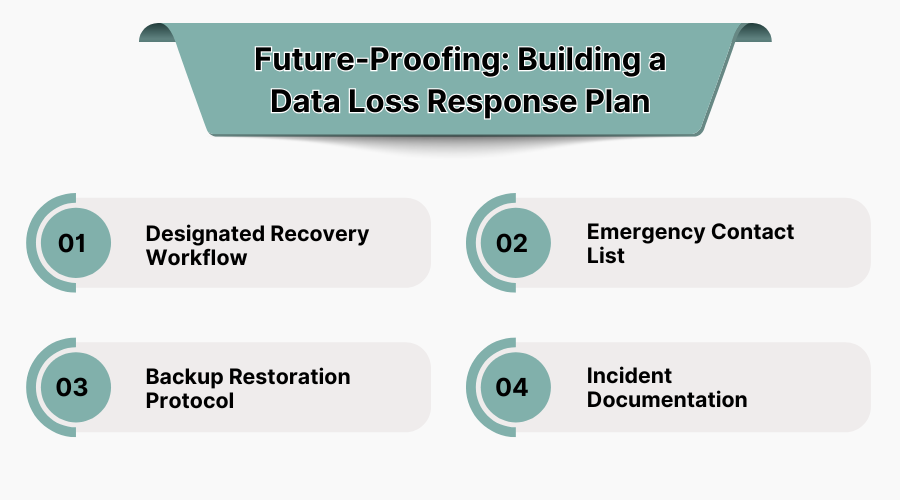
Even with preventive measures in place, no system is 100% immune to data loss. That’s why having a data loss response plan is essential—especially for businesses that rely heavily on digital infrastructure.
Here’s what a simple response plan should include:
1. Designated Recovery Workflow
Define who is responsible for what if data loss occurs. For example, the IT team may run diagnostics, while management communicates with external recovery vendors.
2. Emergency Contact List
Maintain a list of trusted data recovery providers, along with contact details for your cloud storage provider and IT support.
3. Backup Restoration Protocol
Clearly document where backups are stored, how to access them, and who has the credentials. Regularly test your backup restoration process.
4. Incident Documentation
Each data loss incident should be logged, including what caused it, how it was resolved, and how long recovery took. This builds institutional knowledge that improves future responses.
Creating a recovery plan in advance ensures that you’re not scrambling during an emergency. It helps reduce downtime, lowers stress, and increases the odds of a successful outcome.
Avoiding Common Data Recovery Myths
Misinformation can be just as damaging as data loss itself. Let’s debunk some common myths:
Myth 1: Deleted Files Are Gone Forever
In most cases, deleted files remain on the drive until overwritten. With the right tools and fast action, they can often be recovered.
Myth 2: Free Tools Work Just As Well as Paid Services
Free software may work for minor recovery, but lacks the advanced functionality and safety controls of professional tools—especially for complex issues.
Myth 3: Recovery Is Always Possible
Unfortunately, some damage—especially from overwritten files or deep hardware failure—is irreversible. This is why prevention and timely action are critical.
Myth 4: Any IT Technician Can Handle Data Recovery
Not all IT professionals are trained in recovery. Mishandling delicate drives can make recovery impossible, even for professionals later on.
Understanding what not to believe can help you take a more informed, proactive approach.
Choosing the Right Data Recovery Partner
Not all data recovery companies are created equal. If you decide to go the professional route, here are the most important factors to consider:
-
Certifications and Standards
Look for ISO-certified cleanrooms, secure chain-of-custody protocols, and industry accreditations. These indicate professionalism and trust.
-
Transparent Pricing
Be wary of vague or hidden fees. Reputable providers offer clear quotes with “no recovery, no charge” policies.
-
Service Range
Make sure the provider can handle your specific situation—whether it’s a Mac SSD, RAID system, or encrypted server.
-
Customer Support
Data loss is stressful. Choose a provider that offers responsive customer service, regular updates, and compassionate communication.
-
Proven Track Record
Search for testimonials, case studies, or client reviews to evaluate their success rate and professionalism.
Partnering with a reliable provider, ensures that your case will be handled with care, skill, and discretion.
Industry Use Cases: Real-World Impact of Data Recovery
Still unsure if professional recovery is worth it? Consider these common industry scenarios where data retrieval plays a mission-critical role:
-
Healthcare
Hospitals and clinics depend on digital health records. A single ransomware attack can compromise patient safety. Rapid recovery is not just convenient—it can be lifesaving.
-
Legal Firms
Lost case files or tampered evidence can derail court proceedings. Law firms often rely on expert recovery partners to maintain legal compliance.
-
Small Businesses
An e-commerce store that loses product inventory data or customer orders risks not just revenue but reputation. Recovery can prevent total business collapse.
-
Creative Professionals
Photographers, musicians, and designers often store irreplaceable content on drives. A failed SSD shouldn’t mean losing a year’s worth of work.
Data recovery isn't just a technical service—it's a business continuity lifeline across industries.
Sustainable Digital Habits: Long-Term Data Hygiene
In addition to backups and cybersecurity, developing daily digital habits can reduce long-term risk. Consider these ongoing practices:
-
Organize Files Intentionally: Don’t clutter drives with temporary files or untagged data. Label folders clearly and archive unused files regularly.
-
Update Systems: Outdated firmware or OS bugs can introduce vulnerabilities. Regular updates help reduce the risk of crashes or compatibility errors.
-
Limit User Access: In business environments, assign access based on role. Fewer users mean fewer chances for accidental deletion or tampering.
-
Automate Monitoring: Use monitoring tools that alert you to drive failures, low disk space, or abnormal behavior before it escalates.
Good digital hygiene is just as important as antivirus software in today’s tech landscape.
Closing Reflections
Whether it’s a minor hiccup or a catastrophic loss, how you respond to a data emergency shapes the outcome. By understanding your options, avoiding misinformation, and working with experienced professionals, you dramatically increase your chances of a full recovery. Data is too valuable to leave unprotected—and too personal to lose forever. Be proactive, be informed, and when the time comes, make decisions based on facts—not panic.



![What is Professional Employer Organization (PEO) Service? Definition and How it Works [2025]](https://cdn.saasadviser.co/uploads/blog/567/What is Professional Employer Organization (PEO) Service Definition and How it Works.jpg "What is Professional Employer Organization (PEO) Service? Definition and How it Works [2025]")