
What we'll cover
Share with your community!


Get Free Consultation


BambooHR vs Rippling: Top AI HR Software Compared
 David N. Wilks
Two of the most recommended AI HR software platforms in 2026 take completely different approaches to the same problem. BambooHR went one direction. Make HR simple enough that any manager can handle it without specialist support, no IT background required, and no dedicated HR team needed to keep things running. Rippling took a different one: build AI HR software that merges HR, IT, and Finance so completely that the three departments stop needing to coordinate manually. Choosing between them isn't really a features question. It's a question about what kind of organization you're running and what's currently costing you the most time.

Looking for AI HR software? Check out Software Adviser’s List of the Best AI HR Software in USA for your business.
This guide breaks down BambooHR vs Rippling across every major dimension, using what's ranking and resonating with real users in 2026, so the decision takes 30 minutes, not 30 browser tabs.
What Are BambooHR & Rippling? (Quick Overview)
What Is BambooHR?
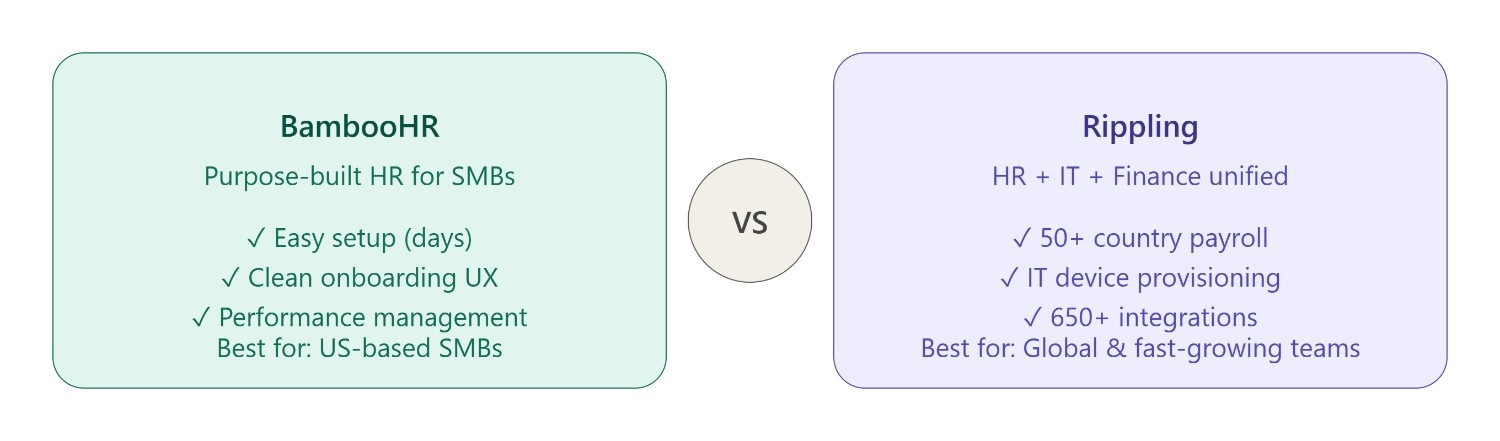
BambooHR has been doing one thing since 2008. HR. Not IT provisioning, not device management, and not finance automation. Employee records, onboarding, time-off tracking, and performance management built for small to medium businesses and nothing else. That focus shows in how the interface works: most people navigate it without any training at all. The "Ask BambooHR" AI assistant handles the data layer, pulling employee summaries, answering policy questions, and building custom reports from plain-language requests.
What Is Rippling?
Rippling isn't only AI HR software. It's a workforce management system that merges HR, IT, and finance into a single data source called the Employee Graph. When someone joins, one workflow handles all of it. HR onboarding. Laptop provisioned. Software accounts created. Payroll started. Benefits are enrolled. When they leave, that same system runs in reverse without anyone managing the checklist. The AI layer running across this AI HR software picks up on things that don't surface in a manual review. Workforce trends that signal a problem before it becomes one. Compliance risks spread across multiple jurisdictions. Routine decisions that used to live entirely in someone's head on the HR team.
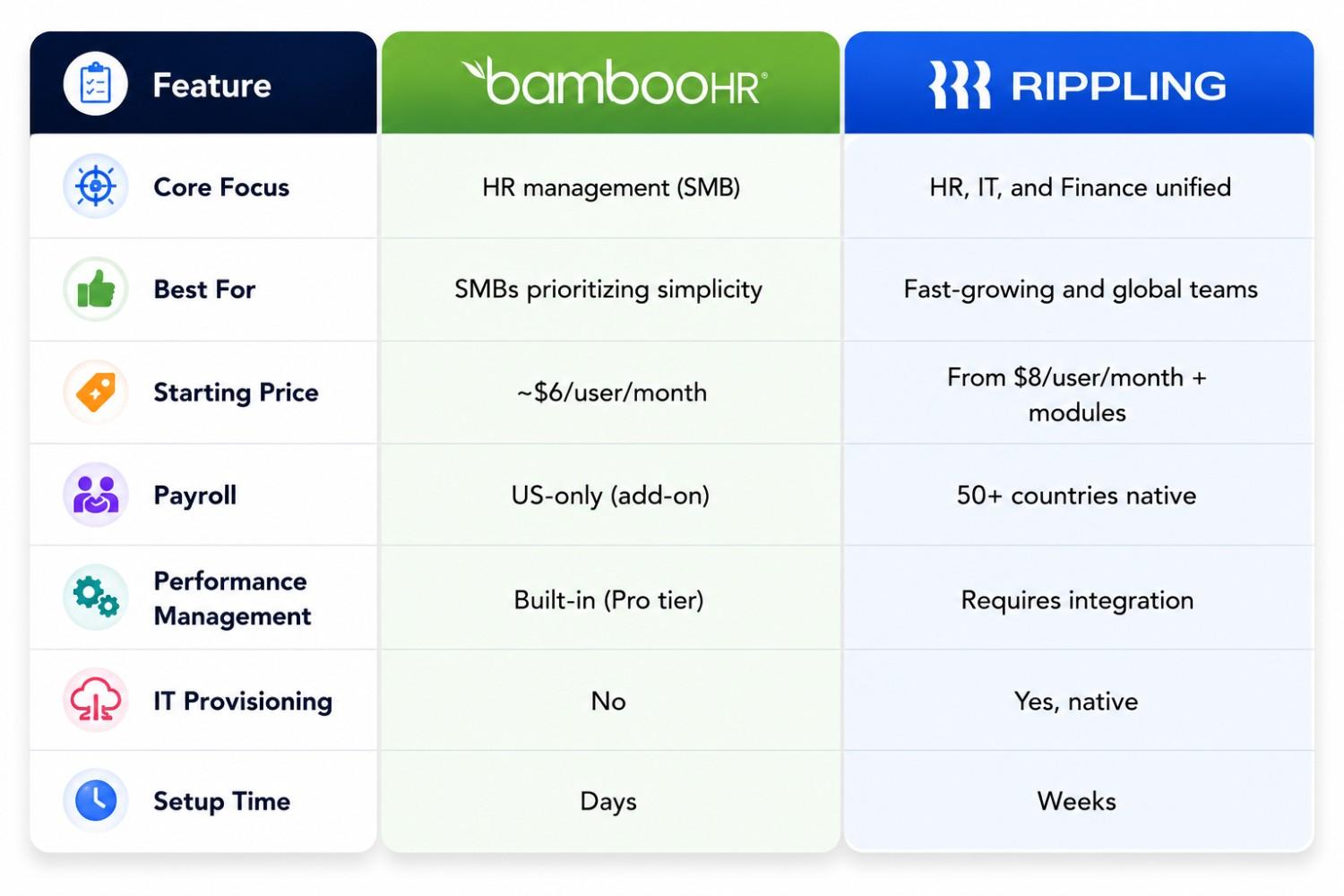
BambooHR vs Rippling: Quick Comparison Table
Feature-by-Feature Comparison
Employee Records & HR Management
BambooHR's employee records are clean, searchable, and easy for an HR generalist to maintain without technical support. Custom fields, org charts, and document storage all work intuitively. Rippling's employee records are the foundation of its entire system, every change to an employee record cascades automatically through payroll, app permissions, and device management. More powerful and more complex to configure initially.
Payroll & Benefits Administration
BambooHR's payroll software is US-only, available as a paid add-on, and well-suited for businesses that only need domestic processing. Rippling's payroll spans 50+ countries natively, handling international compliance, contractor payments, and Employer of Record services for global teams. For a US-only team, both options are functional. The moment international employees enter the picture, Rippling has no real equivalent on this list.
Onboarding & Offboarding
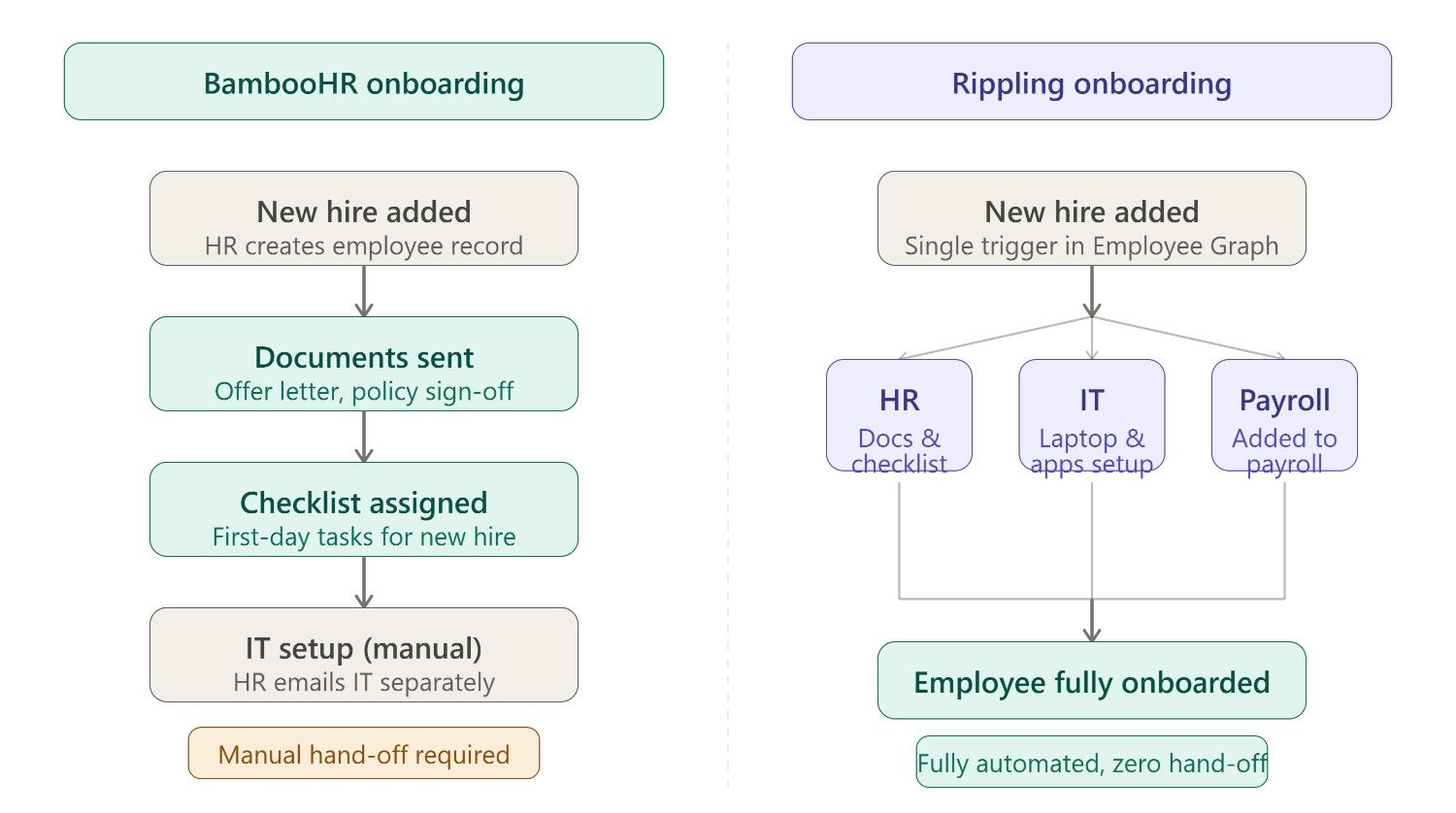
BambooHR's onboarding is one of the cleaner ones in its price range. Not because of the feature count. Because of the sequencing. New hires move through document signing, policy acknowledgments, and first-day tasks in an order that someone clearly thought about from the employee's perspective rather than the compliance checklist's. Rippling does more during onboarding. IT provisioning and app setup happen alongside the HR paperwork in the same workflow. Getting Rippling's onboarding to feel that smooth requires deliberate configuration. It doesn't arrive that way. BambooHR's flow works out of the box; Rippling's is built, not discovered.
Time & Attendance Tracking
Both platforms handle time and attendance tracking as core features. BambooHR's time tracking is intuitive and connects naturally to its leave management module. Rippling's time tracking integrates with payroll calculation across multiple jurisdictions automatically, which matters more as teams grow across states or countries.
Reporting & Analytics
BambooHR's pre-built library covers EEO-1, payroll, time tracking, and performance reports with custom filter options that most HR generalists can use without analyst support. Rippling's reporting pulls from HR, IT, and Finance at the same time. That unlocks questions no pure HRIS can answer: what does a department really cost, including software licenses and hardware? BambooHR can't generate that report because it doesn't hold that data. Rippling can.
Third-Party Integrations
BambooHR integrates with job boards, background check providers, benefits platforms, and performance tools. IT system integrations are limited by design. Rippling connects to productivity tools, accounting software, identity management systems, and hardware management platforms, reflecting its identity as an IT platform as much as an HR one.
AI Capabilities Compared
BambooHR AI Features
The conversational AI assistant embedded in BambooHR goes by "Ask BambooHR," and it does what the name suggests. Employee survey results come back summarized rather than raw. Policy questions get answered without anyone digging through documentation. Custom reports generate from a plain-language description rather than a query builder. The scope is deliberately narrow: HR problems, HR context, and no attempt to stretch beyond that.
Rippling AI Features
Rippling's AI doesn't work from just HR data. The employee graph hands it HR, IT, and Finance simultaneously, which changes what it can do. Flight risk gets flagged before the resignation email arrives. Compliance gaps across multiple jurisdictions surface without anyone manually running through regulations. When a lifecycle event happens, a promotion, a location change, or a departure, the system handles the cross-department coordination. Access permissions update. Payroll adjusts. HR records reflect the change. Nobody on the HR team manages the handoff between departments manually.
Pricing Comparison: BambooHR vs Rippling
BambooHR Pricing Plans
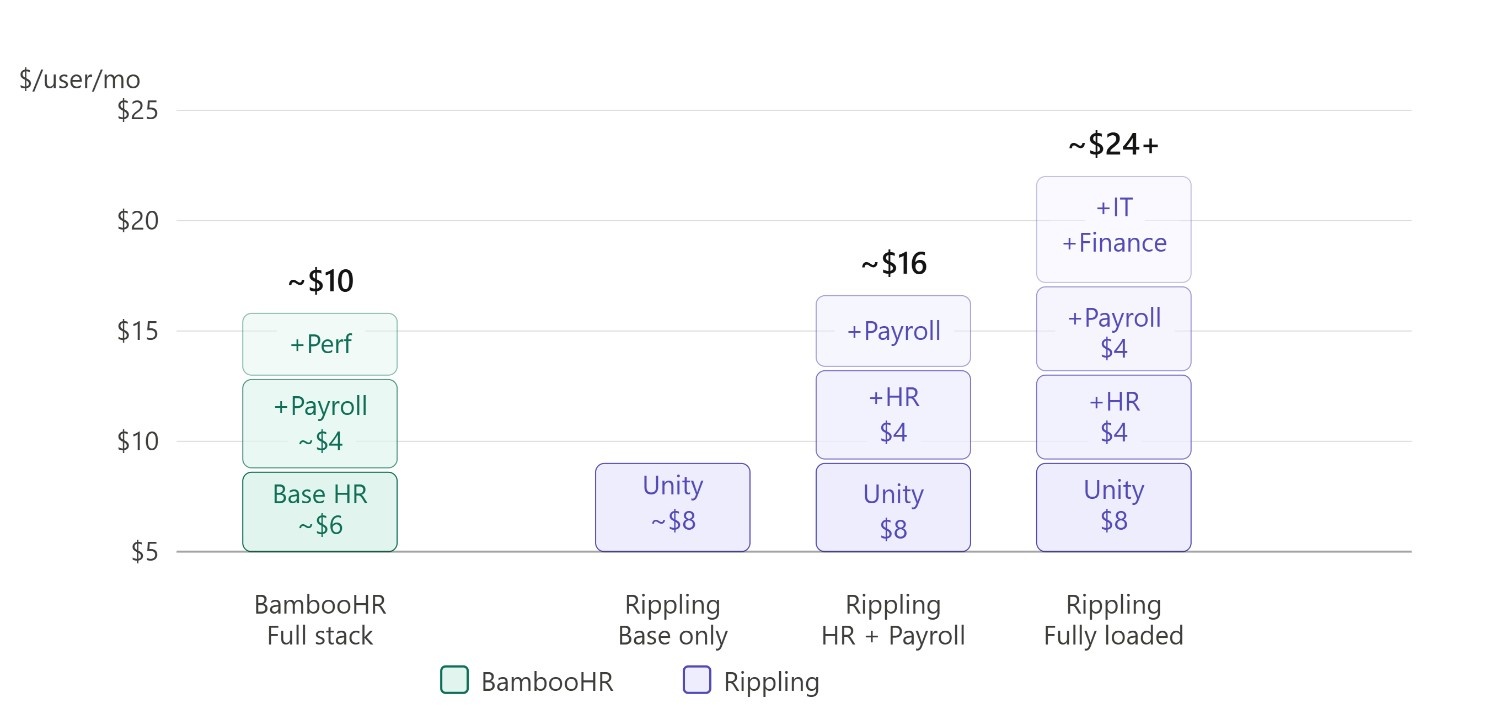
BambooHR prices per employee per month on two main tiers. Core starts around $6 per user per month, covering basic HRIS, ATS, and onboarding. Pro is where performance management, eNPS surveys, and advanced analytics enter the picture. Payroll is a separate add-on rather than bundled. Volume discounts kick in as headcount grows, and most small businesses end up somewhere in the $6 to $10 range once everything is factored in.
Rippling Pricing Plans
Rippling starts at $8 per user per month for the core Unity platform, but that's before modules. Every additional capability, payroll, benefits administration, device management, and expense management comes at a per-user cost that stacks. A fully loaded Rippling deployment can run two to three times what BambooHR costs for pure HR. The consolidation math usually shifts in Rippling's favor somewhere between 50 and 100 employees. Below that threshold, the per-module cost often exceeds what separate tools would run. Above it, the tools Rippling replaces tend to cost more than Rippling does.
Which HR Software Is Best for Your Business?
Best for Small Businesses
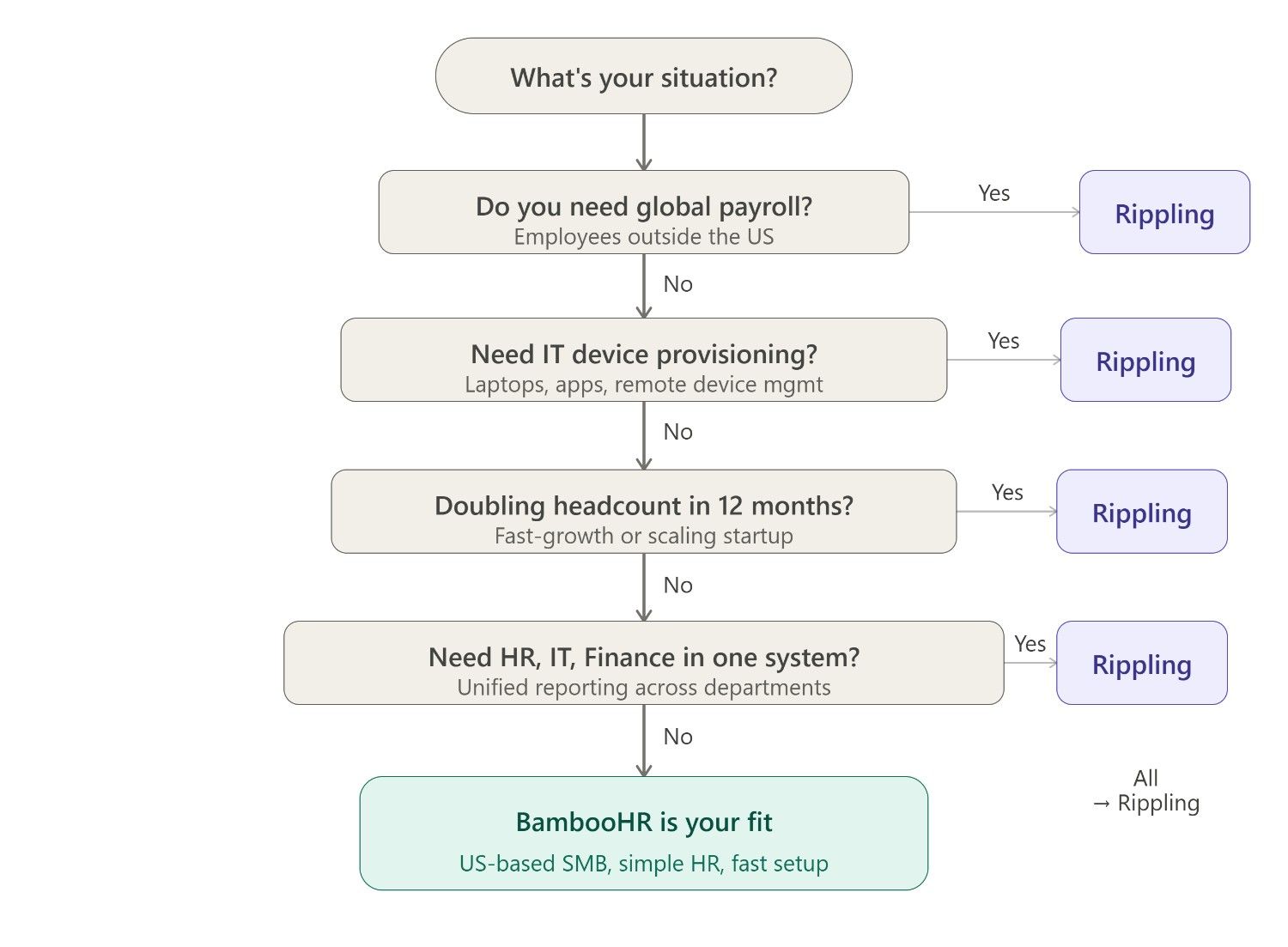
BambooHR. A small team wanting solid HR fundamentals, performance tracking, and an onboarding flow employees can navigate on their own gets everything it needs at an accessible price. Rippling at a small scale often means paying for automation capacity the team isn't using yet.
Best for Mid-Size Companies
Both are viable AI HR software options depending on complexity. BambooHR fits mid-market teams where HR is the primary concern and IT works independently. Rippling fits mid-market organizations running hybrid or remote setups where IT provisioning and HR need to move in sync.
Best for Fast-Growing Teams
Rippling. Doubling headcount in twelve months with Rippling means the software scales with it, new hires get provisioned and onboarded systematically without HR manually managing each step. BambooHR's manual elements become friction as hiring volume climbs.
Best for Global Workforce Management
Rippling, no contest. Native payroll in 50+ countries, EOR services, and global compliance automation are simply not available in BambooHR, which is US-only for payroll. International teams pairing BambooHR with a separate global payroll provider add complexity that Rippling eliminates.
Pros & Cons of Each Platform
BambooHR Pros & Cons
Pros
- Easy to Use and Clean Intuitive interface that requires minimal training for HR teams and employees.
- Smooth onboarding with automated checklists and digital signatures cuts paperwork significantly.
- AI Assistant "Ask BambooHR" answers employee policy questions 24/7 via desktop, mobile, and Slack.
- Centralized HR Data with a single source of truth for employee records, PTO, performance, and documents.
Cons
- Payroll is US-only & an add-on not built-in; it costs extra and doesn't support international employees.
- Limited Workflow Customization Approval flows and advanced automation options are quite restricted.
- Weak Integrations Work well only with preferred partners; others are stuck with CSV imports.
Rippling Pros & Cons
Pros
- A truly all-in-one platform like HR, payroll, IT, and finance in a single system. One employee record triggers everything with app access, device setup, payroll, and benefits simultaneously.
- Powerful Automation Workflow Studio automates complex tasks across departments; onboarding, offboarding, approvals, and compliance all run without manual intervention.
- 650+ integrations that connect with Slack, Salesforce, QuickBooks, GitHub, Okta, and hundreds more and change sync across all tools automatically.
- Built-in IT & Device Management It is unique among HR tools; it can provision, ship, and remotely wipe laptops in 30+ countries, a major advantage for remote teams.
Cons
- Pricing Gets Expensive Fast: It starts at $8/user/month, but costs climb quickly as you add modules; there's no transparent public pricing beyond the base plan.
- Complex Setup Migrating payroll, configuring workflows, and connecting apps takes significant time and expertise, especially for lean or non-technical teams.
- Misconfiguration Risk Because everything is automated and interconnected, one wrong workflow setting can cascade into payroll or IT errors across the whole organization.
Conclusion
A US-based SMB, 10 to 200 employees, needs clean HR, solid performance reviews, and onboarding that employees can navigate without guidance. BambooHR covers all of it. No complexity, no specialist needed to keep things running. No complexity required, no specialist to maintain it. A fast-growing company scaling internationally, managing hardware, or trying to stop running three departments on three disconnected systems? That's the situation where Rippling's setup investment pays back in automation capacity no other AI HR software comes close to matching. Neither is the wrong AI HR software choice. They're built for different organizational situations. The question is which situation matches yours.
FAQ's
BambooHR is the better choice for most small businesses because it offers an easy-to-use HR platform with affordable pricing.
Rippling combines HR, IT, payroll, and finance automation into one platform, making it ideal for fast-growing and global businesses.
Look for employee management, payroll, onboarding, workflow automation, reporting, AI assistance, and third-party integrations.
Yes, AI HR software can automate onboarding by managing paperwork, account setup, training tasks, and employee workflows.
Choose AI HR software based on your business size, workforce complexity, automation needs, budget, and future growth plans.
Managing a corporate inbox is like being on a never-ending hamster wheel. Most business executives and their teams waste hours filtering spam, splitti [...]
David N. Wilks
In the highly competitive 2026 US job market, organizations are shifting away from fragmented legacy checklists toward cohesive, hyper-personalized di [...]
David N. Wilks
Marketing used to mean doing everything by hand: writing the emails, briefing the content, checking the ad accounts, pulling the reports, and chasing [...]